Silverfrost Forums

Welcome to our forums

%PL - some issues/questions

17 May 2020 3:11 #25439
module example
USE clrwin 
INTEGER , PARAMETER :: N=10, gw=1000, gh=800
REAL*8  :: x(N),y(N)
integer :: handle_internal_gr = 1, handle_pl = 2, rb_control = 1
   contains
        integer function create_data()
        integer i
          DO i=1,N
            x(i)=0.1d0*(i-1) ; y(i)=x(i)*x(i)
          ENDDO
          create_data = 2
       end function create_data
       
       integer function plot()
       integer, save :: iw
         iw = CREATE_GRAPHICS_REGION@(handle_internal_gr,gw,gh )
         if ( iw .ne. 1) STOP 'Failed to create internal graphics region'
         iw = winio@('%mn[Close]&','Exit')
         iw = winio@('%`bg[white]&')
         CALL winop@('%pl[width=2,y_max=0.9,framed,etched,x_array,link=curves,symbol=1,colour=red,gridlines,smoothing=4]')
         iw = winio@('%`^pl[full_mouse_input]&',gw,gh,N,x,y, handle_pl, pl_cb)
         iw = winio@('%`rb[Show Moose X,Y data]&',rb_control)
         iw = winio@(' ')
         iw = DELETE_GRAPHICS_REGION@(handle_internal_gr)
         plot = 2
      end function plot

      integer function pl_cb()
      character(len=30) cb_reason
      character(len=100) output_string
      integer i, x1p, y1p
      real*8 x1r, y1r
      integer, save :: c_yellow, c_black
      logical, save :: first = .true.
        if (first) then
          c_yellow = rgb@(255,255,0) ; c_black  = rgb@(0,0,0) ; first = .false.  
        end if
        cb_reason = clearwin_string@('callback_reason')
        if (cb_reason .eq. 'PLOT_ADJUST') then
          ! Other functions triggered by PLOT_ADJUST come here.
          ! etc.
          ! Now copy graphics region created by pl to internal memory
          i = COPY_GRAPHICS_REGION@(handle_internal_gr, 1, 1, gw, gh, handle_pl, 1, 1, gw, gh, 13369376 )
        end if
        if (rb_control .eq. 1) then
          if (cb_reason .eq. 'MOUSE_MOVE' ) then
            x1p = CLEARWIN_INFO@('GRAPHICS_MOUSE_X') ; y1p = CLEARWIN_INFO@('GRAPHICS_MOUSE_Y')
            i = GET_PLOT_DATA@(x1p,y1p,x1r,y1r)
            if ( (x1r .ge. minval(x)) .and. (x1r .le. maxval(x)) .and. (y1r .ge. minval(y)) .and. (y1r .le. maxval(y)) ) then
              write(output_string,'(A2,F5.3,A1,1X,F5.3,A1)') ' (',x1r,',',y1r,')'
              ! Recover back up graphics region from memory to screen and annotate
              i = COPY_GRAPHICS_REGION@(handle_pl, 1, 1, gw, gh, handle_internal_gr,  1, 1, gw, gh, 13369376 )
              call draw_filled_rectangle@(x1p, y1p, x1p+140, y1p+20, c_yellow)        
              call draw_characters@(output_string, x1p, y1p, c_black)
            else
              ! Mouse moved oustide data region, so any existing annotations need to be removed.
              i = COPY_GRAPHICS_REGION@(handle_pl, 1, 1, gw, gh, handle_internal_gr, 1, 1, gw, gh, 13369376 )          
            end if
          end if
        end if
        pl_cb = 2
      end function pl_cb
END module example

program main
use example
implicit none
integer i
  i = create_data(); i = plot()
end program main
18 May 2020 9:19 #25443

I have added new options %pl[hscroll] and %pl[vscroll] for the next release. They work in the same way as similar new options for %gr and could be used in the same manner as the 'pan' buttons in Ken's sample program.

18 May 2020 9:30 #25444

Many thanks, Ken, again to you for the posted code! Thanks Paul for your alternative approach (at first glance it look simpler). Thanks John for your comments!

Now, in turn, my comments/observations/suggestions to %PL:

  1. I had a brief look today at both codes (Ken´s one and Paul´s one). To be honest, I did not catch the point and still cannot imagine how could be possible to EXACTLY match the CONCRETE DX, DY values which belongs to the CONCRETE point in the graph (when hovering over the point or clicking on the point). I have to study your approaches in detail which requires some time and I have also to do another things (not programming only).

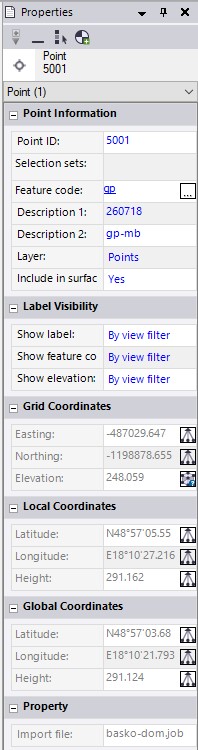
  2. Now, my spirit regarding the use of %PL begins to simulate a sinus wave (at the moment I am at the bottom). The %PL function should be simplified with crystal-clear explanation in the help/documentation what each option means and how it will be interpreted in the graph, when it is used. And - even more important, the %PL needs to be more flexible! It means - it is necessary to ADD to it some additional options. In my case I would welcome an option called ATTRIBUTE or PROPERTIES for the drawn objects (points/lines), which would took the descriptive information about them automatically (if present) to the graph(s). And then, when I click on a graphical object (point/line), it should display so-called property (or attribute) window automatically (just by clicking on a graphical object). Something similar, like in the following example (not all is required, but at least (in the case of a point object) - its real, it means GEODETICAL coordinates of the point, its number (if exists) and its description (attributes) of the point (if they exist, if not - the fields could be blank). BUT- PLEASE - NO PIXEL coordinates (this maybe could be an option, but as a surveyor, I am NOT interesting in PIXEL issues at all!!!. In case of line objects - it should display at least the length of the selected line´s segment and its description (if exists) like the name of the line.

Finally - as an example - the properties window of a point below (it originates from a GNSS software I use, when I perform GNSS measurements). This window I get automatically when I click on a graphic object in the map. Of coarse, NOT all fields are required for the %PL.

[url=https://postimages.org/]https://i.postimg.cc/zXjMBw04/Point-Properties.jpg

To put it all in a one smart sentence: The %PL needs to be simplified, more robust, added with couple of new options, automatized and MUST be easy usable. Should I program pages of code to achieve such thing like to display some basic information about a selected graphical object in the graph, it loses the meaning to use it. At present, the sentence in the old ClearWin+ PDF manual which states that:

'The complexities of the Windows API are avoided by using the ClearWin+ interface with the result that Windows applications can be developed in a very small fraction of the time that otherwise would be needed.'

is in conjunction with the %PL hardly imaginable. Already now, I have many lines of the code because of the use of the %PL and additional ones have to be added.

All, what I have written above, should be considered as an effort/inspiration/impulse to move the %PL function to a new level of versatility, easy of use and flexibility.

18 May 2020 11:37 #25445

Martin

In my opinion it is not reasonable to judge ClearWin+ on the basis of your experience with %pl. %pl is a very small part of a very large library and your application of %pl is way above its designed purpose.

19 May 2020 11:14 #25449

Ken,

your code (with coordinates next to cursor) works PERFECT - thanks! It means - the cursor shows the X,Y geodetical coordinates as defined previously in the graph (so it shows in the volatile small rectangular area something like this -1485265, -495564 and the X, Y coordinates are changing as cursor moves. Again, PERFECT!)

But I wanted to learn and achieve a little bit another thing. I will try to explain it here once again:

I read in a data from a file (87000+ points) which looks like this:

-1335000 -492000 -0.96 -0.84 -1335000 -491000 -0.97 -0.83 -1335000 -490000 -0.97 -0.82 -1335000 -489000 -0.98 -0.81 ..... .....

My goal is to show at the cursor (when I point with the cursor over a point in the graph) its DX, DY values . It means (for example, when I point with cursor to the first point in the list above), I wanted to see preferably its DX, DY variations: -0.96, -0.84. It could also be connected with X,Y, so the cursor would show
-1335000 -492000 -0.96 -0.84. But in any case, the DX,DY variations are very important, therefore I need them to see at the cursor position when hovering over a concrete point in the graph.

And here - I have no idea how to achieve it.

Thanks in advance for your comments.

19 May 2020 12:55 #25450

Martin,

I wrote the following before your last post:

I my example code shows you how to convert pixel coordinates to real world coordinates. With the real world coordinates, a search for the nearest actual grip point would be possible and I had wrongly assumed that you had a methodology to achieve this.

A brute force approach i.e. scanning all your data points would be intensive. However, at the zoom level where picking a grid point is feasible, it may be possible to scan all the grid data once, to produce a reduced set of grid points that are in the ‘current’ window, i.e. do this immediately after a zoom action. Then when you move the mouse about in a zoomed in widow you have a much smaller data set to operate on. This may become practical depending on what data structures that exist prior to the call to %pl. You might have to some duplicate information.

Consider this, as your grid coordinates appear to be equally spaced in the X and Y directions, consider using real arrays XX(1:N) with x grid coordinates and YY(1:M) with y grid coordinates.

This would allow a quicker nearest neighbour scan of just XX and YY and the location values from theses scans point to the physical location in an integer (1:N,1:M) array. The NR routines LOCATE and HUNT (probably better for this application) come to mind.

Your (1:N,1:M) integer array, would contain the index values to another set of arrays which contain the other data (whatever they are) associated with your storage grid points. All of this is separate and in addition to the data you pass to the plotting routine.

19 May 2020 12:57 #25451
MODULE plData
  USE clrwin
  INTEGER(7) hwnd
CONTAINS
  INTEGER FUNCTION cb()
  CHARACTER(80) status,reason
  DOUBLE PRECISION x,y
  reason = clearwin_string@('CALLBACK_REASON')
  IF(reason == 'MOUSE_MOVE')THEN
    ix = clearwin_info@('GRAPHICS_MOUSE_X')
    iy = clearwin_info@('GRAPHICS_MOUSE_Y')
    i = get_plot_data@(ix,iy,x,y)
    status = ' '
    IF(x >= 0d0 .AND. y >= 0d0 .AND. x <= 1d0 .AND. y <= 1d0)THEN
      write(status,'(a,i3,a,i3,a)') ' Point(',ix,',',iy,')'
      CALL set_status_text@(hwnd,0,status)
      write(status,'(a,f6.2,a,f6.2,a)') ' Value(',x,',',y,')'
    ELSE
      CALL set_status_text@(hwnd,0,status)
    ENDIF          
    CALL set_status_text@(hwnd,1,status)
  ENDIF  
  cb = 2
  END FUNCTION
END MODULE plData
!-----------------------------------------------------------------------------------------------
PROGRAM main
  USE plData
  INTEGER,PARAMETER:: N=11,M=2
  DOUBLE PRECISION x(N),y(N)
  INTEGER i,sbparts(M)
  DATA sbparts /26,-1/
  DO i=1,N
    x(i)=0.1d0*(i-1)
    y(i)=x(i)*x(i) 
  ENDDO
  i = winio@('%ww%ca[ClearWin+]&')
  i = winio@('%bg[BTNFACE]&')
  CALL winop@('%pl[title=Quadratic]') 
  CALL winop@('%pl[width=2]')     
  CALL winop@('%pl[x_array]')     
  CALL winop@('%pl[link=curves]') 
  CALL winop@('%pl[symbol=9]')    
  CALL winop@('%pl[colour=red]')  
  CALL winop@('%pl[pen_style=2]') 
  CALL winop@('%pl[frame,gridlines]')
  CALL winop@('%pl[y_sigfigs=2]')
  CALL winop@('%pl[y_axis=y-data]')
  CALL winop@('%pl[x_max=1.0]')
  CALL winop@('%pl[y_max=1.0]')
  CALL winop@('%pl[dx=0.2]')
  CALL winop@('%pl[dy=0.2]')
  CALL winop@('%pl[full_mouse_input]')
  i=winio@('%`bg[white]&')
  i=winio@('%`*sb%lc&', M, sbparts, hwnd)
  i=winio@('%`bg&',RGB@(252,252,252))
  i=winio@('%pv%^pl',400,250,N,x,y,cb)
END PROGRAM
19 May 2020 3:06 #25452

This demonstrates the concept I tried to explain above, obviously, the call to locate_dp and the logical function that test the returned value should be packaged into a single routine.

module from_kss_lib
implicit none
contains
!--------------------------------------------------------------------------------------------------
! #063  subroutine locate (xx, n, x, j) 
!       Given an array xx(1:n), and given a value x, returns a value j such that x is between 
!       xx(j) and xx(j+1). xx(1:n) must be monotonic, either increasing or decreasing. j=0 or
!       j=n is returned to indicate that x is out of range.
!--------------------------------------------------------------------------------------------------
    subroutine locate_dp(xx, n, x, j)
    implicit none
    integer, parameter :: dp = kind(1.d0)
    integer,                         intent(out) :: j
    integer,                         intent(in)  :: n
    real(kind = dp),                 intent(in)  :: x
    real(kind = dp), dimension(1:n), intent(in)  :: xx
    real, parameter :: zero_dp = 0.0d0
    integer          jl, jm, ju
      jl = 0 ; ju = n + 1
      do while (ju-jl .gt. 1)
        jm = (ju + jl)/2
        if ((xx(n) .ge. xx(1)) .eqv. (x .ge. xx(jm))) then
          jl = jm
        else
          ju = jm
        endif
      end do
      if      ((abs(x - xx(1)) .gt. zero_dp) .eqv. .false.) then
        j = 1
      else if ((abs(x - xx(n)) .gt. zero_dp) .eqv. .false.) then
        j = n-1
      else
        j = jl
      endif
    end subroutine locate_dp
    
end module from_kss_lib

    program main
    use from_kss_lib
    implicit none
    real*8 xx(1:10), xtest
    integer i,j
    do i = 1, 10, 1
      xx(i) = dble(i)
    end do
    do i = 1,20, 1
      
      xtest = 10.d0*random@()
      
      call locate_dp(xx, 10, xtest, j)
      if (j .eq. 0) then
        print*, xtest, ' outside range'
      else if (j .eq. 10) then
        print*, xtest, ' outside range'
      else if ( (xtest - xx(j) ) .lt. (xx(j+1) - xtest) ) then
        print*, xtest, ' nearest grid:', j, ' at ', xx(j)
      else if ( (xtest - xx(j)) .gt. (xx(j+1) - xtest) ) then
        print*, xtest, ' nearest grid:', j+1, ' at ', xx(j+1)
      else
        print*, xtest, ' at midpoint'
      end if
      
    end do
    end program main

[/quote]

19 May 2020 3:15 (Edited: 19 May 2020 3:49) #25453

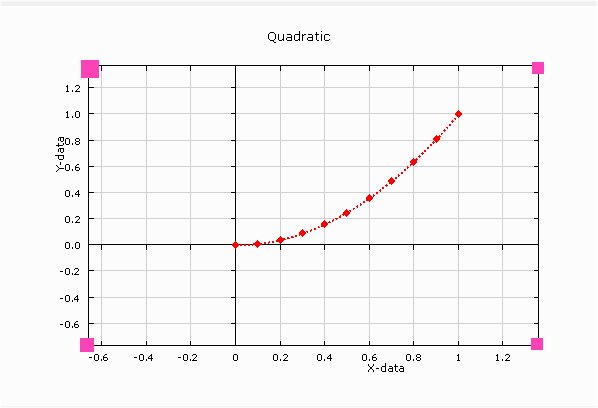
Paul, With your last example if modify x_max, y_max arbitrary way (not coinciding with the plotting data which ends at 1 in your example) how to get pixel (ix, iy) coordinated of each axis?

Things are it is often necessary to place something on axis or exactly nearby but the plotting program modifies user defined x_max and y_max (as well as x_min, y_min) to nearest nice looking for human eye numbers. As a result if i set x_max=1.29 the axis will be at 1.4 but if change dx it will be every time at different nice looking point. We never know which xy point this will be

Here is your example modified to show what i mean. Is there a way for example to place small rectangle DRAW_RECTANGLE@(ixx,iyy,ixxx,iyyy, icolor) exactly on both X an Y axis right top corner ?

Another question - i guess how in my example below the x axis title and numbering appears below the bottom x axis (like it should be in most of cases )? In my own other programs it appear in the middle x axis overwritten by the plotting points and i can not guess what causes this 😃 ?

Note also that axis titles now are not perfectly centered in the middle of each axis but in the middle of only positive part of axis

MODULE plData
  USE clrwin
  INTEGER(7) hwnd
CONTAINS
  INTEGER FUNCTION cb()
  CHARACTER(80) status,reason
  DOUBLE PRECISION x,y
  reason = clearwin_string@('CALLBACK_REASON')
  IF(reason == 'MOUSE_MOVE')THEN
    ix = clearwin_info@('GRAPHICS_MOUSE_X')
    iy = clearwin_info@('GRAPHICS_MOUSE_Y')
    i = get_plot_data@(ix,iy,x,y)
    status = ' '
    IF(x >= 0d0 .AND. y >= 0d0 .AND. x <= 1d0 .AND. y <= 1d0)THEN
      write(status,'(a,i3,a,i3,a)') ' Point(',ix,',',iy,')'
      CALL set_status_text@(hwnd,0,status)
      write(status,'(a,f6.2,a,f6.2,a)') ' Value(',x,',',y,')'
    ELSE
      CALL set_status_text@(hwnd,0,status)
    ENDIF         
    CALL set_status_text@(hwnd,1,status)
  ENDIF 
  cb = 2
  END FUNCTION
END MODULE plData
!---------------------------------------------------------------------------------------
PROGRAM main
  USE plData
  INTEGER,PARAMETER:: N=11,M=2
  DOUBLE PRECISION x(N),y(N)
  INTEGER i,sbparts(M)
  DATA sbparts /26,-1/
  DO i=1,N
    x(i)=0.1d0*(i-1)
    y(i)=x(i)*x(i)
  ENDDO
  i = winio@('%ww%ca[ClearWin+]&')
  i = winio@('%bg[BTNFACE]&')
  CALL winop@('%pl[title=Quadratic]')
  CALL winop@('%pl[width=2]')     
  CALL winop@('%pl[x_array]')     
  CALL winop@('%pl[link=curves]')
  CALL winop@('%pl[symbol=9]')   
  CALL winop@('%pl[colour=red]') 
  CALL winop@('%pl[pen_style=2]')
  CALL winop@('%pl[frame,gridlines]')
  CALL winop@('%pl[y_sigfigs=2]')
  CALL winop@('%pl[x_axis=X-data]')
  CALL winop@('%pl[y_axis=Y-data]')
  CALL winop@('%pl[x_min=-0.66]')
  CALL winop@('%pl[x_max=1.36]')
  CALL winop@('%pl[y_min=-0.77]')
  CALL winop@('%pl[y_max=1.37]')
  CALL winop@('%pl[dx=0.2]')
  CALL winop@('%pl[dy=0.2]')
  CALL winop@('%pl[full_mouse_input]')
  i=winio@('%`bg[white]&')
  i=winio@('%`*sb%lc&', M, sbparts, hwnd)
  i=winio@('%`bg&',RGB@(252,252,252))
  i=winio@('%pv%^pl',600,400,N,x,y,cb)
END PROGRAM
19 May 2020 3:46 #25454

Ken,

thanks for your tips!

I still have some formal questions to your last two responses, since i did not found it on the on-line help:

Q1:

i = COPY_GRAPHICS_REGION@(handle_internal_gr, 1, 1, gw, gh, handle_pl, 1, 1, gw, gh, 13369376 )

What is the real meaning of the numeric arguments 1,1 ... 1,1 ... 13369376 in the code above?

Q2: In your last reply you used the NR abbreviation. I suppose it stands for NUMERICAL RECIPES. When I am right, are these NR somewhere on the web available for download free of charge or all NR are a payed option?

Thanks for your answers in advance!

19 May 2020 4:18 #25455

Dan

Sometimes using a larger font causes the captions to be overwritten by the tick values. In which case there is an offset mechanism to adjust the position of a caption.

ir = GET_PLOT_POINT@(0.0d0, 0.0d0, xpix,ypix)

gives the pixel coordinates of the origin as double precision values.

19 May 2020 4:25 #25456

Martin

Ken will be able to answer Q2.

For Q1, ff you are using Plato then type the name of the routine, place the caret at any point in the name and press F1.

Otherwise open FTN95.chm, and use the search facility.

19 May 2020 4:50 #25457

Q1

https://www.silverfrost.com/ftn95-help/clearwinp/library/copy_graphics_region_.aspx

Q2 http://numerical.recipes/com/storefront.html

Some snippets of NR code can be found using a search engine.

There may be some alternatives to NR and perhaps I am guilty of thinking about programming using the FTN77 techniques I was taught in 1984 rather than ftn95 in 2020. (Not true since I no longer use common blocks!)

The code below does more or less the same job as that I previously posted.

    program main
    implicit none
    real*8 xx(1:10), xtest
    integer i,j
    do i = 1, 10, 1
      xx(i) = dble(i)
    end do
    do i = 1,20, 1
      
      xtest = 10.d0*random@()
      
      j = minloc(abs(xx - xtest), 1)
      print*, xtest, j
            
    end do
    end program main
19 May 2020 10:45 #25458

Quoted from PaulLaidler Dan

Sometimes using a larger font causes the captions to be overwritten by the tick values. In which case there is an offset mechanism to adjust the position of a caption.

ir = GET_PLOT_POINT@(0.0d0, 0.0d0, xpix,ypix)

gives the pixel coordinates of the origin as double precision values.

  1. No, i asked about different thing. In your example the axis origin coincides with the data origin just by chance, in general case the numbering mechanism changes it at will. Here is how plot from your example above looks where i just moved position of axis. How to find the exact (ix, iy) or (x,y) positions of axis corners (marked in magenta)? Without knowing that user can not add anything to the plot using Clearwin graphics library like draw_line@, draw_characters, draw_ellipse@ etc

  2. You can see the axis text is not centered and is too close to numbers despite your font has minimal size and is just 1 pixel thick. (BTW, on the 4k monitor i just do not see anything - this is how small the plot is and specifically how small numbers are and i plan to switch to 8k !!!)

https://i.postimg.cc/vZPbsX9d/Image23.jpg

  1. How to make X axis numbering and X axis name not to be overwritten by the data? In your example numbering placed in the bottom axis, in my case in the middle - which is definitely wrong way to do - and i do not understand why and how to change that

https://i.postimg.cc/13vYtjJJ/Image19.jpg

20 May 2020 7:22 #25459

Dan

  1. I am not sure about the easiest and best way to do this. Maybe I should provide a routine that gives you the data values for the grid corners and maybe other things that users need.

  2. I don't have an answer to this issue except to say that, at the moment as a user, you can either adjust the position of the caption or tell ClearWin+ not to draw them and then draw them directly in a startup callback. Here are some details from the help file..

  1. If ClearWin+ draws a title or axis caption at an inappropriate point then its position can be adjusted. For example [title=My Graph@(4.8)] using a decimal point, draws 'My Graph' at a point that is adjusted 4 pixels to the right and 8 pixels down from its default position.

  2. If an axis caption is not supplied then the defaults are lower case 'x' and 'y'. Setting [x-axis=@] or [y-axis=@] prevents ClearWin+ from drawing the caption which could then be drawn using a callback function.

20 May 2020 10:39 #25460

Dan,

Try %pl[frame]. This was one of the first additions Paul made to the new %pl.

You can define the position of the frame using the margin option. If you don't specify the margins then it's more challenging. That's where the possible new routine Paul has suggested comes in.

Ken

20 May 2020 11:39 #25461

Dan,

Example for you.

module example
use clrwin
implicit none
integer, parameter :: dp = kind(1.d0)
real(kind=dp) :: x_data(1:20), y_data(1:20)
integer :: gw = 800, gh=600
contains
  
integer function generate_data()
  integer i
  do i = 1, 20
    x_data(i) = random@()
    y_data(i) = random@()
  end do
  x_data = x_data - 0.5d0
  y_data = y_data - 0.5d0
  generate_data = 2
end function generate_data

integer function plot()
integer, save :: iw
  call winop@('%pl[independent,x_array,link=none,symbol=6,gridlines,frame,margin=(100,100,100,100)]')
  iw = winio@('%^pl&',gw,gh,20,x_data,y_data, draw_border)
  iw = winio@(' ')
  plot =2
end function plot  

integer function draw_border()
  call draw_rectangle@(100,100,gw-100,gh-100,rgb@(255,0,0)) 
  draw_border =2
end function draw_border

end module example
20 May 2020 8:52 #25473

Thanks Paul and Ken,

Have not noticed your 'frame' which is not the same as my used 'framed' 😃

Is there a way to set the margin just for one specific (right, for example) axis? Then i will not change anything else in existing code (specifically not remove the pivot %pv to resize the plot with the mouse) and will know exactly the pixel position of the right axis while leaving pivot operational. I probably can do my own resizing with any arbitrary margin=(ix,iy,iz,it) but that will bend the idea of %pl to be a simple plotting utility into more complex territory

Paul, the additional function to know X and Y axis position which %pl chose as 'nice numbers' instead of user defined x_min/x_max and y_min/y_max would be very nice. Without that whenever i plot anything on top of %pl, its position relative to any axis permanently changes with changing of plotted data and with pivot resize. Plotting mentioned above user own axis names, tics and captions

Quoted from PaulLaidler

  1. If an axis caption is not supplied then the defaults are lower case 'x' and 'y'. Setting [x-axis=@] or [y-axis=@] prevents ClearWin+ from drawing the caption which could then be drawn using a callback function.

without such function is essentially impossible, the position relative to axis will permanently change

As to the

or [y-axis=@] prevents ClearWin+ from drawing the caption which could then be drawn using a callback function.

without such function is essentially impossible, the position relative to axis will permanently change

As to the [quote:066228a85b="PaulLaidler"]

  1. If ClearWin+ draws a title or axis caption at an inappropriate point then its position can be adjusted. For example [title=My Graph@(4.8)] using a decimal point, draws 'My Graph' at a point that is adjusted 4 pixels to the right and 8 pixels down from its default position. i think that no one will ever object to set the default position of X and Y axis names at the center of axis. As a proof i made Google search images for 'scientific graphs' and among numerous plots on the first page have not noticed any with not centered axis names
21 May 2020 7:04 #25481

Ken - many thanks!

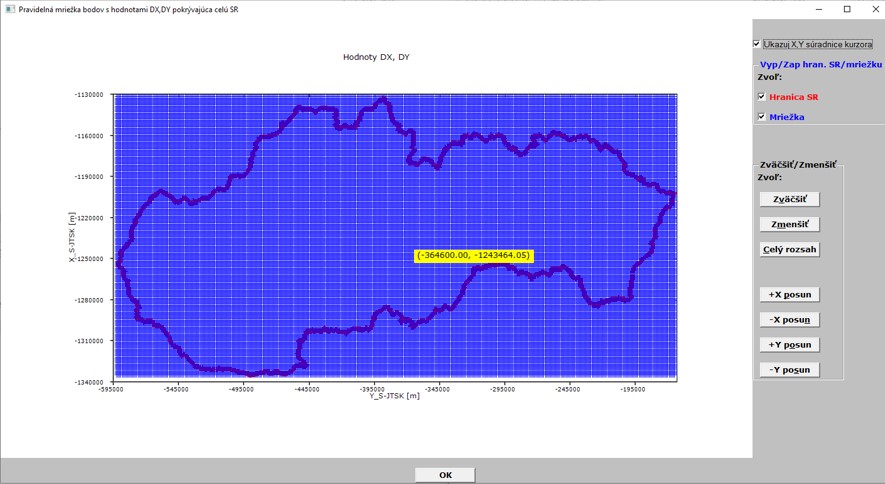
now I see the real geodetic coordinates at the cursor and they are changing as cursor moves (see picture below):

[

[https://i.postimg.cc/DyrgyHgT/Kurzor-cela-mapa.jpg](

[url=https://postimages.org/]https://i.postimg.cc/DyrgyHgT/Kurzor-cela-mapa.jpg)

](https://postimages.org/)

So, two more questions:

Is there a FUNCTION or a SUBROUTINE within ClearWin+ which would allow to snap exactly with the cursor on a concrete selected point in the graphic area?

Paul, would be thinkable in near future to add to the %PL an option like [Point/Line Attributes/Description] which would take the attributes of each concrete point (like Point ID and its description like code or comment) if they were present at the point and would display such information in the graphic when hovering over the point with the cursor? I mean as simple as possible without the need of extensive programming with such option.

21 May 2020 7:17 #25483

Martin

I don't think the first is available nor the second feasible.

Please login to reply.