Silverfrost Forums

Welcome to our forums

%PL - some issues/questions

7 Jun 2020 3:00 #25587

Ken,

I finally again can devote some short time to continue my development. In your code above, there is the function LOCATE_I_J_in_TABLE(I,J,N), where N is size of an NxN matrix. It also contains the code:

locate_i_j_in_table=(i-1)*n+j

I do not understand fully the code above.

My matrix is 204 (204 different values of X, they stand for rows) x 428 (428 different values of Y, they stand for columns) = 87312 (X runs in North/South direction and Y in East/West directions). The X,Y pairs have 1000m spacing (each of them) and contain the DX, DY variations. I am not sure, what should be the value N in the code above? I am not sure that the value 87312 is correct one.

7 Jun 2020 5:20 (Edited: 7 Jun 2020 8:34) #25588

Martin,

If you have a matrix of N rows and M columns, with N =2 and M =3 (1,1,) (1,2) (1,3) (2,1) (2,2) (2,3)

If you write each element of the N x M matrix to file one element at a time BY ROW ORDER, you get: 1 (1,1) 2 (1,2) 3 (1,3) 4 (2,1) 5 (2,2) 6 (2,3)

Notice that the first three elements span M columns as does the last three elements. With this arrangement, the position of element (i,j) in the above table is: Pos(i,j) = (i-1)*M + j

For example: Pos(1,3) = (1-1)*3 + 3 = 3 Pos(2,3) = (2-1)*3 + 3 = 6

If you choose to write the NxM matrix to file one element at a time by COLUMN ORDER, a different look up equation needs to be used. With Column order, for the N x M matrix above, N = 2 and M = 3, there would be M spans of** N** rows in the output file.

Ken

7 Jun 2020 6:48 #25589

Ken,

many thanks, now it is clear (by the way, there is a misspelling error, it should be Pos(2,3) = (2-1)*3 + 3 = 6).

Again - thanks, I continue.

11 Jun 2020 10:06 #25612

Ken,

I still have a problem with the** locate_i_j_in_table(i,j,n)** function. I have the matrix of 204 rows x 428 columns. This I re-rewritten according to ROW order to a binary direct access file containing 87312 rows (lines) with DX,DY values (each of them 8bytes long, so RECL=16 for each row/line).

The code

riadok_x = minloc(abs(x-xlr),1); stlpec_y = minloc(abs(y-ylr),1)

gives me a value of variable** stlpec_y** (which is in the interval between 1-428), however the value of variable riadok_x is always between 1-87312, since the sequential file with values X,Y,DX,DY from which are read the X and Y arrays was also re-written according to ROW order and also has 87312 rows/lines with X,Y,DX,DY values.

So, when using the table location equation with a value of riadok_x (say 26109, then variable stlpec_y=248), where the parameter podla_riadkov=428

locate_i_j_in_table = (riadok_x - 1)*podla_riadkov + stlpec_y

then I get a very big number for the position variable riadok_x and I cannot read a binary record in the position of the variable riadok_x from the binary file containing DX,DY binary values (87312 rows/lines).

It seems to me as if the values of the variable riadok_x already define the position (number of a row) where should be read the binary DX,DY values. I tried it (to read in the DX,DY values in the position of variable riadok_x) but it works only at this concrete point, all other places (when moving with mouse in graphics) show zeros for DX,DY values.

Where am I wrong with defining the correct position in my matrix?

11 Jun 2020 11:27 #25613

Martin,

The X,Y data that define the grid can easily be stored as two arrays, as before – with no memory problems. You don’t need to include this data in the direct access file.

For a given cursor position you can interrogate X and Y arrays to find the nearest grid point at X(i) and Y(j) again as before, and once you know i and j, then read the appropriate line in the direct access file. I think you are making your program too complex.

You may want to consider changing the direct access file from UNFORMATTED to FORMATTED. This would allow you to read the file in notepad for example.

If you want to run your code with the direct access file FORMATTED, you need to pay attention to the format codes for both the write and read operations – they must be the same, and the number of characters they write must be the record length.

I will post a modified version of the direct access example above using FORMATTED access shortly.

Ken

11 Jun 2020 11:47 #25614

Ken,

just for clarification:

I created the binary file containing the binary DX,DY values (and only DX,DY values) separately in a single separate program to have the binary file available for any additional purposes in the future. The binary file was created from the ASCII file containing the X,Y,DX,DY arrays, where only DX,DY values were written to the binary file. So both file have the same number of lines (87312), but binary file contains only DX,DY arrays.

So, my graphical program opens a sequential (ASCII) file containing the X,Y, DX, DY arrays to plot them in a graph and upon reading in the whole X,Y arrays from the ASCII file I also open the binary file where I want to read in the corresponding i,j record of DX,DY values determined from the X,Y arrays of the ASCII file to be able to show the X,Y,DX,DY values at the cursor position iwhen moving with the cursor n the graphics.

11 Jun 2020 12:15 #25615

Example as promised.

implicit none 
integer, parameter :: sp = kind(1.0), dp = kind(1.d0) 
integer ii, i, j, k 
real(kind=sp) asp, bsp 
real(kind=dp) adp, bdp 
integer, parameter :: n = 10
character(len=50), parameter :: fmt='(I3,1X,I3,1X,F10.5,1X,1X,F10.5,1X,F10.5,1X,F10.5)'

! Note that the format code above will write out a string 52 characters long, so this is now the MINIMUM record length
!
! Integer                3 characters
! One space              1
! Integer                3 
! One space              1
! Real                  10
! One space              1
! Real                  10
! One space              1
! Real                  10
! One space              1
! Real                  10
!                    ------
! Total width           52
!                    ------
open(unit=10, file='martin.txt', status='UNKNOWN', access='DIRECT', recl=52, action='WRITE', FORM='FORMATTED', ERR=90 ) 
print*  
print*, 'Writing to file' 
  do i = 1, n 
  write(10,fmt,REC=i,ERR=92) i,i+10, real(i),real(i)+1.0, dble(i), dble(i) + 1.d0 
  write(6,fmt)               i,i+10, real(i),real(i)+1.0, dble(i), dble(i) + 1.d0   ! Echo to screen 
end do 
close(unit=10, status='keep',ERR=91)

! Open the direct access file
open(unit=11, file='martin.txt', status='OLD', access='DIRECT', recl=52, action='READ', form='FORMATTED', err=90) 
print* 
print*, 'Reading from file' 
do i = 1, n 
  read(11,fmt,REC=i,err=93) j,k,asp,bsp,adp,bdp 
  write(6,fmt) j,k, asp, bsp, adp, bdp      ! Echo to screen 
end do 
close(unit=11,status='keep',err=91) 

open(unit=11, file='martin.txt', status='OLD', access='DIRECT', recl=52, action='READ', form='FORMATTED', err=90) 
print* 
print*, 'Reading from file - n random records' 
do i = 1, n
  ii = int(dble(n)*random@()) 
  if (ii .eq. 0) ii = 1           ! ii is random record to be accessed 
  read(11,fmt,REC=ii,err=93) j,k,asp,bsp,adp,bdp 
  print*,'Record', ii 
  write(6,fmt) j,k, asp, bsp, adp, bdp 
end do 
close(unit=11,status='keep',err=91)

goto 100 
90   STOP 'ERROR opening direct access file' 
91   STOP 'ERROR closing direct access file' 
92   STOP 'ERROR writing to direct access file' 
93   stop 'ERROR reading from direct access file' 
100  continue 
end program
11 Jun 2020 12:31 #25616

Suggest you modify your code to include a write to a direct formatted file immediately after your write to the existing direct unformatted file. You will then be able to check that the data written to the binary file is as expected and looking at the 'equivalent' text file.

Unformatted direct binary read/write will be faster than formatted, but it's difficult to find the bugs.

Ken

11 Jun 2020 1:24 #25617

Thanks Ken!

I will review it and try to implement!

11 Jun 2020 1:28 #25618

OK I see your issue now, and it does not appear to be with the direct file.

Minloc should return a value between 1 and 204 for one axis and between 1 and 428 for the other, and there are 204 x 428 = 87,312 records in the binary file.

I don’t understand how minloc can return a value of 87,312 - unless you have read 87,312 points into the X and Y arrays from your input ascii file?

You only need 428 and 204 sets of sequential 'axis' coordinates in these arrays.

Ken

11 Jun 2020 1:59 #25619

Exactly!

I also expected the value for rows/lines in the interval 1 - 204, since I have 204 different X coordinate values (spacing is 1000m, X goes from North to South, therefore X values are rows/lines, where Xmin = -1335000m and Xmax = - 1132000).

For Y the MINLOC outputs the column value correctly (in the interval between 1 - 428, since I have 428 different Y values, spacing 1000m, Y goes from East to West, therefore Y values are columns, where Ymin = - 592000 and Ymax = -165000).

As I wrote earlier in my today´s post - first I read in the whole array of X,Y values from an ASCII file to be able to plot the X,Y grid (spacing 1000m in each direction) in the graph (either without SK border or with the SK border).

When both X,Y arrays are fully read in, then I use the code:

riadok_x = minloc(abs(x-xlr),1); stlpec_y = minloc(abs(y-ylr),1)

where X is X array and Y is Y array.

And from that code above I get the variable riadok_x as a value from the interval 1-87312 (incorrect, it should be from the interval 1-204) and the variable stlpec_y from the interval 1-428 (correct)

As I wrote, I created the binary file separately (outside of the graphic program, with another single program, since I do not want to create it (the binary file) each time when I run my graphics program). Binary file contains DX,DY arrays ONLY, it does NOT contain X,Y arrays (I can do it easily, however I thought that both files have the same number of rows/lines (87312), so I could read in the X,Y arrays from the ASCII file and interrogate their I,J position and then look for this I,J position in the binary file containing DX,DY values only.

11 Jun 2020 2:10 #25620

Supplement information:

the 87312 rows in ASCII file look like follows:

-1335000 -592000 DX DY -1335000 -591000 DX DY -1335000 -590000 DX DY .... -1335000 -165000 DX DY -1334000 -592000 DX DY -1334000 -591000 DX DY ... -1334000 -165000 DX DY -1333000 -592000 DX DY ... -1333000 -165000 DX DY etc.

11 Jun 2020 3:24 #25621

So you need to scan your existing input arrays X and Y, removing duplicates and then sorting into ascending order.

Very quick solution:

program test
implicit none
integer, parameter :: dp = kind(1.d0)
integer, parameter :: n = 20   ! Must be divisble by 4 for this example
real(kind=dp) :: x(n), xtmp(n)
integer i, k
! Generate some random data with duplicates
do i = 1, n, 4
  x(i)   =   100.d0*random@() ; x(i+1) =   x(i) ; x(i+2) = - x(i) ; x(i+3) =   100.d0*random@() 
end do
! print input array with all duplicates
print*, 'Input array with duplicates'
do i = 1, n
  print*, i, x(i)
end do

call remove_duplicates_and_sort_ascending(x, n, xtmp, k)

! print output array with duplicates removed
print*
print*, 'Output array with duplicates removed, sorted'
print*, 'Number of unique elements = ', k
do i = 1, k, 1
  print*, i, xtmp(i)
end do
! redundant information at end of output array
print*
print*, 'Redundant information at end of output array'
do i = k+1, n, 1
  print*, i, xtmp(i)
end do
end program test

subroutine remove_duplicates_and_sort_ascending(array_in, n, array_out, k)
implicit none
integer, parameter :: dp = kind(1.d0)
integer, intent(in)         :: n             ! Number of elements in input array
real(kind=dp), intent(in)   :: array_in(1:n) ! Input array
real(kind=dp), intent(out)  :: array_out(1:n)! Output array
integer, intent(out)        :: k             ! Number of 'usable' elements in output array
! locals
real(kind=dp), allocatable :: res(:), d(:)
integer,       allocatable :: a(:)
integer i
    allocate(res(1:n))
    res = huge(1.d0)               !!!!! WAS res = 0.d0
! Remove dulpicates
    k = 1
    res(1) = array_in(1)
    do i=2, n
        ! if the number already exist in res check next
        if (any( res .eq. array_in(i) )) cycle
        ! No match found so add it to the output
        k = k + 1
        res(k) = array_in(i)
    end do
!   Copy only unique elements to smaller array d    
    allocate (d(1:k))
    do i = 1, k, 1
      d (i) = res(i)
    end do
!   Create index array a
    allocate (a(1:k))
!   Populate array a with pointers to acending locations in d(1:k)    
    call dsort@(a,d,k)  !!!! DSORT@ sorts the REAL array D by setting pointers from 1 to N in the array A
!   Write the first k elements of array_out, containing the unique elements of array_in    
    array_out = 0.d0    
    do i = 1, k
      array_out(i) = res(a(i))
    end do
    deallocate(res,d,a)
end subroutine  remove_duplicates_and_sort_ascending 
11 Jun 2020 9:15 #25622

You can dispense with the allocatable arrays in the above subroutine using this instead, but unfortunately, it takes longer to run! I was hoping it would be faster.

subroutine remove_duplicates_and_sort_ascending_2(array_in, n, array_out, k) 
implicit none 
integer, parameter :: dp = kind(1.d0) 
integer, intent(in)         :: n             ! Number of elements in input array 
real(kind=dp), intent(in)   :: array_in(1:n) ! Input array 
real(kind=dp), intent(out)  :: array_out(1:n)! Output array 
integer, intent(out)        :: k             ! Number of 'usable' elements in output array 
! locals
integer i
real(kind=dp) min_val, max_val
    array_out = 0.d0
    min_val = - huge(1.d0)
    max_val = maxval(array_in)
    i = 0
    do while (min_val .lt. max_val)
        i = i+1
        min_val = minval(array_in, mask = array_in .gt. min_val)
        array_out(i) = min_val
    enddo
    k = i 
end subroutine  remove_duplicates_and_sort_ascending_2 
12 Jun 2020 4:11 #25626

Ken,

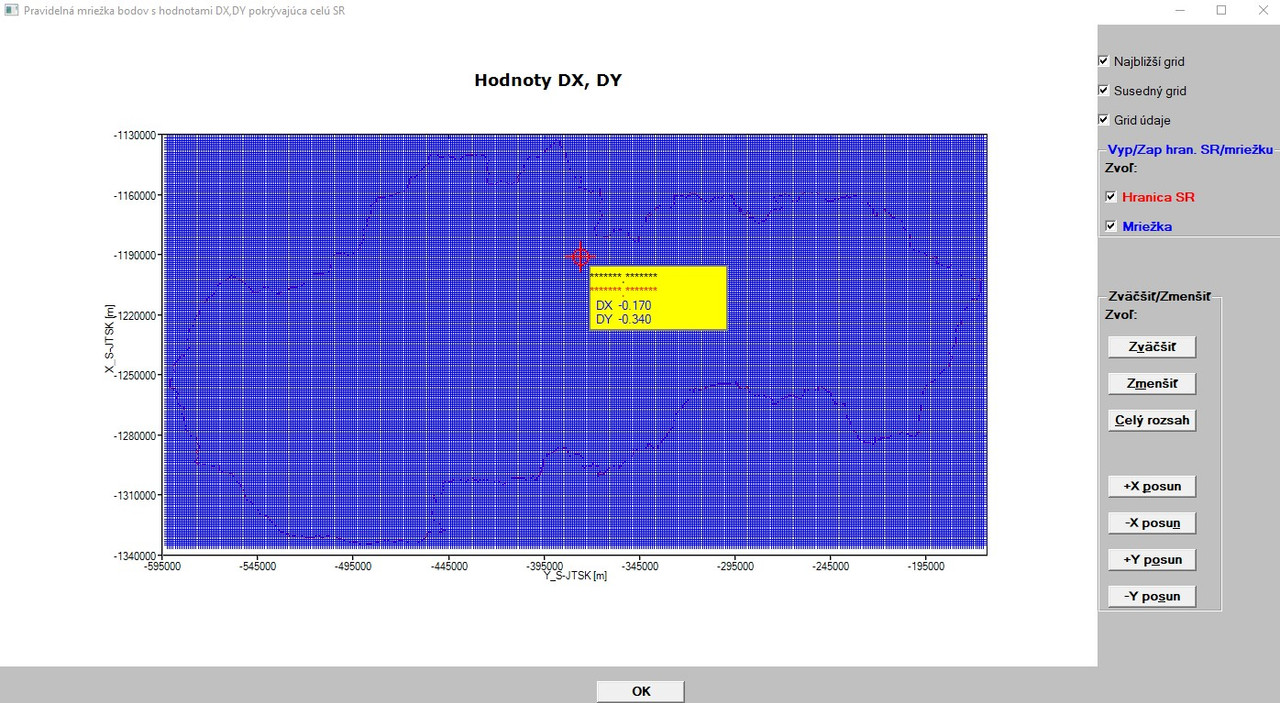
BIG NEWS! Yesterday, after a football match (we are a group of about 24 recreational football players and we play every Thursday at 18.00 for several years - by the way - yesterday I scored twice and we won 5:4), when we were drinking some bear/wine in a pub I got the following idea how to force my program to do right things when reading in the 87312 line ASCII file with X,Y,DX,DY values and then showing right X,Y,DX,DY values in graphs by means of your LOCATE_I_J_IN_TABLE(I,J,N) function:

....
....
pocet_roznych_xx = 1   

    hodnoty_X_Y_DX_DY: do m = 1, pr_subor4

              read (8,*) x(m), y(m), dx(m), dy(m)
             
                if (m.le.428) yy(m) = y(m) ! Limit for 428 different Y values (columns), yy array will be used instead of y array in all subsequent drawing functions
                  
                if (m.eq.1) then                           ! Limit for 204 different X values (rows/lines), xx array will be used instead of x array in all subsequent drawing functions

                  xx(pocet_roznych_xx) = x(m)                    
                  pocet_roznych_xx = pocet_roznych_xx + 1
                  
                else
 
                  if (int(x(m)).eq.int(x(m-1))) then
                      x(m)=dble(x(m)); x(m-1)=dble(x(m-1))
                      cycle

                  else
                    
                    xx(pocet_roznych_xx) = x(m)
                    pocet_roznych_xx = pocet_roznych_xx + 1

                  end if
                end if
                  
     
    end do hodnoty_X_Y_DX_DY
....
....

The result can be seen here:

[ https://i.postimg.cc/4y2LVBC4/X-Y-DX-DY-showed.jpg

And yes, there is still a small error in the display - there are asterisks for X,Y values, which means too small format for the numbers (X,Y) to be dispalyed. But here - although I was looking at your code below 100x - I was unable to get the work done.

Your code:

character(len=20), parameter :: fmt(1:2)=(/'(SP,F7.3,1A,F7.3)   ','(SP,2X,A2,1X,F7.3)  '/)

So, first (and sorry for my trivial question in this case, since I was used to use the format statement with a label along with READ/WRITE commands):

I know all other meanings of the code above, but what does it mean 1A? For example, A2 stands for a character variable with 2 characters, but 1A is what - 1 times a character variable with pre-defined lenght?

Here, in your code above I replaced the F7.3 with F10.2 for Y values (like -496234.22), the second F7.3 I replaced with F11.2 for X values (like -1356852.45) and the third F7.3 with F5.2 for DX/DY values (like -0.45) as follows:

character(len=20), parameter :: fmt(1:2)=(/'(SP,F10.2,1A,F11.2)   ','(SP,2X,A2,1X,F5.2)  '/)

but the compiler says:

[url=https://postimg.cc/PLXBSJrm]https://i.postimg.cc/jjPtdnpk/compiler.jpg ](https://postimg.cc/8fWmVdPx)

Then I tried to adjust the spaces in the FMT to the same length and increased the length of CHARACTER statement - no success.

It is even possible to have different lengths of variables in such way of format defining and if yes how?

Thanks for your answers in advance!

So, many thanks Ken for your kind help and inspirations! It helped me fantastically and I am slowly approaching to my final goal, although I still have some new ideas!

12 Jun 2020 6:06 #25627

Martin,

Good to see you have found a working way around the problem.

character(len=20), parameter :: fmt(1:2)=(/'(SP,F7.3,1A,F7.3)   ','(SP,2X,A2,1X,F7.3)  '/)

The 1A in fmt(1) above provides the space for the text ‘,’ in the line below.

write(output_string(1),fmt(1)) x1r,',',y1r

so you get a comma after the first coordinate.

In this context 1A, A, and A1 all give the same output. For 1A, the one leading 1 means repeat once, and a defines a string of length 1, since there is no number following A.

Your code:

character(len=20), parameter :: fmt(1:2)=(/'(SP,F10.2,1A,F11.2)   ','(SP,2X,A2,1X,F5.2)  '/)

Fails for two reasons, firstly the two format descriptors are different lengths, the first is 22 characters long and the second is 20 characters long, so you have to add two blank spaces at the end of the second descriptor. The compiler will still throw an error because the character strings are 22 characters long, but you have defined their length to be 20, so (len=20) must be changed to (len=22).

The code above now becomes:

character(len=22), parameter :: fmt(1:2)=(/'(SP,F10.2,1A,F11.2)   ','(SP,2X,A2,1X,F5.2)    '/)

It is easier to pick up this type of error when initializing character arrays thus: ! 1234567890123456789012 character(len=22), parameter :: fmt(1:2)=(/'(SP,F10.2,1A,F11.2) ', & '(SP,2X,A2,1X,F5.2) '/)

Ken

12 Jun 2020 11:09 #25629

Ken - many thanks!

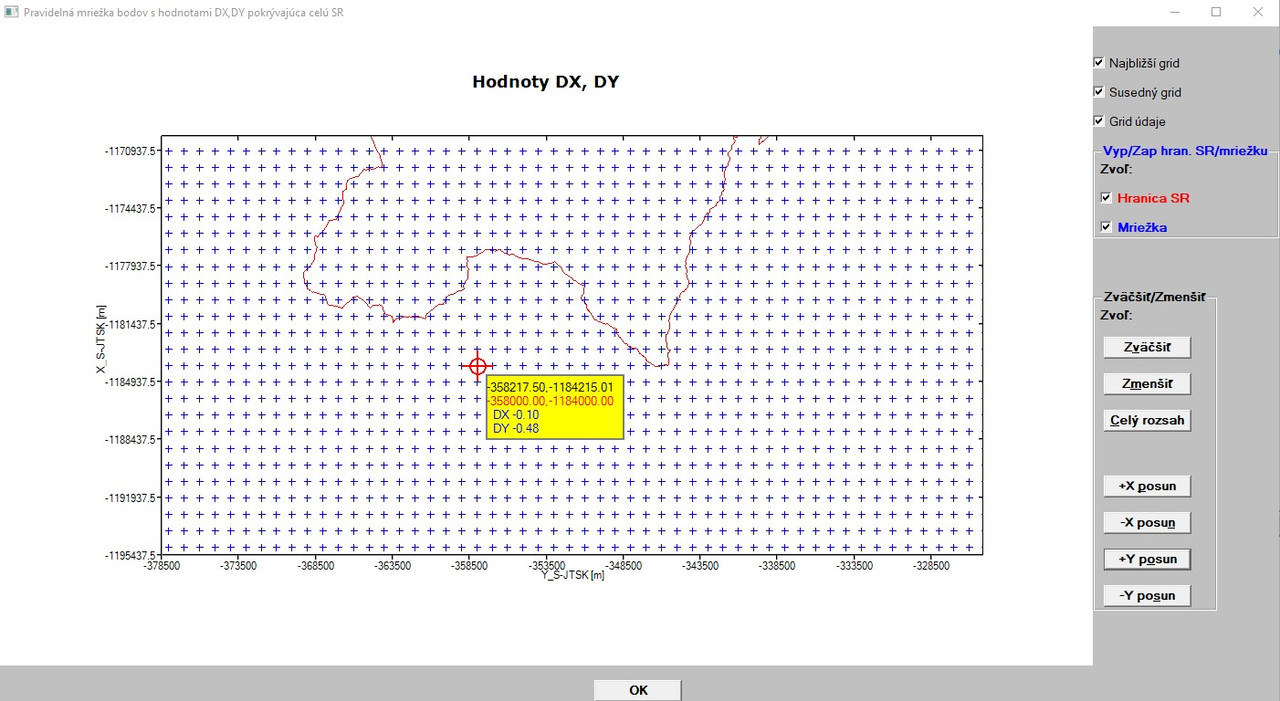
Now it works as expected!

[ https://postimg.cc/Yh3BtW9m]https://i.postimg.cc/jSVxQ6Yv/X-Y-DX-DY-showed-OK.jpg ]( https://postimg.cc/Yh3BtW9m]![https://i.postimg.cc/jSVxQ6Yv/X-Y-DX-DY-showed-OK.jpg](https://i.postimg.cc/jSVxQ6Yv/X-Y-DX-DY-showed-OK.jpg) )

Later - more!

Do you have some info, when the problem with SYMBOL=12 and SYMBOL=13 will be fixed?

Martin

13 Jun 2020 11:31 #25631

John,

here is a part of the code I use for plotting:

...
CALL winop@('%pl[native]') 
CALL winop@('%pl[scale=linear]')
CALL winop@('%pl[fixed_aspect]') 
CALL winop@('%pl[x_sigfigs=7]')
CALL winop@('%pl[y_sigfigs=7]')
CALL winop@('%pl[link=lines,symbol=0]')
CALL winop@('%pl[link=none,symbol=12]')
CALL winop@('%pl[title='Hodnoty DX, DY [m]']')
CALL winop@('%pl[x_axis='Y_S-JTSK [m]']') 
CALL winop@('%pl[y_axis='X_S-JTSK [m]']')
CALL winop@('%pl[x_array]')
CALL winop@('%pl[independent]')
CALL winop@('%pl[colour=red,colour=blue,n_graphs=2,frame,etched]')
iw=winio@('%`^pl[full_mouse_input]&',gw,gh,npoints,y_hr,x_hr,y,x,handle_pl,pl_cb)
....

I would also like to have more control over axes captions (in my case Y_S-JTSK [m] for X axis and X_S-JTSK [m] for Y axis, since they practically touch the numbers above them, what is not well arranged. I would like to put them more to the bottom and more to the left (to have visible spacing between the captions and numbers) and put both in BOLD font (and maybe also in another colour than black), but I found nothing in the help how to do it.

Ken,

still once more back to your explanation with FMT issue. As you advised, I changed your code as follows (I also changed A2 to A3 in FMT(2) to have the text DX= and DY= in the box rectangle in the graphics):

character(len=22), parameter :: fmt(1:2)=(/'(SP,F10.2,1A,F11.2)   ','(SP,2X,A3,1X,F5.2)    '/)

While I understand that FMT(1) is 22 characters long (SP character (plus sign)+10+11=22), I see the FMT(2) as 9 characters long (SP+2x+1x+5=9). When I add to them the 4 trailing blank spaces I get 13.

How can I get the 22 character length for FMT(2)?

Martin

13 Jun 2020 12:57 #25632

This string is 22 characters long:

'(SP,F10.2,1A,F11.2)   '

and this string is also 22 characters long:

'(SP,2X,A3,1X,F5.2)    '

This is totally independent of the actual number of characters produced by the read or write statements that refer to these strings as format codes.

You can now reduce len to 19.

character(len=19), parameter :: fmt(1:2)=(/'(SP,F10.2,1A,F11.2)',&
                                           '(SP,2X,A3,1X,F5.2) '/)

Ken

13 Jun 2020 1:33 #25633

Thanks Ken!

I had totally false imagination about it and this was also the reason why I did not initially find my problem when I changed your original code with my F values.

So, put in another words: to have exactly the same length in the array constructor, all characters put between a pair of apostrophes '' must be counted (including commas and parenthesis) and when this does not fit, it is possible to adjust the required length with blank spaces.

Please login to reply.