Silverfrost Forums

Welcome to our forums

Off limits %~fl warning

8 May 2021 9:18 #27719

Paul,

We discussed this already and I think after some time you have mentioned somewhere last year that similar code like below now shows the warning red dot when code starts or when some other part of program will try to change the value of A to be out of limits (0-1 like in our case).

real*8 A
A=1.1
i=winio@('%~fl%rf%`fl',0d0, 1d0, A)
end

Unfortunately, the behavior is still the same: this dot only appears if you manually try to type value larger than 1. https://i.postimg.cc/jSgqWLTY/Image25.jpg Similar demo showing that if the code will try to change variable A with the value 1.1 no warning is appearing
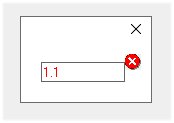
real*8 A
common /aaaa/A
integer, external :: Run
 A=1.1
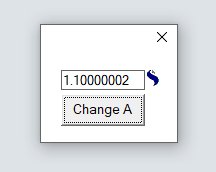
 i=winio@('%~fl%rf%`fl%ff&',0d0, 1d0, A)
 i=winio@('%^bt[Change A]%es', Run)
end

integer function Run()
 A=1.1
 call window_update@(A)
 Run=2
end function

The importance of showing warning is because %rf is used not only for manual entering the values but also when the code itself changing this variable i.e. doing opposite - writing - as if it will be used like with %wf if update A with 'call window_update@(A)'. As i wrote in this case though there is still no warning. %rf/%rd are even more convenient than %wf/%wd by the way. Latter ones i almost never use because it is out of style with %rf/%rd. To use %wf its background has to be changeable, but it is just gray.

We need such dynamically changed warnings ! For example i use warnings like changeable background under the number field, or the font color, or %si! and $si#, or popup windows. Otherwise it is easy to miss something wrong. Unfortunately it is not easy to do (need some efforts in the code) and some of these controls are not dynamically changeable.

For example %si! and %si# signs are very good to warn users but are not dynamically changeable to appear/disappear and not size changeable so i use their smaller visual analog instead, callable as a bitmap fitting into one text line i=winio@(' %bm[exclm_sm] Error!&'), see the example below. Though the size of image now is convenient for inline warnings, the appearance/disappearance is also not dynamically changeable. The %~fl would be great easiest way to get the warnings which do not require any additional efforts besides just adding one single sign of tilde to the code !!! Rozy background in the picture below by the way is also warning sign telling user to pay attention, this one i can dynamically update, but that requires 2-3 orders of magnitude more symbols to add to the code than just one tilde

https://i.postimg.cc/sX6KPLF6/Image23.jpg

10 May 2021 8:25 #27722

Dan

I am not clear about what you are asking for but the following sample may help.

  1. In your code there is a missing 'common /aaaa/A' in the function Run.

  2. Maybe you should be using CONTROL_UPDATE@ rather than WINDOW_UPDATE@ (see cwplus.enh). It depends on what you want.

  3. From the sample you can dig out a way to add your own icon that can be shown/hidden under program control. You will need to provide your own 16x16 icon.

    winapp program main real*8 A common /aaaa/A integer, external :: Run,Switch integer(7) hctrl common /bbbb/hctrl A=1.1 i=winio@('%~fl%rf%`fl&',0d0, 1d0, A) i=winio@('%ic[error]%lc&', hctrl) i=winio@('%sc&', Switch) i=winio@('%ff%^bt[Change A]%es', Run) end

    integer function Run() include <windows.ins> real*8 A common /aaaa/A integer,external::Switch A = 1.1 call CONTROL_UPDATE@(A) i = Switch() Run = 2 end function

    integer function Switch() include <windows.ins> logical, save:: show integer(7) hctrl integer ishow common /bbbb/hctrl logical L data show/.false./ ishow = SW_HIDE if(show) ishow = SW_SHOW L = ShowWindow(hctrl, ishow) show = .not.show
    Switch = 2 end function

    resources error ICON error.ico

11 May 2021 4:30 #27730

Thanks, Paul, i have not got how you have done this trickery, but i will look twenty seventh time again 😃

My code indeed missed common block and also 'use clearwin'. When i added them and control_update@ which i did not know about i got this

https://i.postimg.cc/FsVpMBpW/Image4.jpg

If tilde %~fl will plot this image instead of red cross i still would use it (lazy or often no time to do perfect solutions) but something with red color would be move visible as warning 😃 It is very simple to add 1 symbol to the text and is much better than do not have such functionality at all. Lost uncountable amount of days due to missing one small parameter in settings

11 May 2021 7:33 #27732

Dan

I added the icon to the code in case the %~fl with CONTROL_UPDATE@ does not work in the way you want.

The following sample may do all that you want. If not then please describe the behaviour that you are looking for.

winapp
program main
real*8 A
common /aaaa/A
integer, external :: Run
 i=winio@('%~fl%rf%`fl&',0d0, 1d0, A)
 i=winio@('%ff%^bt[Change A]%es&', Run)
 i=winio@('%sc', Run)
end

integer function Run()
 include <windows.ins>
 real*8 A
 common /aaaa/A
 A = 1.1
 call CONTROL_UPDATE@(A)
 Run = 2
end function
11 May 2021 9:57 #27733

I have not used CONTROL_UPDATE@. However, reading this post and the earlier discussion last year, at present:-

CONTROL_UPDATE@ behaves exactly like WINDOW_UPDATE@ but if the variable relates to %rd or %rf then any limits (%il or %fl) are not applied and any out-of-range alert icon (%~il or %~fl) is removed.

Perhaps what is required is:

CONTROL_UPDATE_SHOWERROR@ behaves exactly like WINDOW_UPDATE@ but if the variable relates to %rd or %rf then any limits (%il or %fl) are not applied and any out-of-range alert icon (%~il or %~fl) is not removed.

Ken

11 May 2021 11:06 #27735

Ken

I get more and more confused. We would then have 3 scenarios.

  1. The user goes out of range so an error icon appears.

  2. The programmer displays an out-of-range value without an error icon.

  3. The programmer displays an out-of_range value with an error icon.

Maybe Dan's initial request (some time back) was for (3) and not (2).

11 May 2021 11:48 #27736

Paul,

Apologies for confusing you further, I was hoping to provide some clarity, but I failed.

In the first line of this post/topic Dan writes:

“you have mentioned somewhere last year that similar code like below now shows the warning red dot when code starts or** when some other part of program **will try to change the value of A to be out of limits”

So it looks like Dan’s initial request was for (3) and not (2).

Hopefully Dan will confirm.

Ken

11 May 2021 12:18 #27737

Ken

On the contrary, my confusion was not with your post. As usual your insight is welcome and valuable.

11 May 2021 6:52 #27738

My request with tilde finctionality was simple : to keep all %il/%fl behavior like it was before and just to inform user with warning that there was an attempt to go out of limits not only when user doing that manually but at any other attempts the code made by itself

Again, let's keep all what was done (if manually change variable out of limits - make the red sign flashing) but just add that when the code itself changing variable out of limits to inform user too

It's like you come home and the smart door lock informs you that there was an attempt to robe your house which failed - this is manual way currently implemented. What i ask is that if somebody from the internet tried to unlock your lock remotely - inform me too 😃

11 May 2021 8:08 #27739

Paul, your code above is not showing any warning signs

11 May 2021 8:31 #27740

Dan

I might be getting near to understanding what you want. That is, a control with the limits applied but a warning icon appearing when an attempt is made to go beyond the limits. With the basic %fl, the feedback is that the control refuses to implement or corrects the change. You would like to have that but to accentuate the error with a warning flag. Presumably such a flag would have a limited time duration.

I don't know how that would work out in the ClearWin+ code but I will put it on the wish list.

Presumably the other context is when the user has provided the name of a data file and where this data contains values that are then displayed on screen. The data has been read in by the user but not directly by typing. Such values could be corrected to be within limits but marked with a warning icon to show the change.

Again I can put this on the wish list.

In my first sample above I have added elements of code for an icon that can be shown and hidden under program control. It could be made to flash by using a gif image instead of an icon. Perhaps one way forward would be for someone to develop those elements into one or two general purpose Fortran functions based on ClearWin+.

12 May 2021 6:34 #27742

Here is my first offering of what you might call ClearWin++ where the user adds their own functionality to standard ClearWin+. It is just a starter. At the moment it is not quite right and could be made more versatile (to allow many similar %rf controls). I have used %si for now.

module dmod
use mswin  
type rf
  real(2) lower,upper,val
  integer(7) hIcon
end type
type(rf)::x
contains

integer function rfcb()
  integer show
  logical L
  show = SW_HIDE
  if(x%val < x%lower)then
    x%val = x%lower
    show = SW_SHOW
  else if(x%val > x%upper)then
    x%val = x%upper
    show = SW_SHOW
  endif
  L = ShowWindow(x%hIcon,show)
  rfcb = 1
end function

subroutine winrf(x)
  type(rf)::x
  iw = winio@('%^rf&', x%val, rfcb)
  iw = winio@('%si#&')
  iw = winio@('%lc&', x%hIcon)
end subroutine

integer function change()
 x%val = 1.1d0
 change = rfcb()
end function
end module

winapp
program main
 use dmod
 x = rf(0.0d0,1.0d0,1.1d0,0)
 call winrf(x)
 iw = winio@('%ff%cn%^bt[Change]&', change)
 iw = winio@('%es&')
 iw = winio@('%sc', rfcb)
end program
12 May 2021 9:51 #27743

This sample illustrates how to make the above user adaptation available to multiple %rf controls. The extension is not trivial. It comes under the heading 'no pain no gain'. I will add a couple of 16x16 icons to ClearWin+ for use with or maybe instead of %si.

module dmod
use mswin
type rf
  real(2) val,lower,upper !val must be first to match 'LATEST_VARIABLE'
  integer(7) hIcon
end type
type(rf),pointer::this
contains

integer function filter(x) !filter the %rf input and show/hide the icon.
  type(rf)::x
  integer show
  logical L
  show = SW_HIDE
  if(x%val < x%lower)then
    x%val = x%lower
    show = SW_SHOW
  else if(x%val > x%upper)then
    x%val = x%upper
    show = SW_SHOW
  endif
  L = ShowWindow(x%hIcon,show)
  filter = 1
end function

integer function rfcb()
  type(rf),allocatable::x
  integer(7) addr
  rfcb = 2
  if(clearwin_string@('CALLBACK_REASON')=='DATA_ALTERATION')then
    addr = clearwin_info@('LATEST_VARIABLE')
    allocate(x,absolute_address=addr)
    rfcb = filter(x)
  endif  
end function

subroutine winrf(x)
  type(rf)::x
  iw = winio@('%^rf&', x%val, rfcb)
  iw = winio@('%si#&')
  iw = winio@('%lc&', x%hIcon)
end subroutine

integer function reset()
 this%val = 1.5d0 !Test by changing to out-of-range value.
 reset = filter(this)
end function
end module

winapp
program main
 use dmod
 type(rf),target::x
 this=>x
 x = rf(0d0,0d0,1d0,0) !Initialise upper and lower.
 call winrf(x)         !User extension of %rf.
 iw = winio@('%ff%cn%^bt[Reset]&', reset)
 iw = winio@('%es&')
 iw = winio@('%sc', reset)
end program
12 May 2021 1:37 #27744

For the next release of ClearWin+ %si has been extended to provide 16x16 icons. %siX is an error icon, %siI is an information icon, %siQ is a question icon and %siW is a warning icon.

12 May 2021 5:18 #27745

Thanks, interesting. We definitely need warning system in Clearwin to be versatile and convenient. Missed that from day 1 for a quarter of century

Question related to this: suppose we will need to make 100 %~fl%rf%`fl controls for 100 different variables.

i=winio@('Variable 1 %fl%rf%`fl&',A1)
i=winio@('Variable 2 %fl%rf%`fl&',A2)
.................

That will be total approximately 100 lines of user code. Now using your examples above, which are about 50 lines long, do we need to write 100*50 = 5000 lines of code ? Or we need one 50 lines setup which will be used by each of our 100 variables, so the source code total length will be 50+100=150 lines ?

12 May 2021 6:11 #27746

It would be about 150 lines.

13 May 2021 11:41 #27748

Dan

I have investigated this issue with the aim of providing an alternative to control_update@ or an additional %rf option. At the moment I can't find a way to do this. It looks like it would require a new format code as an alternative to %rf.

13 May 2021 8:37 #27756

In situations like this I would add a “Check data” button to the Clearwin+ window. The associated call back can then pop up a window displaying an error message, such as “parameter X” out of range. In addition the call back can also do a sense check on combinations of input parameters.

For example if two parameters such as the reactance X (series inductance) and susceptance B (shunt capacitance) for an overhead power transmission line are entered, I would check that these are greater than zero, and also check that in combination they don’t generate a velocity of wave propagation greater than the speed of light. Similarly for XLPE insulated power cables, due to the higher capacitance I would expect the parameters to give a velocity of wave propagation of around 60% the speed of light.

This can catch lots of data entry errors (more than %~fl can do) before any subsequent analysis is undertaken. Even if the user does not perform the manual data check, the call back can be the first routine called by the analysis subprogram so preventing needless computations – so it serves two purposes, without any difficult programming.

13 May 2021 11:27 #27758

What I have been doing is to highlight the control that is 'out of range' to let the user know they need to take action. I don't change the control (value or text), just highlight it. I have about 50 variables of all types (float, integer, text) that have their own criterion for 'good' or 'not good'.

Also, I do use the %fl/%il to apply limits that cannot be exceeded, like the altitude of a drill hole (core) cannot be greater that 28,000 feet, not less than -2000 feet (below sea level). But I signal that something is wrong if drilling is done at greater than 89.9 degrees (upward?).

I enjoyed reading Paul's code; and there are other ways to do the same thing. Granted, each variable that is to be limit checked may have its own set of parameter/WINIO@() commands. That said, if one has a hundred parameters, it is likely that they are initialized/created from an array, making the limits to be applied easier to specify, also with arrays.

I like using a %ud and passing a pointer to a TYPE or array that becomes 'attached' to the control and thus always usable. The callback uses that array/TYPE to determine the goodness of the user input. One set of routines applied 'globally' to limit check different data types and different control types.

14 May 2021 4:56 #27760
winapp
program main
real*8 A
integer (7) ilc_backgr
common /aaaa/A, ilc_backgr
integer, external :: Run

 a=0.1
 ilc_backgr  = 0
 i=winio@('%rf%lc&', A, ilc_backgr)
 i=winio@('%ff%^bt[Change A]%es', Run)

end

integer function Run()
include <windows.ins>
 real*8 A
 integer (7) ilc_backgr
 common /aaaa/A, ilc_backgr

 A = A + 1
 IF(A.GT.2) a=0.1
 call window_update@(A)

if(a.gt.1) then
      iColBkg=rgb@(255,133,155)
      call set_control_back_colour@(ilc_backgr, iColBkg)
else
      iColBkg=rgb@(255,255,255)
      call set_control_back_colour@(ilc_backgr, iColBkg)
endif

 Run = 2
end function

This is how i currently make warnings. Even preparing this smallest demo i spent 30 minutes searching for the bug. You will 1000 times forget to declare integer (7) ilc_backgr i guarantee you ! 😃

Compare that with just one tilde added

Please login to reply.