Silverfrost Forums

Welcome to our forums

New sugestion(s) for %PL - (first - an initial question)

29 Mar 2021 7:51 #27360
WINAPP
module pl_pv_test
USE clrwin
INTEGER, parameter :: N=11
integer i
integer gw,gh
integer, parameter :: mtop = 10, mbottom=20, mleft=100, mright=30
REAL*8 x1(N),y1(N)     
contains
     
integer function gen_data()
  DO i=1,N
   x1(i)=0.025d0*(i-1) ; y1(i)=1.d0-x1(i)*x1(i)
  ENDDO
  gen_data = 1
end function gen_data

integer function draw_pl()
character(len=126) pl_str
  gw=600
  gh=300
  i=winio@('%`bg[white]%tc[black]&')
  CALL winop@('%pl[x_array,link=curves,symbol=9,colour=blue,frame,y_axis=@,x_axis=@,gridlines,width=2]')
  write(pl_str,'('%pl[margin=(',I3,',',I3,',',I3,',',I3,')]')') mleft, mtop, mright, mbottom
  print*, 'Values used to set up %pl'
  print*, mleft, mtop, mright, mbottom
  call winop@(pl_str)
  i=winio@('%^pl&',gw,gh,N,x1,y1,pl_cb)
  print*, gw, gh
  i=winio@('%sf%ff%nl%cn%tt[OK]')
  draw_pl = 1
end function draw_pl

integer function pl_cb()
  if (clearwin_string@('CALLBACK_REASON') .eq. 'PLOT_ADJUST') then
    call draw_frame(rgb@(255,0,0),3)
    print*
    print*, 'Values used in call back'
    print*, mleft, mtop, mright, mbottom
    print*, gw, gh
  end if
  pl_cb = 2
end function pl_cb


subroutine draw_frame(colour,width)
integer, intent(in):: colour, width
call set_line_width@(width)
call draw_rectangle@(mleft, mtop, gw-mright, gh-mbottom, colour)
call set_line_width@(width)
end subroutine draw_frame
     
end module pl_pv_test

program main
use pl_pv_test
i = gen_data()
i = draw_pl()
end program main

29 Mar 2021 9:14 #27361

John,

the exact pasting between X,Y axes (with no overlapping) was achieved when:

  1. The callback assigned to the button which loads in the JPG onto the graph contained the following code:

    INTEGER FUNCTION pridaj_raster () IMPLICIT NONE

    CALL GET_DIB_SIZE@( 'orthophoto_and_geo_surveying.jpg', WIDTH_RASTER, HEIGHT_RASTER, NBBP,ERCODE )
    i = NEW_GRAPHICS_REGION@( 1001, WIDTH_RASTER, HEIGHT_RASTER, rgb@(0,0,0)) i = IMPORT_FILE_IMAGE@( 'orthophoto_and_geo_surveying.jpg' , -10, -15 )
    i = COPY_GRAPHICS_REGION@(handle_pl_OK, mleft, mtop, gw-mleft-mright, gh-mtop-mbottom, & 1001, 0, 0, WIDTH_RASTER, HEIGHT_RASTER, 8913094) !! 13369376)!! 8913094)

        i = DELETE_GRAPHICS_REGION@(1001) 
    
    pridaj_raster = 2
    

    END FUNCTION pridaj_raster

I found out the offset values (-10,-15 for IMPORT_FILE_IMAGE@) by experimenting (by estimating/guessing).

  1. However, since the IMPORT_FILE_IMAGE@ was repeatedly loaded in and also due to other minor problems with graph (when JPG image was on the graph and I zoomed it in/out/to extents), based on Ken´s advise I moved the code:

    CALL GET_DIB_SIZE@( 'orthophoto_and_geo_surveying.jpg', WIDTH_RASTER, HEIGHT_RASTER, NBBP,ERCODE )
    i = NEW_GRAPHICS_REGION@( 1001, WIDTH_RASTER, HEIGHT_RASTER, rgb@(0,0,0)) i = IMPORT_FILE_IMAGE@( 'orthophoto_and_geo_surveying.jpg' , -10, -15 )

from this callback above to the very beginning of the plot function, where %PL is used as follows:

INTEGER FUNCTION plot_OK_MM () 
IMPLICIT NONE
CALL GET_DIB_SIZE@( 'logo_sever_SK_male.jpg', WIDTH_LOGO, HEIGHT_LOGO, NBBP1, ERCODE1 )
CALL GET_DIB_SIZE@( 'orthophoto_and_geo_surveying.jpg', WIDTH_RASTER, HEIGHT_RASTER, NBBP,ERCODE )
iw = CREATE_GRAPHICS_REGION@( 1001, WIDTH_RASTER, HEIGHT_RASTER)
      i = IMPORT_FILE_IMAGE@( 'orthophoto_and_geo_surveying.jpg' , -10, -15 
iw = CREATE_GRAPHICS_REGION@(handle_internal_gr,gw,gh)
....
.... ! now follows quite long code
....

 iw=DELETE_GRAPHICS_REGION@(handle_internal_gr) 
 iw=DELETE_GRAPHICS_REGION@(1001)
 plot_OK_MM = 1

END FUNCTION plot_OK_MM

The callback function responsible for loading in the JPG image now looks like follows:

INTEGER FUNCTION pridaj_raster ()
IMPLICIT NONE

 IF (L_TEST) THEN

 		  i = COPY_GRAPHICS_REGION@(handle_pl_OK, mleft, mtop, gw-mleft-mright, gh-mtop-mbottom,  &
                             1001, 0, 0, WIDTH_RASTER, HEIGHT_RASTER, 8913094) !! 13369376)!! 8913094) 

          L_TEST=.FALSE.

       ELSE

          L_TEST = .TRUE.
          
       END IF

   pridaj_raster = 2
END FUNCTION pridaj_raster

So, I added some new logic to the callback and now (thanks Ken´s advise) the loading of the JPG image is no more repeatedly called (the image is loaded just once during lifetime of plot function) everything works VERY WELL (except black strips, but I will review latest Ken´s post/code and will try to implement the logic to remove unwanted black strips.

However, what is the most interesting is the fact that now, when I use the offsets -10, -15 for the IMPORT_FILE_IMAGE@ moved to the beginning of plot function from the callback - the offsets do NOT work! The common transposition caused the effect. To be honest - I do not know to explain it

29 Mar 2021 10:36 #27362

Print out the values of: gw, gh, mleft, mtop, mright, mbottom

  1. in the part of the program where the %pl is created, and
  2. in the part of the program where you paste the image.

Everything you are saying points to these values being different at different parts of the code - especially since you now say offsets don't 'work' (questionable anyway) when you moved import_image_file@

Offsets with import_image_file@ should not be necessary. You are introducing an apparently good but erroneous 'fix' for another problem. Both of which will undoubtable cause more problems at a later date.

30 Mar 2021 7:08 #27366

Here are the printed dimensions (all within plot function):

First raw - immediately after loading the JPG image.

 CALL GET_DIB_SIZE@( 'orthophoto_and_geo_surveying.jpg', WIDTH_RASTER, HEIGHT_RASTER, NBBP,ERCODE )
      iw = CREATE_GRAPHICS_REGION@( 1001, WIDTH_RASTER, HEIGHT_RASTER)
      i = IMPORT_FILE_IMAGE@( 'orthophoto_and_geo_surveying.jpg' , 0, 0 )                                ! naimportovanie JPG rastra

      print*,'Pasting JPG image:',' gw= ',gw,' gh= ',gh, ' mleft´= ', mleft,' mtop= ',mtop,' mright=',mright,' mbottom= ',mbottom

Second raw - immediately after creating graph with %PL:

 iw=winio@('%`^pl[vscroll,hscroll,full_mouse_input]&',gw,gh,n_pl,Y_OK_U,X_OK_U,handle_pl_ok,pl_cb)

print*,'Created by %PL: ',' gw= ',gw,' gh= ',gh, ' mleft´= ', mleft,' mtop= ',mtop,' mright=',mright,' mbottom= ',mbottom

All dimensions are the same ...

https://i.postimg.cc/fRns8nYB/margins.jpg

[/code]

30 Mar 2021 7:25 #27367

Ok. Can we see the code where you use the margin data in the winop call before the main call to %pl. Need to check that the margins are being correctly specified there.

30 Mar 2021 8:06 #27368

The full (and fully functional) code for the plot function called plot_OK_MM

and its callback called PL_CB.

Both contain extensive commenting (to have it clear what I did when I return back to the code after some time - ignore it).

https://www.dropbox.com/s/is3rmhik5ee321j/PL_function%2Bits_call-back.f95?dl=0

P.S. If necessary, I can publish everything

30 Mar 2021 9:48 #27369

Thanks Martin,

I looked through your code, and checked the areas where I thought there might be a problem to find nothing I am afraid.

Looking back at the images you have posted showing the unwanted 'overlapping' of 10 and 15 pixels, have you noticed that these widths appear to be the same as the width of the scroll bars? I wonder if this has something to do with your issue? You might want to try removing these, as they are the only major difference between your code and the simple examples I have posted. I am clutching at straws now!

30 Mar 2021 10:21 #27370

Ken,

I cannot find words, your tips are priceless!!!! Again - the shot directly to the (practically invisible) target!

Look at the picture now (the destination has mleft, mtop offsets and source graphic region has ZERO offsets):

https://i.postimg.cc/Y2RNPKDp/scrollbars.jpg

Please - do not pay attention to the grey box (Basic Statistics) to the right of the graph - I can easily adjust it, just I quickly tried your tip.

But this situation (when I removed the h + v scrollbars) evokes necessary question:

Since I want to have there the vertical and horizontal scrollbars which provide very professional look of the graphics, where is the problem and how can it be eliminated?

P.S. I tested it several times (even with totally another set of data and JPG image) and the behaviour is the same. I suppose that explanation for it could be that when the h+v scrollbars are added, their thickness is also automatically added to the graphics region (it means - graphics region is extended in their thickness) and IMPORT_FILE_IMAGE@ properly stretches the imported JPG image to cover whole graphics region. So, the task is to avoid the adding of the thickness of h+v scrollbars to the graphic region.

1 Apr 2021 10:29 #27382

Now reinstate the %vx and %hx in your code. DO NOT reinstate the corresponding [vscroll,hscroll] options for %pl.

This is not aligned with the description in the help file but try it to see what happens.

1 Apr 2021 11:32 #27384

It seems that the problem is solved now - thanks Ken!

I removed the vscroll, hscroll as %PL options and everything seems to work properly.

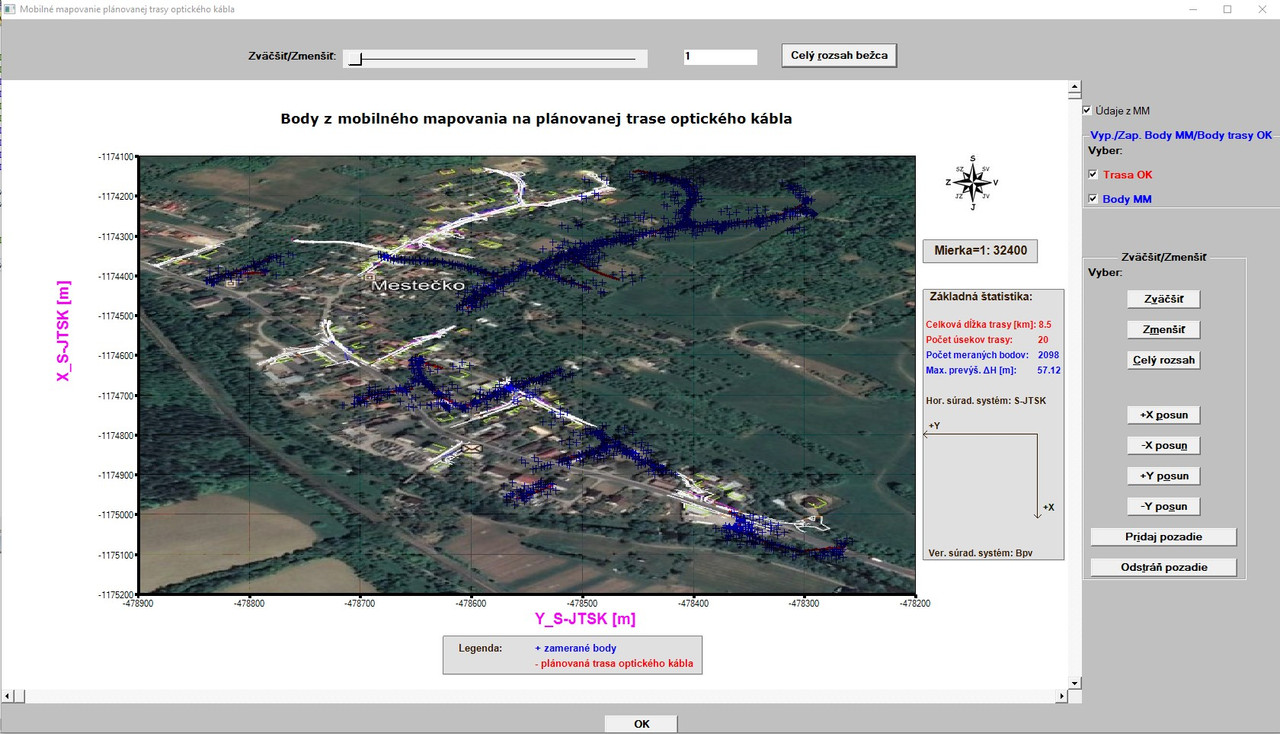
https://i.postimg.cc/C5L6fp9C/vsetko-dobre.jpg

I had to slightly move the two grey boxes further to the right.

What conclusion can be drawn that when using function IMPORT_FILE_IMAGE@ to
the %PL graphic the hscroll, vscroll option may not be used as options with %PL and the %vx, %hx can only be used separately?

1 Apr 2021 12:26 #27385

Ken

If possible, can you provide a short sample of what works and what does not work for %pl scroll bars so that I can correct the documentation.

1 Apr 2021 1:08 (Edited: 1 Apr 2021 1:15) #27386

Paul,

Here is a sample for %pl. Similar issue for %gr in the following post.

Although I accidentally found how to align everything up correctly, there is a clue in the documentation as %vx and %hx are described as applying “to the next control” so [vscroll,hscroll] do look to be redundant.

winapp
module demo_pl_with_scroll_mod 
use clrwin
implicit none
integer, parameter :: dp=kind(1.d0)
integer, parameter :: gw = 400, gh = 400, mtop = 50, mbottom = 50, mleft = 100, mright = 40
integer, parameter :: vpage_step=10, vmax_val=100, hpage_step=10, hmax_val=100
integer            :: vcur_val=0,  hcur_val=0
integer, parameter :: n = 6
real(kind=dp) :: x(1:n) = (/ (i-1 ,i=1,n) /), y(1:n) = (/ ((i-1)**2, i=1,n) /)
contains

integer function plot_data()
integer iw
character(len=126) pl_str
  iw = winio@('%bg&',rgb@(240,240,250))
  iw = winio@('%fn[Consolas]&')
  iw = winio@('%3.1ob&')
  iw = winio@('%tc[red]%cnBAD%tc[black]%nl&')
  call winop@('%pl[native,x_array,independent,frame,etched,gridlines,width=4,colour=blue,smoothing=4]')
  write(pl_str,'('%pl[margin=(',I3,',',I3,',',I3,',',I3,')]')') mleft, mtop, mright, mbottom
  call winop@(pl_str)
  call winop@('%pl[Title='Scroll bars with Vscroll/Hscroll']')
  iw = winio@('%vx&', vpage_step, vmax_val, vcur_val)
  iw = winio@('%hx&', hpage_step, hmax_val, hcur_val)
  iw = winio@('%^pl[vscroll,hscroll]&',gw,gh,n,x,y,pl_cb)
  iw = winio@('%cb&')
  iw = winio@('%tc[green]%cnGOOD%tc[black]%nl&')
  call winop@('%pl[native,x_array,independent,frame,etched,gridlines,width=4,colour=blue,smoothing=4]')
  call winop@(pl_str)
  call winop@('%pl[Title='Scroll bars without Vscroll/Hscroll']')
  iw = winio@('%vx&', vpage_step, vmax_val, vcur_val)
  iw = winio@('%hx&', hpage_step, hmax_val, hcur_val)
  iw = winio@('%^pl&',gw,gh,n,x,y,pl_cb)
  iw = winio@('%cb&')
  iw = winio@('%tc[green]%cnGOOD%tc[black]%nl&')
  call winop@('%pl[native,x_array,independent,frame,etched,gridlines,width=4,colour=blue,smoothing=4]')
  call winop@(pl_str)
  call winop@('%pl[Title='No scroll bars']')
  iw = winio@('%^pl&',gw,gh,n,x,y,pl_cb)
  iw = winio@('%cb&')
  iw = winio@('%ff%nl%cn%bn[OK]&')
  iw = winio@(' ')
  plot_data = 1
end function plot_data

integer function pl_cb()
  call set_line_width@(2)
  call draw_rectangle@(mleft, mtop, gw - mright, gh - mbottom, rgb@(255,0,0))
  call set_line_width@(1)
  pl_cb = 2
end function pl_cb
end module demo_pl_with_scroll_mod

program main
use demo_pl_with_scroll_mod
i = plot_data()
end program main
1 Apr 2021 1:10 #27387
winapp
module demo_gr_with_scroll_mod 
use clrwin
implicit none
integer, parameter :: dp=kind(1.d0)
integer, parameter :: gw = 400, gh = 400, mtop = 50, mbottom = 50, mleft = 100, mright = 40
integer, parameter :: vpage_step=10, vmax_val=100, hpage_step=10, hmax_val=100
integer            :: vcur_val=0,  hcur_val=0
integer, parameter :: uid(3) = (/1001,1002,1003/)
contains

integer function plot_data()
integer iw
character(len=126) pl_str
  iw = winio@('%bg&',rgb@(240,240,250))
  iw = winio@('%fn[Consolas]&')
  iw = winio@('Click on draw button%nl&')
  iw = winio@('%3.1ob&')
  iw = winio@('%tc[red]%cnBAD%tc[black]%nl&')
  iw = winio@('%vx&', vpage_step, vmax_val, vcur_val)
  iw = winio@('%hx&', hpage_step, hmax_val, hcur_val)
  iw = winio@('%`gr[vscroll,hscroll]&',gw,gh, uid(1) )
  iw = winio@('%cb&')
  iw = winio@('%tc[green]%cnGOOD%tc[black]%nl&')
  iw = winio@('%vx&', vpage_step, vmax_val, vcur_val)
  iw = winio@('%hx&', hpage_step, hmax_val, hcur_val)
  iw = winio@('%`gr&',gw,gh, uid(2) )
  iw = winio@('%cb&')
  iw = winio@('%tc[green]%cnGOOD%tc[black]%nl&')
  iw = winio@('%`gr&',gw,gh, uid(3) )
  iw = winio@('%cb&')
  iw = winio@('%^bt[Draw]&',draw_cb)
  iw = winio@('%ff%nl%cn%bt[OK]&')
  iw = winio@(' ')
  plot_data = 1
end function plot_data


integer function draw_cb()
integer i
  do i = 1, 3
    call select_graphics_object@(uid(i))
    call set_line_width@(2)
    call draw_rectangle@(mleft, mtop, gw - mright, gh - mbottom, rgb@(255,0,0))
    call draw_filled_rectangle@(gw-10,10,gw,0,rgb@(255,0,0))
    call draw_filled_rectangle@(gw-10,gh-10,gw,gh,rgb@(255,0,0))
    call draw_filled_rectangle@(1,1,10,10,rgb@(255,0,0))
    call draw_filled_rectangle@(1,gh,10,gh-10,rgb@(255,0,0))
  end do
  draw_cb = 2
end function draw_cb
end module demo_gr_with_scroll_mod


program main
use demo_gr_with_scroll_mod
i = plot_data()
end program main
1 Apr 2021 1:29 #27388

Ken

The two approaches have different outcomes but I think that it is possible to use either. I will try to amend the documentation accordingly.

When using vscroll/hscroll as %pl options, the scrollbars are included in the control (i.e. the child window). Otherwise the scrollbars are provided as separate controls that are linked to the graphics region within ClearWin+.

It certainly looks like it is better for you if you don't use these options.

1 Apr 2021 4:39 #27390

Thanks Paul,

I understand what is happening now.

There is a second difference between the two approaches to catch the unwary.

Without the [vscroll,hscroll] options, when the %pl callback runs clearwin_string@(‘CALLBACK_REASON’) will not return “VSCROLL” or “HSCROLL”.

In these cases, appropriate callbacks must be attached to %vx and %hx, or have the updated scroll data processed later for example by a %dl callback.

3 Apr 2021 9:20 #27396

No John.

The data set is the same, in the second plot I slightly changed the mleft margin value to have more place for the two grey boxes to the right of the plot although in the scale nothing formally changed since the scale is rounded to the nearest whole hundred.

6 Apr 2021 8:54 #27416

John,

you are probably right - but it has no meaning for my purpose. Remember - the JPG raster is - in fact - a pure screenshot of a georeferenced JPG raster image displayed in the mobile mapping processing software using Snip&Sketch tool. And - as I already said, I changed the value for left margin between two images, which has its influence.

So, the JPG screenshot has nothing to do with the real vector graphics, where all points have real geodetical coordinates. It can hardly be aligned with vector graphics (points with the real geodetical coordinates). The screenshot depends what you select in the Snip&Sketch.

Here - it serves only for general purposes - approximately in which area was the mobile mapping done and to have something in the background in otherwise white background plot.

Therefore I suggested to add an option in the %pl to load in a georeferenced raster JPG image. It would mean that the real geodetical coordinates would be known for the top left corner of such image, then there is also specified its pixel size, so every pixel(point) in such image would have its real geodetical coordinates. This could be very well aligned with vector graphic.

Nevertheless, thanks for your observant remarks!

Martin

6 Apr 2021 11:22 #27418

This is a good idea John!

I will include this useful remark somewhere below the plot - thanks!

Martin

P.S. To be clear - the vector points are very precise (their horizontal accuracy is on the level of several centimeters)! So they are accurately displayed in the plot. The term APPROXIMATELY refers to the background JPG image, when it is loaded to the plot into the background (due to known reasons).

6 Apr 2021 3:33 #27423

Thanks John for additional inspiration!

I added the information text regarding the use of JPG picture in the plot and the text and a complex view of the graphics is demonstrated here:

https://i.postimg.cc/vms4psB1/john-silver.jpg

The text says:

ATTENTION! The use of JPG raster image in the background serves for information purposes only!

Martin

Please login to reply.