Silverfrost Forums

Welcome to our forums

New sugestion(s) for %PL - (first - an initial question)

13 Mar 2021 5:43 #27271

If n_graphs > 10 and more than one related call is made to winop@ then the value of n_graphs must be included in the first call to winop@. See item [394] in the Clearwin+ enhancements documentation.

PS. Example with 20 stacked graphs which form 20 cycles of a sine wave. 200 points in each individual graph i.e. 1 cycle.

program test
use clrwin
implicit none
integer, parameter :: dp=kind(1.d0)
integer i, iw
real(kind=dp)twopi, freq, omega, dt, time
real(kind=dp) x(1:4001), y(1:4001)
integer :: n = 20
character(len=50) txt
integer, allocatable :: n_pl(:)
integer gw, gh
twopi = 2.d0*4.d0*atan(1.d0)
freq = 50.d0
omega = twopi*freq
time  = 0.d0
dt    = 0.0001d0

do i = 0, 4000
  x(i+1) = time
  y(i+1) = sin(omega*time)
  time = time + dt
end do

gw = 0.80*clearwin_info@('screen_width')
gh = 0.80*clearwin_info@('screen_depth')

iw = winio@('%mn[Exit]&','exit')
write(txt,'('%pl[native,stacked,n_graphs=',I2,']')') n
call winop@(txt)

call winop@('%pl[x_array,independent,frame,gridlines,etched,axes_pen=2,smoothing=4,width=2,dx=0.02]')
do i = 1, n , 1
  call winop@('%pl[link=lines]')
end do

do i = 1, n/4 , 1
  call winop@('%pl[colour=red]')
  call winop@('%pl[colour=blue]')
  call winop@('%pl[colour=yellow]')
  call winop@('%pl[colour=green]')
end do

allocate(n_pl(n))
n_pl = 200
iw = winio@('%pl&',gw,gh,n_pl,x,y)
iw = winio@(' ')
end
13 Mar 2021 10:52 #27272

I just noticed your new code - I will have a look, thanks!

A few remarks + a problem:

I read the notice 394 in ENH docs and did it as required BEFORE I posted my previous info, just neglected the command winop_hdl@, which was placed before my call to winop@ with 21 graphs. I thought that only pure winop@ commands should be taken into account. This caused the reported error message.

BTW, I also noticed that also option colour must be together with LINK=LINES when more than 10 graphs are to be plotted, otherwise I got the same error report as I previously reported, this time relating to colour.

Now, I am struggling with a specific thing. In fact, I have 21 graphs. The 20 graphs represent 20 different sections of points (every section contains different number of points, together 1951 points in this particular case), where within each section the points must be joined, but no cross joining among section is allowed.

The 21st graph represents points collected in the field (2098 points in this particular case) and these points are NOT to be joined by straight lines. They must be displayed just as individual points in the graph.

Therefore +1 in my previous post with code when doing DO loop for 20x LINK=LINES.

Here is my question/problem regarding the following code:

iw=winio@('%`^pl[vscroll,hscroll,full_mouse_input]&',gw,gh,D,npoints(2),y_ok,x_ok,y_mm,x_mm,handle_pl_ok,pl_cb)

D-represents number of 20 different sections (1951 points) NPOINTS(2) - represents the number (2098) of individual points (no joining). Y_OK,X_OK are 1951 points belonging to all 20 sections (they are to be joined) Y_MM,X_MM are 2098 individual points (no joining)

I know that the code above is wrong, since there can be only one variable telling %PL how many points are to be plotted. I do not know, how should I manage this.

I tried to sum up both variables: D as scalar and also NPOINTS(2) as scalar to have just one amount of points (4049), but it does not work.

14 Mar 2021 11:13 #27273

If you are using the [stacked] opion all x and y data should be passed to the %pl via two arrays say x_pl and y_pl.

The contents of y_ok and x_ok should be copied to the first elements of x_pl and y_pl, and the contents of y_mm and x_mm are appended thereafter at the end of the stack.

You now have 21 sets of data arranged sequentially in x_pl and y_pl.

Define an integer array n_pl(1:21)

n_pl(1) = no of points in first line n_pl(2) = no of points in second line . . . n_pl(21) = no of points in last section i.e y_mm and x_mm.

n_pl is used by %pl to determine the starting/ending positions of each data set in the stack.

A minimum set of winio calls to display this could be:

n = 21
write(txt,'('%pl[native,stacked,n_graphs=',I2,']')') n
call winop@(txt)
call winop@('%pl[x_array,independent])
iw = winio@('%pl&',gw,gh,n_pl,x_pl,y_pl)
iw = winio@(' ')

Once you have the stacked data input working correctly then you can worry about lines etc.

15 Mar 2021 12:15 #27277

Ken,

many thanks - thanks your invaluable help! I come near to my goal, although, at the moment I am not still in it. Namely - I have still two (I think - minor) problems. I appended the array with the points which are NOT be joined (21st graph, points X_MM,Y_MM) to the end of last section of points (20 graphs. all points X_OK, Y_OK) which are to be joined by straight lines, every section separately, no cross section joining.

But first, an observation regarding the PACK function:

At least in my case, the function PACK behaves unpredictably (maybe I don´t use it in proper way, but I don´t think so) and I cannot use it.

The code:

...
      IF (ALLOCATED (D)) DEALLOCATE (D)
                    ALLOCATE (D(en))
                  
          d(1:en) = 0 ! initialisation of D array
          d=pack(section_points,mask=section_points.ne.0) ! to exctrat all NON-zero values of D-array
...

does not produce required results.

Therefore, I wrote a short code, which - in my case - replaces the PACK functionality as follows:

...
	p=0 ! initialisation of an auxiliary variable
                    
					DO i=1,k,1
                      IF (section_points(i) == 0) CYCLE
                      IF (section_points(i) /= 0) THEN
                        p=p+1
                        D(p) = section_points(i)            ! to extract NON-zero values from the array SECTION_POINTS,
                                                            ! in fact, the NON-zero values represent the number of points to be joined by lines in each separate section of points
                      END IF
                    END DO
...

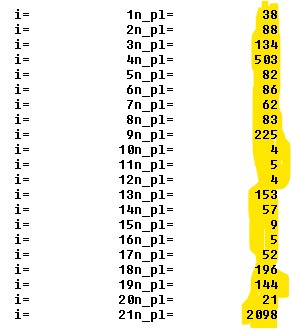
When I use my code above, I get the following correct results (in yellow) for the N_PL(i) array needed for the %PL to draw lines separately in each section of points:
https://i.postimg.cc/CL8Y20sW/n-pl.jpg

When I use the PACK function, it assigns zero values to the elemenents N_PL(1) - N_PL(20), only element N_PL(21) is OK.

So, when invoking function GRAPHICS-vector with my code instead the PACK function, I get the following graph(s):

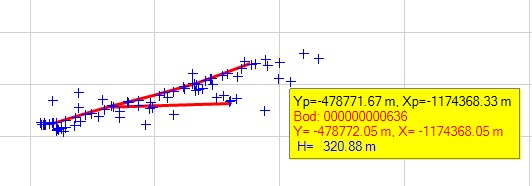
https://i.postimg.cc/F15hsF4k/grafika.jpg

And in the picture above can be seen the two (minor) problems.

FIRST problem: The points of the last (21st) graph are hidden (not visible). They should be in blue colour with + symbols. The fact that they are present in the graph after all (but invisible), shows the yellow rectangle with the data extracted from each blue point (here invisible) when hovering with the cursor over a blue point. Such data are NOT present when hovering over red lines. So invisibility of blue points is unwanted.

So the question is - why are the points belonging to the last (21st) graph invisible?

SECOND problem: If you look at the picture above to its top left section (better seen in the detail below), you see there a short line which also has point symbols with plus sign. And this is also unwanted.
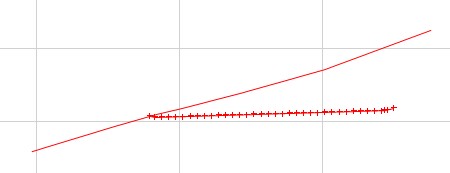
https://i.postimg.cc/QNp46g4k/detail.jpg

So, the question is - why on this short line and only on this short line are also point symbols displayed?

Here is full part of the code used with %PL command. Maybe here, in the code below, is hidden the answer to the two questions above, but, unfortunately, I do not see it.

...
 INTEGER FUNCTION plot_OK_MM ()
  IMPLICIT NONE
  
  iw = CREATE_GRAPHICS_REGION@(handle_internal_gr,gw,gh)
  iw=joining_lines() ! the function which joins the X_OK, Y_OK points (not the points X_MM, Y_MM) by straight lines
   
 WRITE(TXT_LINK,'('%pl[native,stacked,n_graphs=',I2,']')') pocet_roz_usekov    ! pocet_roz_usekov = number of different sections (21)
      CALL winop@(TXT_LINK)
      DO z = 1, pocet_roz_usekov, 1

         IF (z < pocet_roz_usekov) THEN
          CALL winop@('%pl[link=lines,colour=red]') ! X_OK, Y_OK points, all joined with straight lines in each section separately, NO cross sectionjoining, no point sybol used
         ELSE
           CALL winop@('%pl[link=none,colour=blue,symbol=12,symbol_size=3]')   ! X_MM,Y_MM points in  blue with + point symbol, NO joining
         END IF                                                                             

      END DO   

      iw=winio@('%fn[Verdana]%ts[1.4]%bf%gf%sf&',hTitleFont)
      call winop_hdl@('%pl[title_hfont]&',hTitleFont)
      CALL ENABLE_UTF8@(1) 
      
      iw=winio@('%ww[no_border]%ca[Mobilné mapovanie plánovanej trasy optického kábla]%bg[grey]&')
      iw=winio@('%2nl%5ta%bf Zvä&#269;ši&#357;/Zmenši&#357;:%ta%50sl%ta%`bg[white]%`rf%sf&',zoom,zoom_min,zoom_max,zoom) ! SLIDER
      iw=winio@('%ta%bf%^bt[Celý &rozsah bežca]%sf%2nl&',full_extents_cb) ! full extents of the slider
      
      CALL winop@('%pl[scale=linear]')
      CALL winop@('%pl[gridlines]')
      CALL winop@('%pl[x_sigfigs=8]') 
      CALL winop@('%pl[y_sigfigs=9]')
      CALL winop@('%pl[title='Body z mobilného mapovania na plánovanej trase optického kábla']')
      CALL winop@('%pl[x-axis=@,y-axis=@]')
      CALL winop@('%pl[x_array]')
      CALL winop@('%pl[independent]')
      CALL winop@('%pl[frame,etched]')
      CALL winop@('%pl[axes_pen=4,smoothing=4,frame_pen=1]')
      
      iw=winio@('%vx&',vpage_step,vmax_value, vcur_val)
      iw=winio@('%hx&',hpage_step,hmax_value, hcur_val)
      iw=winio@('%`^pl[vscroll,hscroll,full_mouse_input]&',gw,gh,n_pl,Y_OK_U,X_OK_U,handle_pl_ok,pl_cb)
      iw=winio@('%dl&',0.5d0,timer_cb)
      
      ....

Thanks in advance for your comments!

15 Mar 2021 12:19 #27278

sorry, last important section with the code went wrong, so here once again:

...
 INTEGER FUNCTION plot_OK_MM ()
  IMPLICIT NONE
  
  iw = CREATE_GRAPHICS_REGION@(handle_internal_gr,gw,gh)
  iw=joining_lines() ! the function which joins the X_OK, Y_OK points (not the points X_MM, Y_MM) by straight lines
   
 WRITE(TXT_LINK,'('%pl[native,stacked,n_graphs=',I2,']')') pocet_roz_usekov    ! pocet_roz_usekov = number of different sections (21)
      CALL winop@(TXT_LINK)
      DO z = 1, pocet_roz_usekov, 1

         IF (z < pocet_roz_usekov) THEN
          CALL winop@('%pl[link=lines,colour=red]') ! X_OK, Y_OK points, all joined with straight lines in each section separately, NO cross sectionjoining, no point sybol used
         ELSE
           CALL winop@('%pl[link=none,colour=blue,symbol=12,symbol_size=3]')   ! X_MM,Y_MM points in  blue with + point symbol, NO joining
         END IF                                                                             

      END DO   

      iw=winio@('%fn[Verdana]%ts[1.4]%bf%gf%sf&',hTitleFont)
      call winop_hdl@('%pl[title_hfont]&',hTitleFont)
      CALL ENABLE_UTF8@(1) 
      
      iw=winio@('%ww[no_border]%ca[Mobilné mapovanie plánovanej trasy optického kábla]%bg[grey]&')
      iw=winio@('%2nl%5ta%bf Zvä&#269;ši&#357;/Zmenši&#357;:%ta%50sl%ta%`bg[white]%`rf%sf&',zoom,zoom_min,zoom_max,zoom) ! SLIDER
      iw=winio@('%ta%bf%^bt[Celý &rozsah bežca]%sf%2nl&',full_extents_cb) ! full extents of the slider
      
      CALL winop@('%pl[scale=linear]')
      CALL winop@('%pl[gridlines]')
      CALL winop@('%pl[x_sigfigs=8]') 
      CALL winop@('%pl[y_sigfigs=9]')
      CALL winop@('%pl[title='Body z mobilného mapovania na plánovanej trase optického kábla']')
      CALL winop@('%pl[x-axis=@,y-axis=@]')
      CALL winop@('%pl[x_array]')
      CALL winop@('%pl[independent]')
      CALL winop@('%pl[frame,etched]')
      CALL winop@('%pl[axes_pen=4,smoothing=4,frame_pen=1]')
      
      iw=winio@('%vx&',vpage_step,vmax_value, vcur_val)
      iw=winio@('%hx&',hpage_step,hmax_value, hcur_val)
      iw=winio@('%`^pl[vscroll,hscroll,full_mouse_input]&',gw,gh,n_pl,Y_OK_U,X_OK_U,handle_pl_ok,pl_cb)
      iw=winio@('%dl&',0.5d0,timer_cb)
      
      ....
15 Mar 2021 1:38 #27279

I cannot comment on PACK it’s not an element of the language I use particularly often, and when I do MASK is a logical array rather than a logical scalar, (which allows me to check that the MASK is correct).

Look at your DO LOOP, symbol=12,symbol_size=3 is only called once.

%pl processes the option data in the order in which it is presented to winop@, so symbol=12,symbol_size=3 is applied to the first stacked graph. There is not a 21st call to winop@(‘%pl[symbol=12]) so your 21st graph has the default symbol =0 (i.e. no symbol). So for the 21st graph, you have correctly specified a colour, but no symbol. This explains both of your problems!

You need to specify the symbol and symbol_size for all elements sequentially. Try something like this:-

      DO z = 1, pocet_roz_usekov, 1

         IF (z < pocet_roz_usekov) THEN
          CALL winop@('%pl[link=lines,colour=red,symbol=0,symbol_size=3]') ! X_OK, Y_OK points, all joined with straight lines in each section separately, 
                                                                           ! NO cross sectionjoining, no point sybol used
         ELSE
           CALL winop@('%pl[link=none,colour=blue,symbol=12,symbol_size=3]')   ! X_MM,Y_MM points in  blue with + point symbol, NO joining
         END IF                                                                             

      END DO 
15 Mar 2021 10:11 #27281

Your advise is a direct hit to the midpoint of the target! Again, many thanks Ken!

I really thought that in the DO loop first 20 cycles will draw the lines for the 20 different sections of points and since I didn´t want to have there a symbol for the line points, I didn´t use the option symbol there and that the last 21st cycle will draw individual blue points.

Now everything works as expected (here is pictured the detail of the graph, where I previously had the red crosses on the line, Now, all is OK, the 21st graph with individual points is displayed. I also set the line width=3):

https://i.postimg.cc/zXmfrgGq/dobre.jpg

Additional info: When I move with the slider very quickly back and forth, in rare cases program crashes. Can have the speed of slider movement such impact?

16 Mar 2021 7:49 #27282

Martin

A program crash might be caused by a callback (triggered by the slider) being re-entered when it is already being called.

You can block re-entry by setting a static logical variable on entry and resetting on exit. A test on the variable can then prevent re-entry.

16 Mar 2021 10:52 #27284

Martin,

I can see in some of the snippets of code that you have shared that you don't have call backs on the %vx, %hx, or %sl, but you do have a %dl. So all processing of new slider values is possibly carried out asynchronously by the %dl ?

Having said that, when the x or y siders are moved the %pl callback is called, I've just discovered that. 😮ops:

There may be a lot of unnecessary processing within the %pl callback at this time. Try to inhibit this by adding the following code at the very beginning of the call back.

    if (  clearwin_string@('callback_reason') .eq. 'VSCROLL' .or. &
        clearwin_string@('callback_reason') .eq. 'HSCROLL' )    then
        pl_cb = 2
        return
    end if

Don't do this if you are currently using the call back reason VSCROLL or HSCROLL for other purposes - I am second guessing other parts of your code.

As a further safeguard Paul's suggested approach could also be applied to the %pl call back.

See https://forums.silverfrost.com/Forum/Topic/3551&highlight=reentry

Also check that there are no unnecessary calls to simpleplot_redraw@ in the code.**

16 Mar 2021 7:30 #27285

Thanks Paul!

you are right, I did it and after some experiments with really very rapid slider movements back and forth, program did not crash!

Maybe some interesting info for you as FTN95 developer:

During development of the program, I always created the DEBUG/x64 version of the executable using also the option /UNDEF (in Plato environment) and tested the program. Program worked fine in last stages of its development.

Then I created the executable as RELEASE/x64 also with /UNDEF and got some error regarding an undefined variable.

Then, I created again the RELEASE/x64 executable, this time by deactivating /UNDEF and program works fine and after implementing your suggestion regarding slider - no crash occured at all.

16 Mar 2021 8:04 #27286

here is the 15s video - how quickly I moved with slider with no crash! And I repeated it many times.

Thanks Paul again!

https://www.dropbox.com/s/jl0q284watx3m4f/slider3.mp4?dl=0

16 Mar 2021 8:23 #27287

Ken,

Thanks for your - as always - very useful tips/observations. I will have a look at this!

A question:

Somehow, I was unable to understand how could I write a short code for selecting an object in a graphic area by mouse click on it, which could be used universally (for any graphic) and that it would be optically visible in the graphic area, which object (point or line or area) was selected and then - say - deselecting it by additional mouse click (left or right).

Is there a free code which would do it?

17 Mar 2021 8:25 #27288

Martin,

See the following: https://www.silverfrost.com/ftn95-help/clearwinp/gdialog/graphicsicons.aspx

Using the basic ideas described there I was able to develop a graphics interface which allowed me to draw interactively an electrical network and extract its parameters and connectivity to a file for input to another program.

17 Mar 2021 6:08 #27289

I had a look there some time ago, but was unsure whether it can be applied also with %PL, since there is explicitly stated the %GR only.

So, can I use these features also with %PL or there is necessary to rewrite the code with %PL to %GR?

Now - an additional remark for Paul regarding my previous suggestion for enhancing %PL capabilities.:

I still mulled how to simplify my second suggestion for the %PL enhancement (georeferencing of images in the graph) mentioned earlier in this string of conversations and have the following

  • I think, essentially simplified - idea:

Would it be realizable (with no huge effort and amount of time) to add a new option for the %PL like this: %PL [image=filename.jpg]?

The purpose of this option would be to overlay current vector graphics in the graph (like red lines and blue points in my case) with a pure jpg image/picture (like in the case of %IM), with NO georeferencing, hence no association with real geodetic coordinates which have the points/lines/areas in the graph. I suppose, it would mean no complicated mathematics behind this.

The only requirement for such option would be that it would have to stretch the image between X,Y axes in the graph.

Namely, I would be able to prepare a georeferenced orthophotomosaic images in another software used for mobile mapping, which would at least roughly fit the area where objects with real geodetic coordinates are located in the graph. It would mean - at least - a roughly fit/coincide between the image with no coordinate association a and objects in the graph with real geodetic coordinates.

Such option would just serve as a background source for the vector graphics in the graph. I think this would be very interesting enhancement.

Thanks for your evaluation of this idea and answer.

17 Mar 2021 9:08 #27290

Martin, take a look at this example.

https://www.dropbox.com/sh/w46k0wdctr3rkc9/AADwV6E2XI7zgizhyH8tVfooa?dl=0

18 Mar 2021 7:10 #27291

Very long standing.

18 Mar 2021 8:37 #27294

I had a look at your code and this fulfills the basic idea - thanks, Ken!

But as always - it is rarely the case, when something works with me on the first time and this is no exception.

So, I have a problem and a question.

PROBLEM:

I have the following plot function(using %PL) calling a callback (PL_CB) called by %PL (an extract of my code):

INTEGER FUNCTION plot_OK_MM ()
IMPLICIT NONE
iw = CREATE_GRAPHICS_REGION@(handle_internal_gr,gw,gh)
...
 iw=winio@('%`^pl[vscroll,hscroll,full_mouse_input]&',gw,gh,n_pl,Y_OK_U,X_OK_U,handle_pl_ok,pl_cb)
...
iw=DELETE_GRAPHICS_REGION@(handle_internal_gr)
     plot_OK_MM = 1

END FUNCTION plot_OK_MM

The callback PL_CB:

...
IF (cb_reason .eq. 'PLOT_ADJUST') THEN 
...
i = COPY_GRAPHICS_REGION@(handle_internal_gr, 1, 1, gw, gh, handle_pl_OK, 1, 1, gw, gh, 13369376)
END IF

IF (cb_reason .eq. 'MOUSE_MOVE' ) THEN 
                    
i = COPY_GRAPHICS_REGION@(handle_pl_OK,1,1,gw,gh,handle_internal_gr,1,1,gw,gh,13369376)

ENDIF
...

Now, I use your code to display an image in the graph (I modified your code slightly):

INTEGER FUNCTION pridaj_raster ()
IMPLICIT NONE
INTEGER width_raster, height_raster, nbbp, ercode
INTEGER i
   
   CALL GET_DIB_SIZE@( 'orthophoto_and_geo_surveying.jpg', WIDTH_RASTER, HEIGHT_RASTER, NBBP,ERCODE )
   
!   i = NEW_GRAPHICS_REGION@( 1001, WIDTH_RASTER, HEIGHT_RASTER, rgb@(0,0,0))
   i = IMPORT_FILE_IMAGE@( 'orthophoto_and_geo_surveying.jpg' , 0, 0 )
!   i = COPY_GRAPHICS_REGION@(handle_pl_OK, 100, 100, gw, gh,  &
!                             1001,  0, 0, WIDTH_RASTER, HEIGHT_RASTER, 13369376) 
!   i = DELETE_GRAPHICS_REGION@(1001)
   
   pridaj_raster = 2
END FUNCTION pridaj_raster

The result is that the image (file orthophoto_and_geo_surveying.jpg is loaded onto the graph BUT it hides the vector graphic (lines and points are not visible, only the image) AND when I move with mouse over the graph area, the image automatically disappears.

QUESTION: When the problem above will be solved, I thing that when I use the buttons zoom in/out/to extents and slider, all will be related to vector graphic only and the image will not be zoomed out/in.

How could it be resolved that also image file will be zoomed in/out/to extents along with vector graphic?

I could prevent the zooming in/out/to extents when image is displayed, but if possible, it would be better to zoom in/out/to extents also the image.

18 Mar 2021 10:08 #27295

Additional info to my previous post:

I already partially found why the raster JPG image automatically disappears when I moved with mouse over the graph.

In the callback PL_CB called within %PL I originally used the code:

...
IF (cb_reason .eq. 'MOUSE_MOVE' ) THEN 
                    
           i = COPY_GRAPHICS_REGION@(handle_pl_OK,1,1,gw,gh,handle_internal_gr,1,1,gw,gh,8913094) !!!13369376)
...

Now, instead 13369376 I used 8913094 and the image does NOT automatically disappear when moving with the mouse over the graph,

although after its initial loading the lines and points are still not automatically visible over the image. I have to move with the mouse over it and then the lines and points are visible. The same is valid when I switch off the image and subsequently switch on it (first, I have to move over graph to see the lines and points). However, when I make some zooming in/out/to extents (or any other actions relating to graph like switching off/on lines and points), the image displayed in the graph automatically disappears and must be reloaded again.

So, what is the real meaning of numbers 13369376 and 8913094 in this context and where I could find more details (all numbers and their meaning) for COPY_MODE?

18 Mar 2021 10:21 #27296

And still: the use of 8913094 instead of 13369376 is no win-win situation: when I use it (8913094) and I move over the graph with mouse the yellow rectangle, where the relevant data from surveyed points are extracted displayed is always present. It means when I point over a point, then on next and so on, every yellow box remains permanently visible in the graph.

19 Mar 2021 8:43 #27297

Martin,

Any call to simpleplot_redraw@ will remove the imported image as the %pl region is reformed. At this point you have to use COPY_GRAPHICS_REGION@ to repaste the image into the %pl graphics, before you call COPY_GRAPHICS_REGION@ to create a 'back up' copy of the now modified %pl display which is used to let you display your moving yellow box.

To avoid continually calling IMPORT_IMAGE@, it would make sense to create a new permanent internal graphics region into which you import the image just once (permanent for the duration of the winio@ sequence that is associated with the %pl). Also, remember that IMPORT_IMAGE@ imports to the currently selected graphics region.

COPY_GRAPHICS_REGION@ will automatically rescale if the destination and source x/y ranges are different and since you can specify an x/y offset as well as width/height for both destination and source; this gives you a means of pasting a smaller region of the image when you have for example zoomed into an area of the graph - you know the %pl xmin/xmax/ymin/ymax values and you know the pixel width/height dimensions of the image as well as the physical origin and x/y extent coordinates the image refers to.

If your yellow box is permanently displayed you are creating the back up copy at the wrong point in the code. You just need to ensure that the copy operations are in the correct sequence.

Please login to reply.