Silverfrost Forums

Welcome to our forums

New sugestion(s) for %PL - (first - an initial question)

25 Feb 2021 11:21 #27169

Hello,

is it common to post on the forum a quite long post? I do not want to bore anybody, therefore the question. And - it would also have no sense to post it here, when it would not be read.

If yes, I will post it here. It will have nearly 4 A4 pages including 3 pictures, since it contains detail explanations of ideas.

If not, where or to whom could I provide my suggestions by sending a PDF file?

Thanks!

Martin

25 Feb 2021 12:08 #27170

Martin,

Upload your pdf to dropbox and provide a link to it here.

25 Feb 2021 12:32 #27171

Thanks Ken,

here is the link:

https://www.dropbox.com/s/pamx7qj6fpn392o/PL_suggestion_No%201.pdf?dl=0

25 Feb 2021 1:51 #27172

Martin,

If you organize your input data appropriately before calling %pl the %pl[stacked] option might well provide you the flexibility you need.

26 Feb 2021 8:32 #27180

Martin

Thank you for the feedback. I have had a quick look at your document and I think I understand what you are asking for.

Here is a sample program that illustrates how you could draw line sections or basically any lines you need from a %pl callback function.

      WINAPP
      MODULE mymod
      USE clrwin
      INTEGER,PARAMETER::N=11
      DOUBLE PRECISION x(N),y(N)
      CONTAINS
      INTEGER FUNCTION cb()
      INTEGER i,iw
      DOUBLE PRECISION xx(N),yy(N)
      DO i=1,N
        iw = GET_PLOT_POINT@(x(i),y(i),xx(i),yy(i))
      ENDDO
      CALL SET_LINE_WIDTH@(2)
      CALL DRAW_POLYLINED@(xx,yy,N,RGB@(0,0,255))   
      cb = 2
      END FUNCTION
      
      END MODULE mymod
      
      PROGRAM main
      USE mymod
      INTEGER i
      DO i=1,N
        x(i)=0.1d0*(i-6)
        y(i)=x(i)*x(i)
      ENDDO
      i=winio@('%ca[Quadratic]%pv&')
      CALL winop@('%pl[title=Graph]') !graph title
      CALL winop@('%pl[y_max=0.25]')  !maximum y value on axis
      CALL winop@('%pl[x_array]')     !x data is provided as an array
      CALL winop@('%pl[link=none]') !join data points with curves
      CALL winop@('%pl[symbol=9]')    !mark data points with filled rhombuses
      CALL winop@('%pl[frame]')
      i=winio@('%^pl&',400,250,N,x,y,cb)
      i=winio@('%sf%ff%nl%cn%tt[OK]')
      END
26 Feb 2021 6:01 #27184

Thanks Paul!

I tried it and it works - thank again.

The only quite boring thing which remains is that in case of several 1000 points grouped into one TXT input file (and this is what I get from our field crew after initial processing of the collected data) from the first point to the last one, with no mark where a section of line starts and where it ends, I have to look manually into the file and identify each section of line which must be isolated and not connected with the other one.

Therefore, I think that the idea with coding of the points which should be drawn on the map as required is worth of thinking and if you would have a possibility to implement it - it would be a great thing!

Usually, I prepare all codes for the objects which are to be collected in the field and then - in the field - it is sufficient just assign a code to the surveyed point in the field collecting software by one click. So, after such data collecting, to generate an input TXT file with points where each of them has assigned a code is just the matter of a click and the input file is immediately ready for further processing.

And if the FTN95 would be able to process the points taking into account their assigned codes with an built-in internal function(s) - I think, it would be a significant breakthrough for its graphic capabilities.

The process would be significantly automated just with one requirement - properly coding of points (but this can be corrected also in the office, when some error in coding would happen in the field).

Thanks again for your kind help and tips!

26 Feb 2021 8:35 #27185

Here is my 2nd suggestion for the %PL enhancement:

https://www.dropbox.com/h?preview=PL_suggestions_2.pdf

If something like this already exists, disregard it and please, give me tips.

Thanks

27 Feb 2021 7:16 #27186

Martin

It should be possible for you to automate the collation of data independently of ClearWin+. If not then realisically there is no possibility that ClearWin+ can do it for you.

I can take a look at your second document except that the link does not work for me. But please don't forget to consult the ClearWin+ documentation before asking detailed questions.

27 Feb 2021 12:46 #27187

Martin,

This demonstrates what I was thinking about when I mentioned the %pl[stacked] option. The trick is to organise the input data correctly.

https://www.dropbox.com/s/0bbpufrnir7uvpa/stacked.f95?dl=0

With multiple sets of lines, areas, and objects putting all lines in the stack array first (and recording the number of sets of lines), then doing the same for areas, and then the same again for the objects, will simplify the extra coding required in both selling up the %pl region, and in the function cb.

PS This corrects a minor error in the previous example:-

https://www.dropbox.com/s/lbrupecs42napss/stacked2.f95?dl=0

28 Feb 2021 6:01 #27190

Thanks Ken again!

I will look at it as soon as possible. In the meantime, I prepared with huge effort to sort the data directly in the graphical software which serves for initial processing of the field data (I did not use the FTN95 functions DSORT@/CHSORT@ in my program).

It means, I ran CROSS DETECTION GEOMETRY function which identifies where from the main line of the optical cable (OC) are the secondary diversions of the OC. It created more than 20 secondary OC lines including the points which belongs both to the main line and to the secondary line - in fact, they are points, in which start two or more additional directions of OC). I assigned to all points (created by using function CREATE_AT_INTERVALS - I used 1m interval) belonging to the corresponding section of OC a unique code (S1 = section 1, S2 , S3, S4 ...).

So, I have now the whole web of OC points coded. I created a new TXT input file with the format:

PointID, Code, X, Y

After reading in the data from the file containing the data in the format outlined above, I test in my program, whether two adjacent points have the same code or not. IF not, then all preceding points are to be joined with a call to a callback containg DRAW_POLYLINE@ function.

I wanted to use the Paul´s suggestion, everything is prepared, but I am not sure how to use it (where to place the call to the new call-back).

The callback used with %PL[full_mouse_input] called PL_CB draws the graphs (as points only):

iw=winio@('%`^pl[full_mouse_input]&',gw,gh,npoints,y_ok,x_ok,y_mm,x_mm,handle_pl_mm,pl_cb)

I created a new function called LINES where DRAW_POLYLINE@ is used and it is unclear for me, how could I call it with %PL[full_mouse_input], since there is already a call-back called (PL_CB). Can I call 2 call-backs within the command above, (something like: (%`^PL ... pl_cb, lines)? (it does not work)

Or, should I put and call the new call-back (LINES) within the callback called from %PL (PL_CB)? (it seems - it does not also work).

Thanks for your tips!

28 Feb 2021 6:58 #27191

Within the %pl callback you need to detect when clearwin_string@('callback_reason') equals 'PLOT_ADJUST', this is the point when other information can be added to the %pl graphics region using the graphics drawing primitives.

2 Mar 2021 4:57 #27198

A new routine SET_PLOT_MODE@ has been added to ClearWin+. Work is still ongoing. With this routine ClearWin+ will change the plotting co-ordinates for you so that my sample above will become...

      WINAPP
      MODULE mymod
      USE clrwin
      INTEGER,PARAMETER::N=11
      DOUBLE PRECISION x(N),y(N)
      CONTAINS
      INTEGER FUNCTION cb()
      CALL SET_PLOT_MODE@(1)
      CALL SET_LINE_WIDTH@(2)
      CALL DRAW_POLYLINED@(x,y,N,RGB@(0,0,255))   
      cb = 2
      END FUNCTION
      
      END MODULE mymod
      
      PROGRAM main
      USE mymod
      INTEGER i
      DO i=1,N
        x(i)=0.1d0*(i-6)
        y(i)=x(i)*x(i)
      ENDDO
      i=winio@('%ca[Quadratic]%pv&')
      CALL winop@('%pl[title=Graph]') !graph title
      CALL winop@('%pl[y_max=0.25]')  !maximum y value on axis
      CALL winop@('%pl[x_array]')     !x data is provided as an array
      CALL winop@('%pl[link=none]') !join data points with curves
      CALL winop@('%pl[symbol=9]')    !mark data points with filled rhombuses
      CALL winop@('%pl[frame]')
      i=winio@('%^pl&',400,250,N,x,y,cb)
      i=winio@('%sf%ff%nl%cn%tt[OK]')
      END
3 Mar 2021 7:55 #27205

Thanks Paul!

A) It does not work with me (the new mode) since I would need a new DLL (with current version I have - it does not function). I hope that there will be some help about the new functionality. B) Question: I noticed that you use DRAW_POLYLINED@. What´s the difference with respect to DRAW_POLYLINE@? C) After some time of struggling I cannot find the problem why the function DRAW_POLYLINE@ does not draws the lines as I want. Please, below is link to my whole project including full source code files and input TXT/JPG files. The short description of the problem is in the Description.pdf file. If anybody could have a look at this, I would very appreciate it. Probably there is a logic error in my code. The code should function without errors when creating the executable. D) I also included once again the PDF file describing my 2nd suggestion for the %PL which you were unable to download. I hope that this time it will be OK.

Thanks

https://www.dropbox.com/s/jn3vjtywq8j2g61/NewDesign_ver1.zip?dl=0

PS: I tested the link above and was able to download it back using EDGE.

3 Mar 2021 11:25 #27207

Martin,

See item 354) in cwplus.enh for the answer to B).

Have you omitted to transform from real world coordinates to graphics region coordinates using GET_PLOT_POINT@ ?

4 Mar 2021 7:11 #27208

Martin

I have had a look at your second suggestion regarding ClearWin+ support for .jgw files.

Realistically, I don't see how this can be provided. It would require a detailed understanding of your project and an investigation into how ClearWin+ could be extended in order to simplify a particular programming task. So my first guess is that it would involve at least 2 or 3 man weeks of work at the outset.

I suspect that such an extension would require either a wealthy financial backer or an indication of significant user demand.

4 Mar 2021 12:41 #27210

Ken,

I did not use the GET_PLOT_POINT@, since the points which are to be joined have real world coordinates with which they were plotted in the graph using the command:

 iw=winio@('%`^pl[full_mouse_input]&',gw,gh,npoints,y_ok,x_ok,y_mm,x_mm,handle_pl_ok,pl_cb)

Y_OK,X_OK are real geodetic coordinates of optical cable Y_MM,X_MM are real geodetic coordinates from mobile mapping.

Paul,

thanks for your real evaluation of my idea.

6 Mar 2021 11:51 #27214

John,

I meant Microsoft Edge.

13 Mar 2021 12:35 #27267

This is basically an additional question to Ken´s post of PostPosted: Sat Feb 27, 2021 1:46 pm.

Since the function DRAW_POLYLINED@ does not work with me as I want, I already organized the input data to be able to use the %PL option STACKED and to also use the option LINK=LINES.

Now, I have 20 different sections of data points (it means 20 different graphs put into one graph) which are to be joined (each section separately, no cross joining among sections).

Questions:

Should I use the option LINK=LINES 20x in the %PL? (In your example for STACKED, you use LINK=LINES 2x).

Moreover, I NEVER know in advance, how many different sections will be present in the data (the number of different sections is always a variable). Is there a method to tell the options LINK=LINES, how many times it should be used for graphs taking into account the variable computed during the run of program which says how many different sections are to be joined (the points within each section)?

I mean - something like variable:LINE=LINES (in my case 20: LINE=LINES)

13 Mar 2021 12:13 #27269

For n graphs you could do something like this.

use clrwin
integer i,n
character(len=50) txt
n = 10
write(txt,'('%pl[n_graphs=',I2,']')') n
call winop@(txt)
do i = 1, n , 1
  call winop@('%pl[link=lines]')
end do
end
13 Mar 2021 4:54 #27270

Thanks, Ken!

I used the code:

      WRITE(TXT_LINK,'('%pl[n_graphs=',I2,']')') pocet_roz_usekov+1
      CALL winop@(TXT_LINK)
      DO z = 1, pocet_roz_usekov, 1
        CALL winop@('%pl[link=lines]')
      END DO

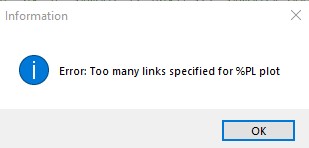
However, is there a limitation for the option LINK=LINES (in the sense of its number, since in this particular case I have 20 different sections/graphs, where points are to be joined + one graph with points only/no joining), because I get the following error:

https://i.postimg.cc/9fJx1RFQ/link.jpg

Please login to reply.