Silverfrost Forums

Welcome to our forums

Birth defect of Clearwin

22 Sep 2024 1:16 #31558

There exist few design problems of Clearwin annoying from its start. Here is one of them:

Sometimes not human readable numbers.

Any chance to fix these unbearable F-formatted 12345678546665456 numbers and make them human readable in E format like 1.23456E+18 ?

https://i.postimg.cc/m2HbsH00/Birth-Defect-Of-Clearwin.png

22 Sep 2024 5:26 #31559

See for example item 421 in cwplus.enh.

22 Sep 2024 3:32 #31561
use clrwin
real*8 :: a = 12345678546665456.d0
i = winio@('a = %18`rf%nl&',a)
i = winio@('a = %12`rf%nl&',a)
i = winio@('a = %6`rf%nl',  a)
end
23 Sep 2024 6:14 #31562

Cool, that good upgrade. The only problem i am getting an error

%rf[fmt] requires %co[check_on_focus_loss]

To demonstrate it i tool Ken's example and modified it according to 421 enh

use clrwin
real*8 :: a = 12345678546665456.d0
i = winio@('a = %18rf[fmt=0.4e]%nl&',a)
i = winio@('a = %12rf[fmt=0.4e]%nl&',a)
i = winio@('a = %6rf[fmt=0.4e]%nl',  a)
end   
23 Sep 2024 1:15 #31563

Dan, I don't think that's unreasonable, since the value may be changed by the user and the displayed value needs to 'reformatted'.

24 Sep 2024 5:05 (Edited: 24 Sep 2024 7:48) #31564

Convince me why controlling focus loss it is obligatory and why i will die without it. Typically i never use focus monitor. Before when i used it it only produced me troubles and in early times of Clearwin crashes

Also I see the length of control changes. In my example above all of them initially at 18, 12 and 6 character length became at the end of the same length. When i wrote

i = winio@('a = %18rf[fmt=0.4e]%nl&',a)

declaring it 18 characters long that was done for the purpose of formatting of GUI. Otherwise the controls will be jumping in size with changing declarations in the E format ruining GUI alignment. That would be permissible if i declared the %RF control too short for the E format to be able to write the number correctly, then i'd agree the length could be modified by the code (because generating an error to crash GUI is unacceptable)

24 Sep 2024 5:43 #31565

In general when a user types in a fp number it will contain digits, possible full stop, signs and E or e. Only when they have finished can ClearWin+ read and then present the number in the requested format.

The %co option effectly says 'read the number when the user changes to a different control'.

Maybe ClearWin+ could do 'better' in cases where E and e are not permitted but otherwise to read and present as the number is typed character by character seems too much.

But if the Clearwin+ programmer knows exactly what they want then they can use a callback function to filter the input character by character.

24 Sep 2024 7:50 #31566

Can you guys rewrite complaining demo code above to show how it was intended to work by design? Potential advantages of this approach (or unavoidable obstacles) kind of do not cross my quick view. I do not understand why you like it. May be it is not that bad as i understood how it works. I have 100000 %RF used mostly both for reading and writing simultaneously and adding too much more to this operation would be way too cumbersomish. Clearwin was good because it was comparable and even surpassing in simplicity and convenience to plain Fortran WRITE(,) var

28 Sep 2024 9:57 #31577
program main
real*8 a,b,c
a = 0.0d0
b = 0.0d0
c = 0.0d0
iw = winio@('%co[check_on_focus_loss]&')
iw = winio@('%nlA: %rf[fmt=7.2g]&', a)
iw = winio@('%nlB: %rf[fmt=7.2g]&', b)
iw = winio@('%nlC: %rf[fmt=7.2g]&', c)
iw = winio@('%nl%^bt[Compute]','continue')
end program

The formats are applied when changing from one input box to another and when clicking on the button and when switching to a different application.

29 Sep 2024 6:18 #31581

This is exactly what was needed! Thanks Paul

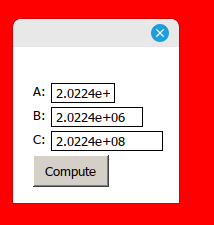
Was it well advertised in Silverfrost own channels? I do not have Help for FTN95 temporally, it does not work by some reason in WINE (very old version probably) under Linux and can not see visual examples like this below. KBase would be good place i think instead of digging deep into Clearwin..enh

https://i.postimg.cc/wvDNJvKT/Screenshot-from-2024-09-29-11-10-30.png

And it correctly makes fields sizes too. Adding one %CO per file (not per each %RF as i initially thought) would be not as cumbersome (if Clearwin will remind about $CO was missing Would be totally awesome) The source was this

program main
real*8 a,b,c
a = 20.22444120d3
b = 20.22444120d5
c = 20.22444120d7
iw = winio@('%co[check_on_focus_loss]&')
iw = winio@('%nlA: %8rf[fmt=8.4g]&', a)
iw = winio@('%nlB: %12rf[fmt=8.4g]&', b)
iw = winio@('%nlC: %15rf[fmt=8.4g]&', c)
iw = winio@('%nl%^bt[Compute]','continue')
end program
12 Oct 2024 11:55 #31611

Paul, I noticed one strange conflict of this formatting method with my existing code. First example is a demo showing how my code was working before adding this upgrade. If you wiggle slider %sl its value is displayed in the %rf control. You also can change the value directly using %df or typing new value between 0 an 1. The value changes OK in both %rf control and in the slider handle.

module MOD1
  real*8 :: var1=0, var2=0
  Contains
integer function fun1 ()
  var2 = var1
  call window_update@(var2)
  fun1 = 2
end function fun1

integer function fun2 ()
  var1 = var2
  call window_update@(var1)
  fun2 = 2
end function fun2
end module MOD1
!.....................
Program OK
use mod1
i=winio@('%ww%ca[Conflict in form]&')
i=winio@('%^30sl[horizontal]  %df%^8rf%ff&',var1, 0d0,1d0, fun1, 0.1d0, var2,fun2 )
i=winio@('%nl%cn%bt[OK]%es')
END

Second example where i add this [form=] method shows that my code fails when you use %df or directly type the value - the slider does not react on that anymore

module MOD1
  real*8 :: var1=0, var2=0
  Contains
integer function fun1 ()
  var2 = var1
  call window_update@(var2)
  fun1 = 2
end function fun1

integer function fun2 ()
  var1 = var2
  call window_update@(var1)
  fun2 = 2
end function fun2
end module MOD1
!.....................
Program CONFL
use mod1
i=winio@('%co[check_on_focus_loss]&')
i=winio@('%ww%ca[Conflict in form]&')
i=winio@('%^30sl[horizontal]  %df%^11rf[fmt=0.3e]%ff&',var1, 0d0,1d0, fun1, 0.1d0, var2,fun2 )
i=winio@('%nl%cn%bt[OK]%es')
END

These were two methods of controlling numerous different parameters, slider was quick and %df%rf more accurate. I have many such sliders. Now the accurate method does not work.

ADDITION

May be i over-complicated things a bit with two variables and two callbacks doing the same things to avoid stucking (when you try to move slider but displayed in %rf variable trying to move slider back) so i separated them.

I found simpler version with just one variable and one callback also works, i do not know why it did not work before

module MOD1
  real*8 :: var1=0

  Contains

  integer function fun3 ()
  call window_update@(var1)
  fun3 = 2
  end function fun3

end module MOD1
!.....................
Program OK2
use mod1
i=winio@('%ww%ca[Not Working]&')
i=winio@('%^30sl[horizontal]  %df%^11rf%ff&',var1, 0d0,1d0, fun3, 0.1d0, var1,fun3 )
i=winio@('%nl%cn%bt[OK]%es')
END

but again if i add there FMT= it stops working too

module MOD1
  real*8 :: var1=0

  Contains

  integer function fun3 ()
  call window_update@(var1)
  fun3 = 2
  end function fun3

end module MOD1
!.....................
Program CONFL2
use mod1
i=winio@('%ww%ca[Not Working]&')
i=winio@('%co[check_on_focus_loss]&')
i=winio@('%^30sl[horizontal]  %df%^11rf[fmt=0.3e]%ff&',var1, 0d0,1d0, fun3, 0.1d0, var1,fun3 )
i=winio@('%nl%cn%bt[OK]%es')
END
12 Dec 2024 8:41 (Edited: 12 Dec 2024 9:12) #31734

Two more problems of this approach. One caused me two days of losses, and another also a day or two too when i was guessing what the heck is going on with perfectly working before GUI. The E format in %rf instead of F one is very needed but curent approach to achieve it still is too raw to use.

  1. If use %cw window defined like this below with COPY, PASTE and CUT it causes crash with access violation when you click on some other controls of your extensive GUI (mostly when you put your mouse on some %rd)

     integer*4 function PrintOnScreen ()
    
         integer (7) ihwTextWindow
    
     SAVE
    

    ! iOUTun2 = 0 ! 6

    !... text window font Monospace Tahoma for Linux. For WIndows -- font Terminal

         i = winio@('%ca[Console1:'//trim(CurrentDirectoryName)//']%ww[no_border]&')  ! %ww[no_border]
    
         i = winio@('%mn[&File[&Open,&Save,Save &As,E&xit],&Edit[&Copy     Ctrl+C,Cu&t        Ctrl+X,&Paste     Ctrl+V]], &',&
         'EDIT_FILE_OPEN',   open_filePrintScr, filePrintScr, &
         'EDIT_FILE_SAVE',   open_filePrintScr, new_filePrintScr, &
         'EDIT_FILE_SAVE_AS',open_filePrintScr, new_filePrintScr, &
         'EXIT','COPY','CUT','PASTE')
    
    
         i = winio@('%fn[Ubuntu Mono]%ts%bf%`bg%pv%128.20cw[hscroll,vscroll,local_font]&', 1.d0, rgb@(244,246,255),iOUTun1)
     i = winio@('%ac[Esc]&','confirm_exit','C l o s e   Text Window?')
    
        i=winio@('%pm[Save Highlighted Text in Clipboard'//char(9)//'Ctrl+C]&',  'COPY' )
        i=winio@('%pm[Paste Clipboard Text'//char(9)//'Ctrl+V]&', 'PASTE')
        i=winio@('%pm[~Cut Highlighted Text'//char(9)//'Ctrl+X]&',  0, 'CUT')
    
        i=winio@('%ac[Ctrl+C]&','COPY')
        i=winio@('%ac[Ctrl+V]&','PASTE')
        i=winio@('%ac[Ctrl+X]&','CUT')
    
        i = winio@('%hw&', ihwTextWindow)
        i = winio@('%lw[owned]', lw_ctrltxtw)
    

    1000 PrintOnScreen = 2 end FUNCTION

  2. if your GUI has such combinations

    %dd%^rd

the %dd works when you use it (i.e. mouse wheel works ok) but associated control is not called. This resembles what was described in previous post

12 Dec 2024 9:07 #31735

Dan

I would need the code for a self contained working program before investigating.

It just takes too much time for me to work out what is intended when incomplete code is presented.

12 Dec 2024 9:26 (Edited: 13 Dec 2024 1:31) #31736

Paul

Just use the last code i published earlier above on Oct 12. Could be solving it will resolve all other problems too. Meantime I will try to make other demos where i suspect conflict exists with the focus monitor and the %cw clipboard/highlighted text

  1. Move slider and see that the numbers in %rd also change

  2. then do the opposite -- click on control %dd (the %rd wheel, spin control or how it is correctly called) of %rd up and down. The slider which is sharing the same variable with %rd is not moving - defect !

  3. to see what was intended modify this code by commenting this line out

    !i=winio@('%co[check_on_focus_loss]&')

which deactivates the fmt approach (ignore the Clearwin complaint at the run time) Also repeat steps 1-2 by moving slider - see that the numbers in %rd are running ok, then use %dd wheel - the slider also reacts on that ok

12 Dec 2024 12:31 #31739

Dan

I can see 3 or 4 programs in that post.

Please repost the one you want investigated.

12 Dec 2024 4:54 (Edited: 13 Dec 2024 1:17) #31740
module MOD1
  real*8 :: var1=0

  Contains

  integer function fun3 ()
  call window_update@(var1)
  fun3 = 2
  end function fun3

end module MOD1
!.....................
Program CONFL2
use mod1
i=winio@('%ww%ca[Not Working]&')
i=winio@('%co[check_on_focus_loss]&')
i=winio@('%^30sl[horizontal]  %df%^11rf[fmt=0.3e]%ff&',var1, 0d0,1d0, fun3, 0.1d0, var1,fun3 )
i=winio@('%nl%cn%bt[OK]%es')
END


The whole purpose of this code is to set using slider some preliminary (low resolution) value of some variable var1 and then use %dd or %rf to set it precisely as needed. And during the process when you move slider you see the value of variable and vice versa if you change the value of var1 in the %dd or %rf the slider also reacts on that.

This link of these controls is broken if %co[on_focus_loss] is present in the code.

Or even worse, the %co somehow conflicts with the %cw (or its components which allow to highlight and save parts of the text inside %cw window) and the whole GUI crashes

13 Dec 2024 8:26 #31742

Dan

What you experience and describe is not a bug but is what you get with %co[check_on_focus_loss]. In effect it is a limitation on the use of [fmt=0.3e].

I will see if I can come up with a work-around or an enhancement to ClearWin+.

You do not provide any information about the %cw failure so I am not able to comment on that.

13 Dec 2024 1:08 #31743

The next release of the DLLs for the ClearWin+ library will include an enhancement so that the following program will respond as requested.

The slider will immediately respond to changes made via the spin control.

winapp
program main
real*8 :: var1=0
i=winio@('%ww%ca[Working]&')
i=winio@('%30sl[horizontal]&',var1,0d0,1d0)
i=winio@('%fl&',0d0,1d0)
i=winio@('%co[check_on_focus_loss]&')
i=winio@(' %df%11rf[fmt=0.3e]&',0.1d0,var1)
i=winio@('%ff%nl%cn%tt[OK]')
end
23 Dec 2024 4:42 #31754

That is great. All workarounds for Clearwin are welcome. Clearwin is not yet a Standard Fortran anyway. But it is very powerful and incredibly useful tool. People who use this compiler for years but do not use Clearwin are just a effing m$%^s.

If Silverfrost similarly lead the entire Fortran development (for which it had all the chances starting from 1990th) then any workarounds, any sneeze developers made or what their left leg would just decided anywhere in Fortran also become a standard. Given the perturbations with Intel and its Fortran and some others stopped their development may this is not yet too late. For that standard parallelization is needed to add and may be also to jump into AI

23 Dec 2024 9:05 #31755

AI will access and use online help files so any advance will depend on the quality of these files. In that sense there is no direct link between AI and a compiler such as FTN95.

Please login to reply.