Silverfrost Forums

Welcome to our forums

Limitation of number of plots in %PL

5 Oct 2021 7:16 (Edited: 5 Oct 2021 10:05) #28314

Paul, What is the limit on number of curves with %PL if they are built as 'independent' ? I tried more than 10 curves but failed. I remember we discussed here that it would be great to increase this. Is it doable or needs much work ?

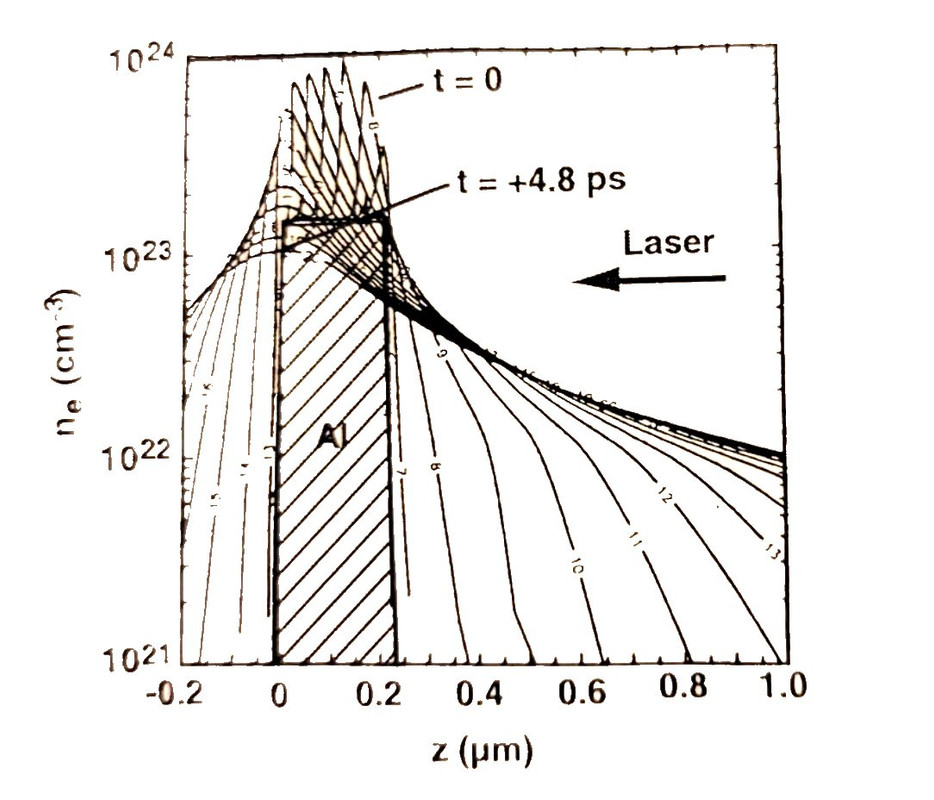
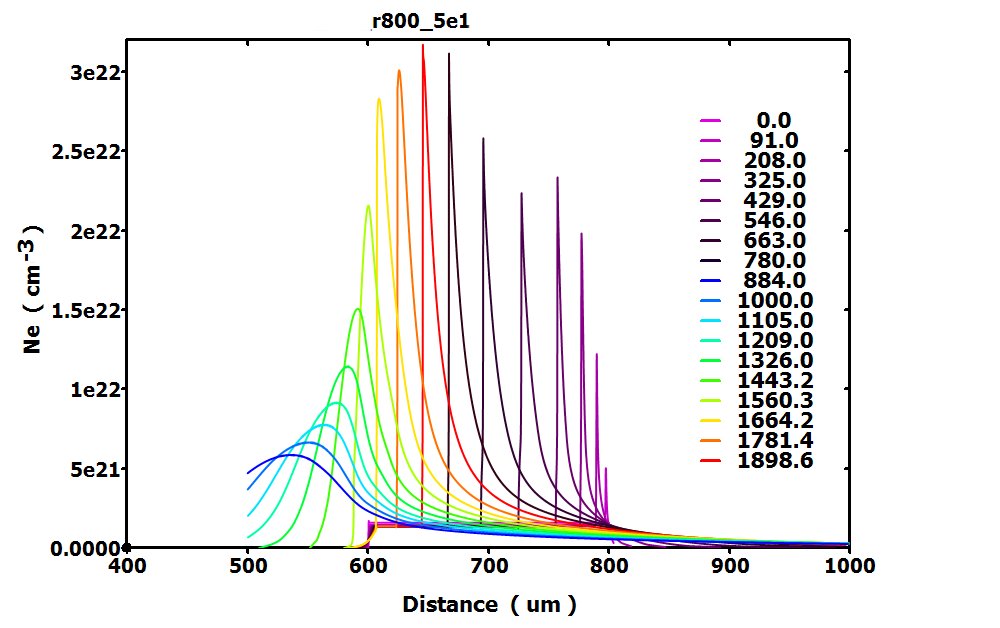
Tried to reproduce this nice plot made ages ago using professional contour software. The greatness of it is that it actually displays the evolution movie in one static XY plot ! https://i.postimg.cc/L5f2H0tz/Image2.jpg

5 Oct 2021 9:13 #28316

Dan,

This should work, the thing to remember is that if n_graphs > 10 and more than one related call is made to winop@ then the value of n_graphs must be included in the first call to winop@.

5 Oct 2021 4:17 #28317

The following sample program illustrates a way to draw multiple curves on one set of axes via a callback function. Details can be found in cwplus.enh.

      WINAPP
      MODULE mymod
      USE mswin
      INTEGER,PARAMETER::N=11
      DOUBLE PRECISION x(N),y(N)
      CONTAINS
      INTEGER FUNCTION cb()
      DOUBLE PRECISION xx(5),yy(5)
      CALL set_plot_mode@(1)
      CALL set_line_width@(2) 
      CALL draw_curvesD@(x,y,N,RGB@(0,0,255))   
      CALL draw_line_betweenD@(0d0, 0d0, x(N), y(N), 255)
      CALL draw_line_betweenD@(0d0, 0d0, x(1), y(1), 255)
      CALL draw_rectangleD@(0.1d0, 0.1d0, 0.3d0, 0.15d0, RGB@(0,255,0))
      CALL draw_filled_ellipseD@(-0.1d0, 0.15d0, 0.04d0, 0.02d0, RGB@(0,255,0))
      CALL draw_charactersD@('Caption', 0.1d0, 0.2d0, 0)
      xx = (/0d0, 0.05d0, 0.05d0, 0d0, 0d0/)
      yy = (/0d0, 0d0, 0.035d0, 0.035d0, 0d0/)
      CALL draw_filled_polygonD@(xx,yy,5,RGB@(0,0,255))
      CALL draw_symbolsD@(x,y,N,11,5,255)
      CALL set_plot_mode@(0)
      cb = 2
      END FUNCTION
      END MODULE mymod
      
      PROGRAM main
      USE mymod
      INTEGER i
      DO i=1,N
        x(i)=0.1d0*(i-6)
        y(i)=x(i)*x(i)
      ENDDO
      i=winio@('%ca[Quadratic]%pv&')
      CALL winop@('%pl[title=Graph]') !graph title
      CALL winop@('%pl[y_max=0.25]')  !maximum y value on axis
      CALL winop@('%pl[x_array]')     !the data provides other max and min values
      CALL winop@('%pl[smoothing=5]') 
      CALL winop@('%pl[link=user]')   !all lines and symbols drawn via set_plot_mode@
      CALL winop@('%pl[frame]')
      i=winio@('%^pl&',400,250,N,x,y,cb)
      i=winio@('%sf%ff%nl%cn%tt[OK]')
      END
      
5 Oct 2021 8:06 (Edited: 5 Oct 2021 9:58) #28318

Very cool, thanks, Paul Here is your example with 50 curves added:

      WINAPP
      MODULE mymod
      USE mswin
      INTEGER,PARAMETER::N=11
      DOUBLE PRECISION x(N),y(N),xprev(N),yprev(N) 
      CONTAINS
      INTEGER FUNCTION cb()
      DOUBLE PRECISION xx(5),yy(5)
      CALL set_plot_mode@(1)
      CALL set_line_width@(2)

      nCurves = 50	
      do ii=0,nCurves	
      y(:) = yprev(:)+0.2/nCurves*ii
      CALL draw_curvesD@(x,y,N,RGB@(max(0,-255+ii*2*255/ncurves),255-abs(255-ii*2*255/ncurves),max(0,255-ii*2*255/ncurves)))
      enddo	
      y(:) = yprev(:)
      CALL draw_line_betweenD@(0d0, 0d0, x(N), y(N), 255)
      CALL draw_line_betweenD@(0d0, 0d0, x(1), y(1), 255)
      CALL draw_rectangleD@(0.1d0, 0.1d0, 0.3d0, 0.15d0, RGB@(0,255,0))
      CALL draw_filled_ellipseD@(-0.1d0, 0.15d0, 0.04d0, 0.02d0, RGB@(0,255,0))
      CALL draw_charactersD@('Caption', 0.1d0, 0.2d0, 0)
      xx = (/0d0, 0.05d0, 0.05d0, 0d0, 0d0/)
      yy = (/0d0, 0d0, 0.035d0, 0.035d0, 0d0/)
      CALL draw_filled_polygonD@(xx,yy,5,RGB@(0,0,255))
      CALL draw_symbolsD@(x,y,N,11,5,255)
      CALL set_plot_mode@(0)
      cb = 2
      END FUNCTION
      END MODULE mymod
     
      PROGRAM main
      USE mymod
      INTEGER i
      DO i=1,N
        x(i)=0.1d0*(i-6)
        y(i)=x(i)*x(i)
      ENDDO
	xprev(:)=x(:)
	yprev(:)=y(:)
      i=winio@('%ca[Quadratic]%pv&')
      CALL winop@('%pl[title=Graph]') !graph title
      CALL winop@('%pl[y_max=0.25]')  !maximum y value on axis
      CALL winop@('%pl[x_max=0.39]')  !maximum X value   <--------------
      CALL winop@('%pl[x_array]')     !the data provides other max and min values
      CALL winop@('%pl[smoothing=5]')
      CALL winop@('%pl[link=user]')   !all lines and symbols drawn via set_plot_mode@
      CALL winop@('%pl[frame]')
      i=winio@('%^pl&',600,400,N,x,y,cb)
      i=winio@('%sf%ff%nl%cn%tt[OK]%es')
      END

By the way i like %es ESCape acceleration key to exit the program. Recommend.

ADDITION: Have you noticed one small defect after i added x_max =marked as ←------- ?

5 Oct 2021 9:38 (Edited: 6 Oct 2021 3:59) #28319

Ken, Your comment how to make n_graphs > 10 usual way i did not understand, sorry 😦. I have done it this way which does not work if i use Nt (number of curves) more than 10. here is working example with 10

      USE mswin
      INTEGER,PARAMETER:: Nx=11, Nt=10
      DOUBLE PRECISION Xmp(Nx,Nt),Ymp(Nx,Nt)
      integer Np(Nt)
      integer, external :: SnapshotMultiplotPL	

      DO j = 1,Nt
	Np(j) = Nx
        do i = 1,Nx
          Xmp(i,j)=0.1d0 * (i-(Nx+1)/2)
          Ymp(i,j)=Xmp(i,j)**2 + 0.2/Nt * j
        enddo
      endDO


   i=winio@('%ww%fn[Tahoma]%bf&')
   i=winio@('%ts&', 2.0d0)

   call winop@('%pl[x_axis='Radius ( um )']')
   call winop@('%pl[y_axis='Temperature  ( eV )']')
   call winop@('%pl[file=MultiplotPL1.set]')   

   i=winio@('%pv%pl[frame,framed,axes_pen=2,frame_pen=2,etched,'//&
	        'width=2,x_array,independent,n_graphs=10]%ff&',&
       1000,700, Np,&
       Xmp(1,1), Ymp(1,1), Xmp(1,2), Ymp(1,2), Xmp(1,3), Ymp(1,3),&
       Xmp(1,4), Ymp(1,4), Xmp(1,5), Ymp(1,5), Xmp(1,6), Ymp(1,6),&
       Xmp(1,7), Ymp(1,7), Xmp(1,8), Ymp(1,8), Xmp(1,9), Ymp(1,9),&
       Xmp(1,10),Ymp(1,10))


   i=winio@('%ts&', 1.0d0)     
   i=winio@('%cn%^tt[Snapshot]%es', SnapshotMultiplotPL)

   MultiplotPL = 2
    end ! function
!......................................................
!   ____  __ _   __   ____  ____  _  _   __   ____ 
!  / ___)(  ( \ / _\ (  _ \/ ___)/ )( \ /  \ (_  _)
!  \___ \/    //    \ ) __/\___ \) __ ((  O )  )(  
!  (____/\_)__)\_/\_/(__)  (____/\_)(_/ \__/  (__) 
!......................................................

        integer function SnapshotMultiplotPL()
        use clrwin

	character  PNGfilename*256, chdate*8, chtime*10, chzone*5
	integer ivalues(8)

	call DATE_AND_TIME(chdate, chtime, chzone, ivalues ) ! chdate format 20210504
       PNGfilename='zDesignerPL_'//chdate(1:8)//'_'//chtime(1:6)//'.png'
       
        i = export_image@(trim(PNGfilename))

        call sound@(3000,1)
        call sound@(1000,1)
        call sound@(2000,1)


        SnapshotMultiplotPL= 2
        end function


6 Oct 2021 3:51 #28320

And if i just change Nt and n_graphs to 12 and add two more pairs of Xmp, Ymp to make 12 curves then i got crash with the error message 'Invalid n_graphs in %PL specification'. Here is the full text

      USE mswin
      INTEGER,PARAMETER:: Nx=11, Nt=12
      DOUBLE PRECISION Xmp(Nx,Nt),Ymp(Nx,Nt)
      integer Np(Nt)
      integer, external :: SnapshotMultiplotPL	

      DO j = 1,Nt
        Np(j) = Nx
        do i = 1,Nx
          Xmp(i,j)=0.1d0 * (i-(Nx+1)/2)
          Ymp(i,j)=Xmp(i,j)**2 + 0.2/Nt * j
        enddo
      endDO


   i=winio@('%ww%fn[Tahoma]%bf&')
   i=winio@('%ts&', 2.0d0)

   call winop@('%pl[x_axis='Radius ( um )']')
   call winop@('%pl[y_axis='Temperature  ( eV )']')
   call winop@('%pl[file=MultiplotPL1.set]')   

   i=winio@('%pv%pl[frame,framed,axes_pen=2,frame_pen=2,etched,'//&
	        'width=2,x_array,independent,n_graphs=12]%ff&',&
       1000,700, Np,&
       Xmp(1,1), Ymp(1,1), Xmp(1,2), Ymp(1,2), Xmp(1,3), Ymp(1,3),&
       Xmp(1,4), Ymp(1,4), Xmp(1,5), Ymp(1,5), Xmp(1,6), Ymp(1,6),&
       Xmp(1,7), Ymp(1,7), Xmp(1,8), Ymp(1,8), Xmp(1,9), Ymp(1,9),&
       Xmp(1,10),Ymp(1,10),Xmp(1,11),Ymp(1,11),Xmp(1,12),Ymp(1,12))


   i=winio@('%ts&', 1.0d0)     
   i=winio@('%cn%^tt[Snapshot]%es', SnapshotMultiplotPL)

   MultiplotPL = 2
    end ! function

I scaled compiler just one step down, because 8.80 does now allow me to use debugger with other codes and i temporally can not change it to 8.80 because lot of programs are running. Is this the reason possibly?

6 Oct 2021 11:59 #28321

Dan,

Here is a modification to your second example that now works as expected.

Ken

      USE mswin
      INTEGER,PARAMETER:: Nx=11, Nt=12
      DOUBLE PRECISION Xmp(Nx,Nt),Ymp(Nx,Nt)
      integer Np(Nt)
      integer, external :: SnapshotMultiplotPL   

      DO j = 1,Nt
        Np(j) = Nx
        do i = 1,Nx
          Xmp(i,j)=0.1d0 * (i-(Nx+1)/2)
          Ymp(i,j)=Xmp(i,j)**2 + 0.2/Nt * j
        enddo
      endDO


   i=winio@('%ww%fn[Tahoma]%bf&')
   i=winio@('%ts&', 2.0d0)

   call winop@('%pl[n_graphs=12]')                                    !###  n_graphs=12  is in the first call to winop@
   
   call winop@('%pl[x_axis='Radius ( um )']')
   call winop@('%pl[y_axis='Temperature  ( eV )']')
   call winop@('%pl[file=MultiplotPL1.set]')   

   i=winio@('%pv%pl[frame,framed,axes_pen=2,frame_pen=2,etched,'//&
           'width=2,x_array,independent]%ff&',&                       ! ### n_graphs=12 removed
       1000,700, Np,&
       Xmp(1,1), Ymp(1,1), Xmp(1,2), Ymp(1,2), Xmp(1,3), Ymp(1,3),&
       Xmp(1,4), Ymp(1,4), Xmp(1,5), Ymp(1,5), Xmp(1,6), Ymp(1,6),&
       Xmp(1,7), Ymp(1,7), Xmp(1,8), Ymp(1,8), Xmp(1,9), Ymp(1,9),&
       Xmp(1,10),Ymp(1,10),Xmp(1,11),Ymp(1,11),Xmp(1,12),Ymp(1,12))


   i=winio@('%ts&', 1.0d0)     
   i=winio@('%cn%^tt[Snapshot]%es', SnapshotMultiplotPL)

   MultiplotPL = 2
    end ! function
6 Oct 2021 4:54 #28322

Ken, Wow ! Gazillion monkeys randomly hitting keyboards would probably earlier write 'War and Peace' than me logically finding this so counterintuitive solution ! Are

call winop@('%pl[n_graphs=12]')

and

i=winio@('%pl[n_graphs=12]')

NOT THE SAME ??????

How did you find it? Paul, how this could ever being included in design ?

6 Oct 2021 6:54 #28323

Dan,

This works without calls to winop@ before the i=winio@ function call:

      USE mswin
      INTEGER,PARAMETER:: Nx=11, Nt=12
      DOUBLE PRECISION Xmp(Nx,Nt),Ymp(Nx,Nt)
      integer Np(Nt)
      integer, external :: SnapshotMultiplotPL   

      DO j = 1,Nt
        Np(j) = Nx
        do i = 1,Nx
          Xmp(i,j)=0.1d0 * (i-(Nx+1)/2)
          Ymp(i,j)=Xmp(i,j)**2 + 0.2/Nt * j
        enddo
      endDO


   i=winio@('%ww%fn[Tahoma]%bf&')
   i=winio@('%ts&', 2.0d0)

   i=winio@('%pv%pl[x_axis='Radius ( um )',y_axis='Temperature  ( eV )','//&
                    'file=MultiplotPL1.set,frame,framed,axes_pen=2,frame_pen=2,etched,'//&
                    'width=2,x_array,independent,n_graphs=12]%ff&',&
       1000,700, Np,&
       Xmp(1,1), Ymp(1,1), Xmp(1,2), Ymp(1,2), Xmp(1,3), Ymp(1,3),&
       Xmp(1,4), Ymp(1,4), Xmp(1,5), Ymp(1,5), Xmp(1,6), Ymp(1,6),&
       Xmp(1,7), Ymp(1,7), Xmp(1,8), Ymp(1,8), Xmp(1,9), Ymp(1,9),&
       Xmp(1,10),Ymp(1,10),Xmp(1,11),Ymp(1,11),Xmp(1,12),Ymp(1,12))

   i=winio@('%ts&', 1.0d0)     
   i=winio@('%cn%^tt[Snapshot]%es', SnapshotMultiplotPL)

   MultiplotPL = 2
    end ! function

This also works, where calls to winop@ 'preload' all the %pl configuration data:

      USE mswin
      INTEGER,PARAMETER:: Nx=11, Nt=12
      DOUBLE PRECISION Xmp(Nx,Nt),Ymp(Nx,Nt)
      integer Np(Nt)
      integer, external :: SnapshotMultiplotPL   

      DO j = 1,Nt
        Np(j) = Nx
        do i = 1,Nx
          Xmp(i,j)=0.1d0 * (i-(Nx+1)/2)
          Ymp(i,j)=Xmp(i,j)**2 + 0.2/Nt * j
        enddo
      endDO


   i=winio@('%ww%fn[Tahoma]%bf&')
   i=winio@('%ts&', 2.0d0)

   call winop@('%pl[n_graphs=12]')
   call winop@('%pl[x_axis='Radius ( um )']')
   call winop@('%pl[y_axis='Temperature  ( eV )']')
   call winop@('%pl[file=MultiplotPL1.set]')
   call winop@('%pl[frame,framed,axes_pen=2,frame_pen=2,etched,width=2,x_array,independent]')

   i=winio@('%pv%pl%ff&',1000,700, Np,&
       Xmp(1,1), Ymp(1,1), Xmp(1,2), Ymp(1,2), Xmp(1,3), Ymp(1,3),&
       Xmp(1,4), Ymp(1,4), Xmp(1,5), Ymp(1,5), Xmp(1,6), Ymp(1,6),&
       Xmp(1,7), Ymp(1,7), Xmp(1,8), Ymp(1,8), Xmp(1,9), Ymp(1,9),&
       Xmp(1,10),Ymp(1,10),Xmp(1,11),Ymp(1,11),Xmp(1,12),Ymp(1,12))

   i=winio@('%ts&', 1.0d0)     
   i=winio@('%cn%^tt[Snapshot]%es', SnapshotMultiplotPL)

   MultiplotPL = 2
    end ! function

See items 379, 394 of cwplus.enh

6 Oct 2021 10:48 #28324

So what was wrong in my 12-curve example versus working 10-curve example? The 2-curves were working, 3-curves were working, 10-cureves were working and abruptly more were not?

!----------------------------------------- Not related question: In %PL we set the colors of curves this way

CALL winop@('%pl[colour=#110011]')

How to extract this color for using with draw_filled_polygon@ or draw_symbols@ which use RGB@() for setting colors? How translate #110011 exactly to what rgb@ gives ?

Or if put this different way, is it possible instead of

CALL winop@('%pl[colour=#110011]')

to set the colors somehow this way

CALL winop@('%pl[colour]'), rgb@(x,y,z) ????

7 Oct 2021 6:06 #28325

#110011 is equivalent to RGB@(17,0,17). 11 is hexadecimal so becomes 16+1 decimal. The order is the same so red is #ff0000 and RGB@(255,0,0).

Here is some code that does the conversion...

write(str,'(a,z6.6,a)') '%pl[colour=#', RGB@(ired,igreen,iblue), ']'
7 Oct 2021 8:10 #28326

Thanks Ken and Paul for the hints and tips

8 Oct 2021 7:17 #28327

Here is what i got with multiplot (of course case was different from the one shown in first picture). Ideal for planning experiments https://i.postimg.cc/KYHdCvtz/multiplot.jpg

11 Oct 2021 7:52 #28333

I spent a day experiencing another devilry bug after noticing that the order of colors in the plot does not correspond to the order in the time history with numbers at the right. Colors at the right are correct, they correspond to natural palette from violet to red. Order of colors in the plot are wrong. Initial 7-8 times are in correct order with the plot history and then abruptly colors on the plot are turned upside down and start with red down to blue

Tried to change anything but this damn order still persists. If i make small demo like i did above both look in correct order. I used standard method of plotting we discussed with Ken which has strange not yet understood behavior. With Paul's method this would not happen but it is too new to me and i do not feel comfortable yet to jump into it as there could be many other pitfalls

12 Oct 2021 4:59 #28337

Dan,

For the problem you describe, I would check that each :

CALL winop@('%pl[colour=#110011]') etc

is in the correct order for graphs 1 to N.

12 Oct 2021 8:11 #28338

Yes, Ken, they are in correct order, the last color is red, not blue. Same colors then were taken for the legend with numbers at the right. Looks like this is the second bug here besides the one which did not allow >10 plots. WE NEED MORE USERS of %PL. This way such bugs will be revealed quicker.

/* I do not understand why people using this compiler do not use the unique opportunity that the same company which makes them compiler makes also the graphics and GUI too. If all 3 were different pieces software from 3 different vendors the chance users code will disintegrate over a decade, maximum two would be almost 100%. Clearwin, its graphics, and OpenGL are working for all other Fortran compilers now, so the bet on using them is safest ever

19 Oct 2021 6:59 #28366

Dan wrote

the last color is red, not blue.

Can you show us how you converted the (r,g,b) triplet to hex?

Or try using this approach:

module dan_test_mod
use clrwin
implicit none
integer, parameter :: dp = kind(1.d0)

contains

integer function start()
integer iw, i
real(dp) x1(2), y1(2)
character(len=19) str
integer :: np = 2

  x1 = [0,1]
  y1 = [0,1]
  
  iw = winio@('%mn[Exit]&','exit')
  call winop@('%pl[n_graphs=1]')
  call winop@('%pl[x_axis='x']')
  call winop@('%pl[y_axis='y']')
  call winop@('%pl[x_array,independent,frame,width=2]')
  
  str = plcolour(255,0,0)
  
  print*, str
  call winop@(str)

  call winio@('%pl',400,400,2,x1,y1)
start = 1
end function start

character(len=19) function plcolour(r,g,b)
integer r,g,b
character(len=12), parameter :: start_str = '%pl[colour=#'
character(len=1),  parameter :: end_str = ']'
character(len=2)   red, green, blue
  write(red,   '(z2.2)') r
  write(green, '(z2.2)') g
  write(blue,  '(z2.2)') b
plcolour = start_str//red//green//blue//end_str
end function plcolour

end module dan_test_mod

program main
use dan_test_mod
implicit none
integer i
i = start()
end program main
20 Oct 2021 3:56 #28367

Ken, Thanks for attention to this issue Here is my way of assigning colors.

!... 1) here data was prepared for time moments it = 1,2,3,...,23
!       Xmp(:,1), Ymp(:,1)
!       Xmp(:,2), Ymp(:,2)
!      ....................
!       Xmp(:,23), Ymp(:,23)
! 
!   2) Then colors are assigned for these time moments

DO it = 1, 23
!.................................................
! here 23 times ir111,ig111,ib111 are prepared by some rule
!.................................................
! 3) here they are used 

  iCol_MplotPL(it) = rgb@(ir111,ig111,ib111)

  write(SomeplotText1,'(a,z6.6,a)') '%pl[colour=#', rgb@(ir111,ig111,ib111), ']'
  write(ColorsMplot2(i),'(a,z6.6,a)') '#', rgb@(ir111,ig111,ib111)

!.. here these colors are assigned to %PL
  CALL winop@(trim(SomeplotText1))

  enddo 

!... 4) here we check if 23 colors are following palette order from violet to red? ?
  write(*,*) ColorsMplot2


endDO ! DO it = 1, 23

!...5) Here we call %PL

	i=winio@('%pv%^pl[frame,framed,axes_pen=3,frame_pen=3,etched,'//
     *	'width=2,x_array,independent]%ff&', 
     *  lenXScrSize_MplotPL, lenYScrSize_MplotPL, Np, 
     *  Xmp(1,1), Ymp(1,1), Xmp(1,2), Ymp(1,2), Xmp(1,3), Ymp(1,3),
     *  Xmp(1,4), Ymp(1,4), Xmp(1,5), Ymp(1,5), Xmp(1,6), Ymp(1,6),
     *  Xmp(1,7), Ymp(1,7), Xmp(1,8), Ymp(1,8), Xmp(1,9), Ymp(1,9),
     *  Xmp(1,10),Ymp(1,10),Xmp(1,11),Ymp(1,11),Xmp(1,12),Ymp(1,12),
     *  Xmp(1,13),Ymp(1,13),Xmp(1,14),Ymp(1,14),Xmp(1,15),Ymp(1,15),
     *  Xmp(1,16),Ymp(1,16),Xmp(1,17),Ymp(1,17),Xmp(1,18),Ymp(1,18),
     *  Xmp(1,19),Ymp(1,19),Xmp(1,20),Ymp(1,20),Xmp(1,21),Ymp(1,21),
     *  Xmp(1,22),Ymp(1,22),Xmp(1,23),Ymp(1,23), cb2MultiplotPL)


!...6) Here is cb2MultiplotPL where we plot colors 


idShiftTimesMesh = 18    ! vertical spacing between time numbers
ixShiftTimesMesh = 150  ! shift time numbers to the right
iyShiftTimesMesh = 650  ! shift time numbers up/down

       do it=1,23

       CALL draw_line_betweenD@(
     *        1d0+ixShiftTimesMesh+idx, 
     *        iyShiftTimesMesh + it*idShiftTimesMesh+1d0, 
     *        20d0+ixShiftTimesMesh+idx,
     *        iyShiftTimesMesh + it*idShiftTimesMesh+1d0,
!      *       iCol_MplotPL(it) ) --> in such order or in next line another
     *        iCol_MplotPL(23-it+1) )

	write(SomeplotText1,'(f7.0)') TimeActual(it)*1000.
        CALL draw_charactersD@(trim(SomeplotText1), 
     *  30.d0+ixShiftTimesMesh+idx, 
     *  iyShiftTimesMesh + it*idShiftTimesMesh+13.d0, 0)	
       enddo	

Will tell about even more strange devilry thing. As you saw above I tried to generate regular solar spectrum color palette from violet to red (or red to violet, it does not matter). If my colors started from violet and go to red then all is messed up like was shown above in that post a week ago. But if i omit violet and start colors with blue and they go to red then all works without issues.

20 Oct 2021 1:02 #28371

Dan,

This demonstrates where I think the issue may be:

character(len=19) str1, str2
print*
print*, 'cyan   is rgb(0,255,255) which is HEX #00FFFF' 
print*
print*, 'yellow is rgb(255,255,0) which is HEX #FFFF00'
print*

! For a line in the %pl region which is cyan (for example) replace your equivalent line:
write(str1,'(a,z6.6,a)')           '%pl[colour=#', RGB@(0,255,255), ']'

!with this:
write(str2,'(a,3z2.2,a)')          '%pl[colour=#', 0,255,255,       ']'

print*, 'str1:  ', str1
print*, 'str2:  ', str2

end
20 Oct 2021 10:31 #28372

Yes! This was the solution. Ken, i owe you! This devilry tricked me so much that even comparing colors i have not noticed differences but they existed

Please login to reply.