Silverfrost Forums

Welcome to our forums

New Video

25 Jun 2020 5:19 #25804

Excellent.

Looking at your videos, there is a significant delay in some cases between the button being pushed and the graph being refreshed. You might want to add something like this to the call backs that take a while to refresh the screen.

module demo
use clrwin
integer control_temp_win       ! Control variable for temp window
contains

  integer function do_long_calc()
    integer i
    print*, 'Beginning long calc'
    i = temp_window()
!   Do some long calc - here just sleep for 10 s

    call sleep1@(10.d0)

    print*, 'Completed long calc'
    
!   All done, close temp_window, by setting control_temp_win = 0 and calling window_update@(control_temp_win)
    control_temp_win = 0
    call window_update@(control_temp_win)
    do_long_calc = 1
  end function do_long_calc


  integer function temp_window()
  integer, save :: iw
    iw = winio@('%ww[no_caption,no_maxminbox,topmost]&')
    iw = winio@('%fn[Tahoma]&')
    iw = winio@('%ts&',1.2d0)
    iw = winio@('%bg[grey]&')
    iw = winio@('%ws&','Processing')
    iw = winio@('%nl%ws&','Please wait')
    iw = winio@('%lw&', control_temp_win)       ! This automatically sets control_temp_win to -1 
    iw = winio@(' ')
    temp_window = 2
  end function temp_window

end module

program main
use demo
  i = do_long_calc()
end program main
26 Jun 2020 5:09 #25824

John,

I was on a business trip today and currently travelling back. During my pause in travelling - just quick answer/question to you.

I do not understand what do you mean under: ...to be part lissing... What do you mean?

I will incorporate Ken´s suggestion as soon as I have little bit more time (maybe you also pointed to the fact that re-drawing of graphs with about 135000 points takes a while, whereas it can seem to the operator that program does nothing).

Martin

28 Jun 2020 12:25 #25849

John’s comments remined me that with the new DLLs is should be possible to add scroll bars to the native %pl. Does anybody have a simple example they could share to demonstrate this in practice?

Ken

28 Jun 2020 3:21 #25850
      module mymod
        use clrwin
        implicit none
        integer pos,range
        real(2) y_min0,y_max0
      contains
        integer function cb()
          integer iyoffset
          character(32) reason
          reason = clearwin_string@('CALLBACK_REASON')
          if(reason == 'VSCROLL')then
            iyoffset = pos*range;
            call change_plot_dbl@(0, 'y_min', 0, y_min0 + iyoffset/1000d0)
            call change_plot_dbl@(0, 'y_max', 0, y_max0 + iyoffset/1000d0) 
            call simpleplot_redraw@() 
          endif  
          cb = 2
        end function
      end module
        
      WINAPP
      program main
      use mymod
      implicit none
      INTEGER N,i,page,iw
      INTEGER(7) hTitleFont
      PARAMETER(N=11)
      REAL*8 x(N),y(N)
      DO i=1,N
        x(i)=0.1d0*(i-1)
        y(i)=x(i)*x(i)
      ENDDO
      y_min0 = 0.0d0
      y_max0 = 1.0d0
      pos = 0
      page = 50
      range = 100
      i=winio@('%ca[Quadratic]%pv&')
      CALL winop@('%pl[title=Graph]') !graph title
      CALL winop@('%pl[width=2]')     !pen width
      CALL winop@('%pl[x_array]')     !x data is provided as an array
      CALL winop@('%pl[link=curves]') !join data points with curves
      CALL winop@('%pl[symbol=9]')    !mark data points with filled rhombuses
      CALL winop@('%pl[colour=red]')  !pen colour
      CALL winop@('%pl[pen_style=2]') !2=PS_DOT
      CALL winop@('%pl[tick_len=6]')
      CALL winop@('%pl[frame]')
      CALL winop@('%pl[y_sigfigs=2]')
      CALL winop_flt@('%pl[x_max]', 1.0d0) 
      CALL winop_flt@('%pl[y_max]', 1.0d0) 
      i=winio@('%fn[Verdana]%ts[1.2]%it%gf%sf&',hTitleFont)
      CALL winop_hdl@('%pl[title_hfont]',hTitleFont)
      iw = winio@('%vx&', page, range, pos)
      i=winio@('%^pl[vscroll]&',400,250,N,x,y,cb)
      i=winio@('%sf%ff%nl%cn%tt[OK]')
      END
28 Jun 2020 9:37 #25855

Ken,

Today, I implemented your suggestion regarding to significant delay (in some cases) between the pushing a button and subsequent re-drawing the graphics - many thanks, now it works!

However - I lost nearly 2 hours with this simple task! I was already totally frustrated, since it did not work with my code. I did not know further what I should do, so as last desperate attempt, I changed the graphical representation of the grid points from symbol 12 to symbol 10.

After this change, it worked IMMEDIATELY problem free with symbol 10!

Please - could you try the procedure with symbol 12 (and then, for example. with symbol 10), whether it will work with the symbol 12 or not and confirm my knowledge or negate it? In any case, when I pick symbol 12, I always have some big issues!

Thanks in advance!

Martin

P.S. I have the latest DLLs, MOD, INS and FTN95.EXE (v8.63) of June 22, 2020.

28 Jun 2020 11:24 #25856

Martin,

Here is a modified version of the previous code which includes the change so that the simple splash screen appears:

https://www.dropbox.com/s/g8cg06abe8ypcj9/martin3.f95?dl=0

I have marked the changes in the code. In most cases 3 lines are added to each call back function.

And here is how it responds:-

https://youtu.be/PDrYfr_gUic

No problems with symbol = 12.

Ken

29 Jun 2020 10:13 #25861

Martin,

here is a link to a slightly better implementation, which avoids the need for the global control variable. The control variable is now stored internal to the function temp_window() which creates, and removes the splash window.

The first call to the function temp_window() creates the splash window, the second removes it and so on.

https://www.dropbox.com/s/dzy1fboj21czitl/martin4.f95?dl=0

Again no problems with symbol = 12.

29 Jun 2020 11:44 #25865

Ken,

thanks for your tips!

I found a hidden and sneaky bug in my code! It caused my big troubles with graphics in certain circumstances.

Namely, in one instance (under one IF construct), I used as a dummy argument the name, which I already used elsewhere in the code as the name for a data object in a named COMMON statement.

This bug caused my troubles and lost of big amount of time.

Now, it is removed! Take a look at my video below, please, I will have a question.

I implemented (in a modified way) your suggestion regarding the display of info messages when the program does long calculations - thanks again for your countless inspirations!

[/url] https://www.youtube.com/watch?v=btnBVB-CqNM&feature=youtu.be [

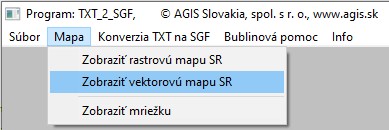
As you can notice, at the time of about 25s from the start, I click on the menu (in EN: MAP/DISPLAY VECTOR MAP OF THE SR (Slovak Republic)

[url=https://postimages.org/]https://i.postimg.cc/tCBGjRs2/Menu-Mapa-Zobrazit-vektorovu-mapu-SR.jpg](

As you can notice, at the time of about 25s from the start, I click on the menu (in EN: MAP/DISPLAY VECTOR MAP OF THE SR (Slovak Republic)

[url=https://postimages.org/]https://i.postimg.cc/tCBGjRs2/Menu-Mapa-Zobrazit-vektorovu-mapu-SR.jpg)

Here is a significant delay between the moment when the menu is selected and till the selected action is completed (drawing graphics for grid PLUS border line). Similar delay can be observed at about 1m 55s from start, when I select the menu MAPA/ZOBRAZIŤ MRIEŽKU (MAP/ONLY GRID DISPLAY).

In these both cases I would like to add an info message that something is happens (processing ...), but I am not sure, where in program is the right place for it. I achieved a result (not good), when I placed such message in the corresponding plot call-back. It worked, but the information window never dismissed, although I used the same coding like for the buttons in the graphics.

When I placed the coding in the corresponding call-back for the menu item, it also does not work as expected.

So, where should I place the code for info message?

Thanks in advance for your tip!

Martin

P.S. I will have a look at your last post (of Mon Jun 29, 2020 11:13 am) on Thursday,, since tomorrow I am very busy with another tasks.

30 Jun 2020 8:50 (Edited: 30 Jun 2020 9:35) #25866

Ken,

I identified the right place, where to put the splash window when initially (for the first time) the graphics is drawn (for both menu: MAP/DISPLAY VECTOR MAP SR and MAP/DISPLAY GRID ONLY).

Now, I see the splash window in the right place and it automatically dismisses when the selected task (via menu) is finished.

Do not waste your time with this! (I will still have another topic for discussion :lol: ).

Martin

P.S.

Added a short video how it looks now: https://www.youtube.com/watch?v=ZXD9r8hHphs

BTW - why compiler did not make a notice that I used not allowed use of the same name for a variable and the same name for a data object in a named COMMON statement? This was extremely time-consuming issue for me.

As I detected the problem yesterday, I have no more problems with graphic symbols of points!

30 Jun 2020 9:33 #25867

Good.

COMMON blocks can always cause problems, I prefer to put global variables in a MODULE.

At t = 32 s in the video I see the windows processing icon appear and you may get the program “not responding”. This can be avoided by a call to TEMPORARY_YIELD@() within CPU consuming loops.

Ken

30 Jun 2020 9:43 #25868

I will add the function TEMPORARY_YIELD@() to the corresponding part of my code.

I also use the MODULE possibility in the code (it is - by far - the most important part of my code), but I also have quite big amount of COMMON statement (first of all an mainly in my main program and in a subroutine) and to re-code them would also be quite time-consuming task. Anyway, I will minimize their use.

Martin

30 Jun 2020 10:07 #25869

Ken,

I've always used COMMON blocks, without the slightest problem - at least once I mastered what they did. Putting global variables in a module is a great idea, but it does rather destroy the fundamental tenet in earlier versions of Fortran that the scope of a variable name was limited to a single subprogram, and that in fact there are no global variables! While I have no doubt that this is in many scenarios a great idea, it can be the very devil when you deal with old codes that relied on that scoping rule and implicit typing and mixing the two is where you can generate all sorts of problems.

And don't knock the old code base - for example, it was used to analyse things much better than we have today, like aeroplanes that got you from Heathrow to New York in a little over 3 hours.

Eddie

30 Jun 2020 4:05 #25870

Eddie,

Knuckles have been wrapped with my steel ruler. Never did get a flight on Concorde.

Ken

1 Jul 2020 7:09 #25871

Ken,

What a pity. Only £3000 each way in the 1990s, and being December there was a double air miles offer. As Concorde was always double First Class airmiles already, a trip for a meeting with New York lawyers provided the air miles or a family holiday. Frequent flyers left behind the leather 'gifts' and silver pens, and I collected enough for my Christmas presents that year.

On a subsonic flight the windows get cold, but on Concorde they got hot, and the aisle seat (2 each side like a 707) was the best. I've always asked for an aisle seat ever since ...

Incidentally, we won the case before an Arbitration Tribunal, but not before I'd also been to meetings in Australia and a day-and-a-bit site visit in Indonesia.

The business of mixing modules and COMMON is likely to create mayhem in a way that one or the other exclusively will not, after that it's a matter of taste.

Eddie

1 Jul 2020 8:35 #25872

Eddie,

I have been gradually transitioning COMMON to MODULE.

The disadvantage of COMMON was they could be (re)defined each time they were used, but this was overcome by only using COMMON in an include file. Nevertheless, we are told COMMON is bad programming style, by those who make Fortran much more complex.

The advantage of MODULE is it allows derived types, which can assist with organising data property tables. ALLOCATE is also a big change (post F77) which is useful in modules.

A disadvantage of MODULES has been the vaguaries of using EQUIVALENCE. It is interesting, that early on, I tried EQUIVALENCE in a MODULE and got an error message, which discouraged me from persisting with that approach. However, equivalence can be used in modules, although its use is less of an issue; mostly can now be done differently. I have seen COMMON used in a module, although I don't know why ! There is a SEQUENCE statement.

As for Common on the Concord, only £3000 each way might not be compatible.

1 Jul 2020 8:39 #25873

Quoted from Kenneth_Smith

Knuckles have been wrapped with my steel ruler. Ken

Hard to unwrap with just one or zero hand free. Unless you meant the Iron Lady. 😃

1 Jul 2020 9:05 #25874

COMMON has one bad property that one must contend with. It forces a specific order on sets of variables, when in most cases the user wishes to access just a few members the block as it it contained an unordered set -- just those variables in one or more common blocks that are needed in a subroutine.

Here is an example, that AKS brought up in his recent posts. The US Navy SMP program contains scores of subroutines. Many subroutines are about 100 lines of code, of which about 80 lines are COMMON and type declarations. Most of the variables in the common blocks are never used in the subroutine, but they have to be present (and their types declared if leaving the types implicit based on the initial letter is going to affect the memory layout).

https://apps.dtic.mil/sti/citations/ADA282341

1 Jul 2020 11:13 #25875

Mecej4,

That is simply bad programming style, perhaps because the compiler first used had a limitation on the number of named common blocks. One could do the same bad thing in a module full of unused declarations, with the disadvantage that when such a module is USEd, you don't usually get to see those declarations when reading the source code, as you would not, for example, if the COMMON blocks were simply INCLUDEd.

The different lengths of variables is a 'useful stupidity' that arose when byte-orientated memory layouts became the norm: when one had two 24-bit words or a single 60-bit one, REAL and INTEGER were the same length. You lost the benefits of the same length while gaining a better utilisation of memory - but also usually created more problems of INTEGER overflow as shorter INTEGERs were the main benefit. Having implicit type (and I know that you don't like that, but I do) means that I can tell the variable type at a glance. Yep, and I know that you can stick to the I-N for integers convention with explicit typing, but explicit type declarations also make the declaration section longer than perhaps it strictly needs to be (your complaint, not mine), especially if you have a lot of local variables (I try to keep the number of those as small as possible).

I respectfully submit that the argument against COMMON in your observation is not so much an argument against a particular thing like COMMON, but is an argument against how it might be badly employed.

The same may be said against the use of a hammer, which may be used for driving in both nails and woodscrews, but although it may be used to get nails out (if it has a claw) is not so good for getting screws out, whereas a screwdriver is good for getting screws out as well as putting them in,so it must be superior - forgetting that a screwdriver is no good for driving nails in or getting them out. (Incidentally, a hammer is sometimes colloquially termed a 'Birmingham Screwdriver', and for some types of carpentry works it is far quicker at getting large woodscrews into rough timbers than a conventional screwdriver).I don't advise the use of this technique in aerospace applications, by the way!

You also find that some layouts, for example the traditional 80-column card format lead to lots of continuation 'cards', but of course, any statement that takes many lines of continuation has very little chance of being understood easily by anyone years after it was written, the fault lying not with the restriction on the length of each line, but in the complexity of the statement. Certainly, one can lay out the elements of an overcomplicated statement in a way that helps readability, but this is true whether one has a longer line length or spread it over several lines, and indeed the latter may prove preferable when printing or even using some editors.

To return to COMMON, it would be completely barmy to include a COMMON block in a subroutine that did not access any of the COMMON block's variables, and it is still barmy to put too much in a single COMMON block when you can divide the content over 2 or more. This was perhaps more obvious with the early Microsoft Fortran 77 versions where COMMON blocks were limited in any case to 64k, with the limit on how many blocks there were restricted by total memory and one's imagination in giving them names.

Eddie. (Not from Brum, by the way)

PS. What happened to the old preference in FTN of starting arrays on 8-byte boundaries? Is it still a good idea? In which case how do we do it?

1 Jul 2020 12:13 #25876

My point is not that bad programming practices should be followed. It is that some aspects of old Fortran make it impossible or very tiresome and error-prone to do things right.

I have rarely come across large programs in which the order of the variables in COMMON was of any use or interest to the programmer. Rather, it makes the compiler's job easy and allows the symbol tables to be broken up into short blocks.

In the card-deck days, there was no INCLUDE 'abc.inc', and if you did not have a card duplicator, punching multiple sets of cards containing large common blocks was non-trivial.

On the other hand, many small common blocks increase the load on the linker. You may remember MS Fortran 3.3 and MS Link on MSDOS. Sometimes it took longer for the linker to finish than for the compiler to process the many source files that were part of a large program.

Hollerith strings longer than 56 characters form another example.

1 Jul 2020 3:26 #25878

That's interesting. I don't think that I ever timed a linker, but you may have a point. I always thought that the MS Fortran linker had a bigger job than the compiler, which in the first version(s) I used had 2 completely separate passes, and I never compiled a whole program in one go after moving to a PC until relatively recently. I would expect compiling a single subprogram to be quick. In any case, the whole process on a PC was infinitely faster than sending a deck of cards off in a box with a courier, and waiting until the end of the day or the next day to get the results back. It was also faster than waiting for the normal day to end and getting the computer room key so that the mainframe machine could be restarted, in the case of a machine I used for some years by operating big circuit breakers like the ones in Frankenstein's lab! The margin of difference was so huge that it didn't occur to me until I got my second PC that 'virtually instant' could actually be speeded up.

Oddly, I never found that duplicating cards was a big job, using 026 and 029 card punches - but I do find it tedious with cut and paste. This must surely be to do with the pace at which one can work nowadays. (And there aren't that many of them to duplicate if you have arranged your COMMON blocks appropriately. (I don't think that I had any views about the order of variables in a particular COMMON block, what I hoped that I was saying was that the choice of variables that go in particular COMMON blocks can impact on what is needed for particular subprograms, and therefore it didn't make sense to have large sections of COMMON blocks in any subprogram). Also, I found that IBM card punches could also copy a card that the reader had mangled, usually without too much difficulty.

You said somewhere that you worked originally on CDC machines, and the high speed card reader on a 6400 at Imperial College could, on occasions, spew 500 or so cards in the air in a matter of seconds. Afterwards, it wasn't just a matter of getting them back in order, it was also a question of replacing those that were irreparable or missing.

And anyway, wasn't card punching mainly a job for that room with four or more middle-aged women who punched the cards (or tape) from coding sheets while discussing the previous night's episode of Coronation Street and filling the air with cigarette smoke? Or the card duplicator that could punch n copies of a small deck? (If you could get it working, that is. Mostly the effort wasn't worth it, and the hardly-used duplicator was scrapped along with the worn out punches and the computer that had become a museum piece.)

I fear that we'll never agree on the ancient v. modern approaches, but I found your comments particularly valuable, as it never occurred to me that COMMON blocks made the compiler's job any easier. One lives and learns.

Eddie

Please login to reply.