Paul,
I curious to know if you have been able to make any progress with the suggestions I made back at the beginning of May?
Thanks
Ken
Welcome to our forums
Paul,
I curious to know if you have been able to make any progress with the suggestions I made back at the beginning of May?
Thanks
Ken
Ken
I haven't done any work on this for a while. I am hoping to review this thread an make some final adjustments some time before the next full release.
Thanks Paul. I found myself looking at the native %pl again today after 6 weeks doing other things and rediscovering some of the minor issues for a second time - my memory is not as good as it used to be - hence the question. Ken
Addition to my post called CONTINUE2 above about LOG scale.
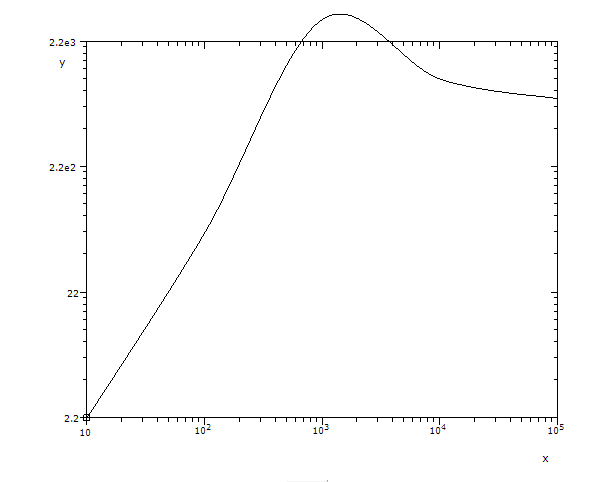
With the latest DLLs i found that the code produces initially bad looking Y scale numbering and goes out of scale, see for example this simple code (the code for plotting must be always short and simple like this or even shorter)
use clrwin
parameter (N=5)
real*8 X(N), Y(N)
Data X/1e1, 1e2, 1e3, 1e4, 1e5/
Data Y/2.2, 66, 8333, 1111, 777/
i=winio@('%ww%pv%pl[framed,x_array,scale=log_log,N_GRAPHS=1]%es', 625,500, N, X, Y)
end

But if you try to resize the plot just a tiny bit pulling window border or corner using mouse it abruptly displays everything correctly.
Interesting is that if we change one number 8333 to 3333 this trick does not work
Probably will be easy to fix.
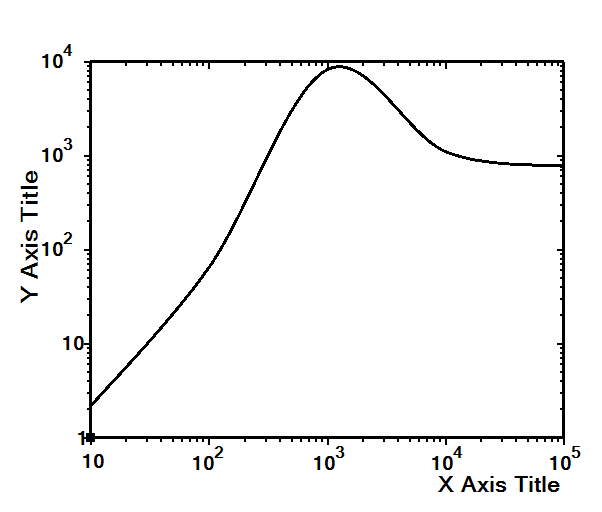
I hope that in the future after fixing all the bugs Silverfrost will make the default plotting with the one simple command like with the code above and the plot will look nice and perfectly ready for publication. This is how Matlab is doing that flattening competition landscape for decades. Of course it is easy to do all the 'beautifications' with just one-two more lines of code like here
use clrwin
parameter (N=5)
real*8 X(N), Y(N)
Data X/1e1, 1e2, 1e3, 1e4, 1e5/
Data Y/2.2, 66, 8333, 1111, 777/
i=winio@('%sf%ts%bf%es&', 2d0)
call winop@('%pl[axes_pen=3,width=3,x_axis='X Axis Title',y_axis='Y Axis Title']')
i=winio@('%ww%pv%pl[native,framed,x_array,scale=log_log,N_GRAPHS=1]', 625,500, n, X, Y)
end

But my previous two decades experience with the hundreds of uses of Simpleplot in my codes tells me that beautification takes a lot of time so that you end up with no any. As a result many my plots which were quickly made look ugly like the first picture above, and there is no time to change anything because any touch to the working CWP code always causes many recompilations, CWP has a lot of intricate details you always forget.
This nicer looking example shows the defects of absence of Scientific, Decimal etc numbering formatting options: the numbering does not look concise, in one style, it mixes different styles.
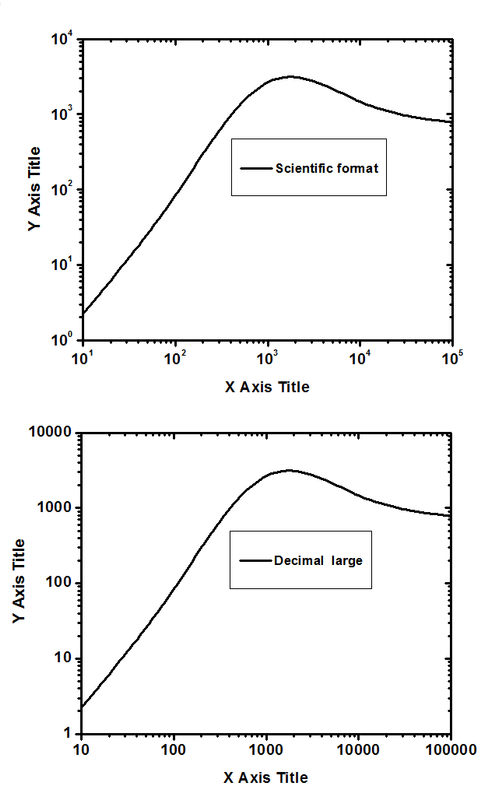
With the LOG scale it is often possible for the code to choose these formats automatically: if the numbers are very small or very large and there are a lot of orders of magnitude to display then just the Scientific format has to be used
At the end here how this exact XY data is visualized by the professional scientific software using Scientific and Decimal formats. As you can compare the new %PL is already pretty close to the best of the best (the new PL can also do antialiasing for curves and in this example is even better doing data interpolation - compare how 8333 peak values are displayed)

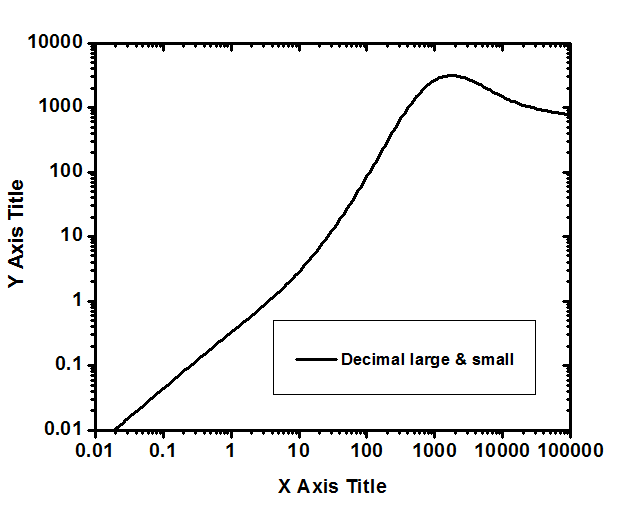
Decimal format is of course the most difficult. If extend the plotted data to
0.01 0.011
0.1 0.044
1 0.33
10 2.2
100 66
1000 8333
10000 1111
100000 777
the OriginLab plots it this way
and if even more then 1e-3, 1e-4 ...
I see same plot like you. Bug.
Thought I'd share these plots - all produced using the new native %pl

One thing for the nice to have list - it would be good if you could set width for each plot in turn - at present this is specified just once - for all curves in the %pl region.
Regards
Ken
Thanks for the feedback Ken. Unfortunately the extension to variable width is unlikely to be feasible within the current design constraints.
It is great to see some 'real' uses of FTN95. Great images too!
Thanks Paul, I thought that might be the case for the width option.
For those that are curious, the polar plots are produced as follows:
The only odd thing I have noted is that sometimes the tick marks on the x and y axis (which are selected automatically) are different, even although the magnitude of the data to be plotted has the same extent (due to the enclosing circle). This can be seen in the plots above.
The plots are certainly more informative than the text data at the bottom left hand side – which contains all the information in the plots.
Regards
Ken
Can native %pl plot two lines on the same plotting area each having its own (X,Y) set of data and own number of points?
Yes you can have a number of graphs on one x-y frame each with its own independent data and with its own number of points. In this case the argument giving the number of points becomes an array of values rather than a single scalar value.
Cool, thanks.
Dan,
Very quick and dirty demonstration for you.
Ken
module mod1
implicit none
real(kind=2) x1(1:2), x2(1:2), y1(1:2), y2(1:2)
integer:: n(1:2) = (/2,2/)
contains
subroutine main
include<windows.ins>
integer i
do i = 1, 2, 1
x1(i) = RANDOM@()
x2(i) = RANDOM@()
y1(i) = RANDOM@()
y2(i) = RANDOM@()
end do
i=winio@('%`bg[white]&')
call winop@('%pl[native]')
CALL winop@('%pl[smoothing=4]')
CALL winop@('%pl[width=2]')
CALL winop@('%pl[x_array]')
CALL winop@('%pl[x_min=0,x_max=1]') !######
CALL winop@('%pl[y_min=0,y_max=1]') !######
call winop@('%pl[N_GRAPHS=2]')
CALL winop@('%pl[independent]')
CALL winop@('%pl[link=lines,link=lines]')
CALL winop@('%pl[colour=red, colour=blue]')
call winop@('%pl[pen_style=0,pen_style=0]')
i = winio@('%pl&',400,250,n,x1,y1,x2,y2)
i = winio@('%ff%nl%cn%^tt[NEXT]',update)
end subroutine main
integer function update()
include<windows.ins>
integer i
do i = 1, 2, 1
x1(i) = RANDOM@()
x2(i) = RANDOM@()
y1(i) = RANDOM@()
y2(i) = RANDOM@()
end do
call SIMPLEPLOT_REDRAW@()
update = 1
end function update
end module mod1
program test
use mod1
implicit none
call main
end program test
Thanks Ken, that was very usable demo, saving me time for initial experimentation which is always the most unpleasant with Clearwin - you try, and try and try and things are not working, not working and not working and when eventually it start working you do not understand what was wrong in the first place 😃
I hope Silverfrost will eventually include numerous demo examples.
Dan (and other 64 bit %pl users)
I was planning to fix some of these issues but there is too much information here for me to process. Would you be willing to isolate one issue at a time and post some code that demonstrates each failure. Just one detail at a time please and when that is fixed we could move on to the next.
Paul,
Yes, we can summarize all the problems in one page
One critical strategic moment has to be in mind before you start (to avoid fixing of current fixing) : at some point the native %pl has to offer scalability when you use mouse to resize: by fixing aspect ratio it has to offer proportional changes of the sizes of all elements on the plotting surface like all Pro plotting software is doing by default. Here is Originlab:

This is needed both for run-time and postprocessor visualization graphics and specifically for presentations and publications where each publisher has own requirements. Right now changing plotting area size creates havoc in the initially adjusted position of all elements and requires reprogramming. Scalability has to be a default and changed by the user.
As we all showed above, the current native %pl is close to exceed all other plotters in simplicity being of topmost classic look, production quality, ready for any highend (Nature, Scientific American etc) publications. That means either all lines and fonts have to be specific size (say lines 2 pixel wide, specific fonts, bold size, border sizes etc ) by default or Styles have to be introduced at some point (like Default Style, Classic1, Classic2, MyStyle1 etc) and invoked in one simple call. And that means these lines like in the example above
i=winio@('%sf%ts%bf%es&', 2d0) call winop@('%pl[axes_pen=3,width=3,x_axis='Radius(cm)',y_axis='Temperature (MeV)']')
have to be hidden inside some new keyword for Style %st[1] or so being editable by the user. Current default (one pixel lines, fonts sizes, borders) follows old dead Simpleplot %pl default and looks unacceptably bad as it was shown above many times.
Then the LOG (log_log, log_lin, lin_log) plotting to be fixed first which has the most of problems right now. You can start with the last demo example few posts back
Anything else mentioned above is a bonus
Dan
I will aim to add 'fixed_aspect' as an option.
I would need a working program and all its data. Is that available and if so where?
Paul That fixed style would be great
As to source examples and data I have emailed to you sources and data for LINEAR plotting. For the LOG plotting this example has all numbers set in the DATA and its pictures published few posts back
use clrwin
! parameter (N=5)
parameter (N=8)
real*8 X(N), Y(N)
! Data X/1e1, 1e2, 1e3, 1e4, 1e5/
! Data Y/2.2, 66, 5555, 1111, 777/
Data X/0.01,0.1,1,10, 100,1000,10000,100000/
Data Y/0.011,0.044,0.33,2.2,66,3333,1111,777/
i=winio@('%sf%ts%bf%es&', 2d0)
call winop@('%pl[axes_pen=3,width=3,x_axis='X Axis Title',y_axis='Y Axis Title']')
i=winio@('%ww%pv%pl[native,framed,x_array,scale=log_log,N_GRAPHS=1]', 625,500, n, X, Y)
end
and this example (discussed in CONTINUE2 above and the pictures are posted there too) also does not need external files, it creates data by itself
WINAPP
MODULE modd
USE clrwin
INTEGER,PARAMETER::N=65
REAL*8 X(N),Y(N),Z(N),T(N), U(N)
!.....................................
CONTAINS
!.....................................
INTEGER FUNCTION callb()
REAL(2) random
DO i=1,N
X(i)=i
Y(i)=exp(0.35*i) * random()
T(i)=Y(i)
Z(i)=exp(0.7*i) * (random()-0.003)
U(i)=Z(i)
ENDDO
CALL SIMPLEPLOT_REDRAW@
callb = 2
END FUNCTION
END MODULE
!.....................................
PROGRAM KKK
USE modd
j=callb()
i=winio@('%ww&')
CALL winop@('%pl[native]')
! CALL winop@('%pl[title='Log_linear@(115,299)']')
CALL winop@('%pl[title='Title: ideal log_linear@(-15,10)']')
CALL winop@('%pl[x_array]')
CALL winop@('%pl[scale=log_linear]')
! CALL winop@('%pl[y_min=.3]')
CALL winop@('%pl[y_max=1e7]')
CALL winop@('%pl[N_GRAPHS=4]')
call winop@('%pl[framed]')
CALL winop@('%pl[tick_len=10]')
CALL winop@('%pl[axes_pen=4]')
CALL winop@('%pl[x_axis='Wavelength (A)@(-202,2)']')
CALL winop@('%pl[y_axis='Intensity (arb.units)@(-20,-222)']')
! i=winio@('%fn[Tahoma]&') ! Verdana
i=winio@('%sf&')
i=winio@('%ts&', 2.2d0)
i=winio@('%tc&',rgb@(0,0,0))
i=winio@('%bf&')
CALL winop@('%pl[width=3]')
CALL winop@('%pl[colour=red,link=none,symbol=7]')
CALL winop@('%pl[colour=blue,link=none,symbol=9]')
CALL winop@('%pl[symbol_size=8.]')
CALL winop@('%pl[colour=black]')
CALL winop@('%pl[colour=green]')
i=winio@('%pv%pl&', 700,570, N, X,Y,Z,T,U)
i=winio@('%ac[Ctrl+Z]&',callb)
i=winio@('%sf%ts&', 1.d0)
i=winio@('%ff%cn%^bt[Redraw]%es',callb)
END
John
I will aim to fix any obvious bugs. At the moment I am not compiling a wish list.
Also I am very short of time so I will need new posts with working programs and all the data. If a program and its data are too large to post then you can either use Dropbox or I can supply an email address to use.
I have already fixed a number of bugs so you may prefer to wait for the new DLL upload due shortly.
Paul,
I appreciate that you are not compiling a wish list, but please don't forget my request way back in May which you did say might be a simple addition:
A useful possible addition would be a flag which forces %pl to place the scales external to the frame, this would avoid the situation where data points obscure the numbers on the scale, and would give a more uniform appearance when groups of plots a combined together.
Thanks,
Ken