20 Apr 2017 3:03
#19442
A new set of DLLs is now available for download from here...

Welcome to our forums
A new set of DLLs is now available for download from here...
Thanks Paul. The simpleplot_update@ (though the name sounds irrelevant) now works. As I wrote the linear plotting looks almost ideal now, here how it looks in comparison with the leading scientific software OriginLab
 Antialiasing makes curves look better then anything on the market now.
The only what needs fixing is numbering (Y scale has also problems, like number 1e22 instead of 100 or at least 1e2) and sometimes plotting gets out of plotting region (see the same below for LOG scales),
axis captions are better put centered by default -- and it is completely done
Antialiasing makes curves look better then anything on the market now.
The only what needs fixing is numbering (Y scale has also problems, like number 1e22 instead of 100 or at least 1e2) and sometimes plotting gets out of plotting region (see the same below for LOG scales),
axis captions are better put centered by default -- and it is completely done
The source for this comparison is here. All may use own data or I can send mine for exact comparison (does this code work with you under last DLL7 ?)
 winapp
USE clrwin
integer, parameter :: n_dim = 1153
real*8 xstart, X(n_dim), Y(n_dim)
integer(7):: hDib !
integer*4 ilw
character filename*128

      i=winio@('%ww[no_border]&')
      i=winio@('%gr[BLACK]%ff%lw&',660, 550, ilw)

      filename = 'SpectraSampleLinear.bmp'
      hDib = import_bmp@(filename,ires)
      if(ires == 0) ires = dib_paint@(0,0,hDib,0,0)
      call release_screen_block@(hDib)

OPEN (UNIT=275,FILE='A.dat',STATUS='old',err=990)
do i=1,10000
  if(i.gt.n_dim) goto 100
  read(275,*,err=995,end=100) X(i), Y(i)
enddo
100 close(275)
n_points=i-1
xstart=0 ! 12 !

      i=winio@('%ww[no_border]%es%ca[Default Plot]%pv&')
      i=winio@('%fn[Tahoma]&')  ! Verdana
      i=winio@('%ts&', 1.9d0)
      i=winio@('%tc&',rgb@(0,0,0))
      i=winio@('%bf&')
      i=winio@('%`bg&',rgb@(250,255,255))
      CALL winop@('%pl[axes_pen=3]')

!     CALL winop@('%pl[SCALE=LOG_LINEAR]')

      call winop@('%pl[framed]')
      CALL winop@('%pl[tick_len=9]')
      CALL winop@('%pl[margin=131]')
      call winop@('%pl[link=curves]') ! link=lines
      CALL winop@('%pl[n_graphs=1]')
      CALL winop@('%pl[title='Native PL Linear']')
      CALL winop@('%pl[x_axis='Wavelength (A)']')
      CALL winop@('%pl[y_axis='Intensity (arb.units)@(-5.0)']')
      CALL winop@('%pl[width=2]')
      CALL winop@('%pl[smoothing=4]') ! anti-aliasing
      CALL winop@('%pl[colour=black,style=0,pen_style=0]')
      CALL winop@('%pl[x_array]')
      CALL winop@('%pl[x_min=12.0]')
      CALL winop@('%pl[y_max=155.0]')
      i=winio@('%pl',770,660,n_points,x,y)
goto 10000

!................. errors ......................
990 Print*, 'Error opening file A.dat for read'
goto 10000
995 Print*, 'Error reading file A.dat'
goto 10000

10000 continue
end
And now LOG scale plots start to approach usable shape. Log scales are kind of more important to get fixed because without them 3/4 of all %pl cases (linear, log_linear, linear_log, log_log) will not work
Couple of problems with the DLLs7
continue
DLLs7 still crash my main code and SDBG64 in few circumstances so I still need to get back to older DLLs5. If this is not my problems and the users will also see the same crashing problems may be we will need to update the entire compiler. I may even give you to play my code so that the bugs will be found and fixed much faster not taking time of developers from more important things.
Now about LOG scale plotting. It looks now MUCH better, everyone can see that on this example I further modified from README file
   WINAPP
   MODULE modd
   USE clrwin
   INTEGER,PARAMETER::N=25
   REAL*8 X(N),Y(N),Z(N),T(N)
   !.....................................
   CONTAINS
   !.....................................
   INTEGER FUNCTION callb()
   REAL(2) random
   DO i=1,N
     X(i)=i
     Y(i)=exp(1.*i) * random()
     Z(i)=exp(2.*i) * random()
     T(i)=exp(3.*i) * (random()-0.003)
   ENDDO
   CALL SIMPLEPLOT_REDRAW@
   callb = 2
   END FUNCTION
   END MODULE

   !.....................................
   PROGRAM JJJ
   USE modd

   j=callb()
   i=winio@('%ww&')
   CALL winop@('%pl[native]')
   CALL winop@('%pl[title='Native pl Log_linear']')
   CALL winop@('%pl[x_array]')
   CALL winop@('%pl[scale=log_linear]')
   CALL winop@('%pl[y_min=100.0]')
   CALL winop@('%pl[y_max=1e7]')
   CALL winop@('%pl[x_array,N_GRAPHS=3]')
   call winop@('%pl[framed]')
   CALL winop@('%pl[tick_len=10]')
   CALL winop@('%pl[axes_pen=3]')
   CALL winop@('%pl[x_axis='Wavelength (A)']')
   CALL winop@('%pl[y_axis='Intensity (arb.units)@(-5.0)']')

!  i=winio@('%fn[Tahoma]&')  ! Verdana
   i=winio@('%sf&')
   i=winio@('%ts&', 2.2d0)
   i=winio@('%tc&',rgb@(0,0,0))
   i=winio@('%bf&')

   CALL winop@('%pl[width=2]')
   CALL winop@('%pl[colour=red,link=none,symbol=7]')
   CALL winop@('%pl[colour=blue,link=none,symbol=8]')
   CALL winop@('%pl[colour=green]')
   i=winio@('%pl&', 800,600, N, X,Y,Z,T)
   i=winio@('%ac[Ctrl+Z]&',callb)
   i=winio@('%sf%ts&', 1.d0)
   i=winio@('%ff%cn%^bt[Redraw]%es',callb)
   END
Few defects are
Reason why I pay such attention to developing easy scientific graphics plotting utilities in Fortran is because I'm 100℅ convinced that without them Fortran is dead. It will be swallowed by MATLAB. Each student of technical universities now uses MATLAB. Adoption of Fortran is 1000x less. What is the reason for such crazy discrepancy? Both are simple, even similar in syntax and Fortran is even faster. The answer is that Matlab just made super easy professional graphics and math libraries, they are like ultimate easiest Lego blocks. Look at the MATLAB samples I cited few days back in another ℅pl thtead. Even the plot of 3D data can be done typing just a dozen symbols.
Dan
What would you suggest that %pl does when calculating log10(y) and it finds that the supplied y is not positive? Maybe such values could be ignored (filtered out) but would that be helpful?
Paul, I'd experiment with these options first. If do not set y_min=positiveVal then I'd leave things as they are now, i.e. switching on linear scale plotting. Same with y_min was set as negativeVal or zero. If y_min was set as positiveVal then I'd treat negative y point as tiny positive number say 1d-200. That might help the algorithm to do smoothing better than just ignoring the negative point.
Formally 1d-200 is not even needed to be that small. Visually it will be hard to distunguush two plots one with 1d-200 and another with some number smaller then minimum plotted value by just 4-5 orders of magnutude. That may help smoothing algorithm even more.
By the way among all smoothing algorithms I like in Originlab software so called B-spline as the most stable and kind of universal due to that. It works much more reasonable than Bezier or Spline and almost never makes artifacts. I do not know how it works though, it always was no time to investigate. Ideal in this case would be to have variable degree of smoothing from straight lines to spline at your wish. May be someone here can develop such single universal function, I always wanted to have that.
After all that it would be good to add to pop-up window which informs about switching from logarithmic to linear scale that ℅pl[ y_min=Val ] can prevent the switching
Thank you. I will see what can be done.
John,
Ideal axis numbering is not easy matter. I tried this and I know myself. You will swear like hell doing it. My own codes (not %pl based but the ones I made myself) numbering currently choses 5-7 numbers per axis and looks not bad.
Also in my own graphics programs when i use %pv and decrease plot size (if axis is too small for used large fonts) then number of tics decreases eventually to zero. Native %pl is doing something similar
Ideally with native %pl of course is to scale fonts size together with plot size, but hopefully this can be easily done in the future when all defects will be fixed. There are also some other small suggestions for corrections like longer tic marks in LOG scale, better name for 'width' of plotted lines in CALL winop@('%pl[width=2]') which better call 'linewidth' etc
Among them could be also your good suggestion to use arbitrary step (in Originlab it is called increment), say, 5 for X axis like in the plot above. But you know why I call the current state of native %pl close to ideal? The blind choice of computer looks as better option because increment 5 leaves only two numbers on X axis 15 and 20 - aesthetically this would not be good, though in some cases necessary. I hope in the future Paul will implement user definable increment in axis numbering and user's choice of first and last axis numbers (From and To), as well as drawing minor tic marks, horizontal and vertical grid lines (see pic below), background from external files, different axis numbering options like in this plot for example ( with the comma, I never used but some may like it)

the error bars, text labels and may be more symbols like here

or eventually at some point even color scale and surface plotting like here
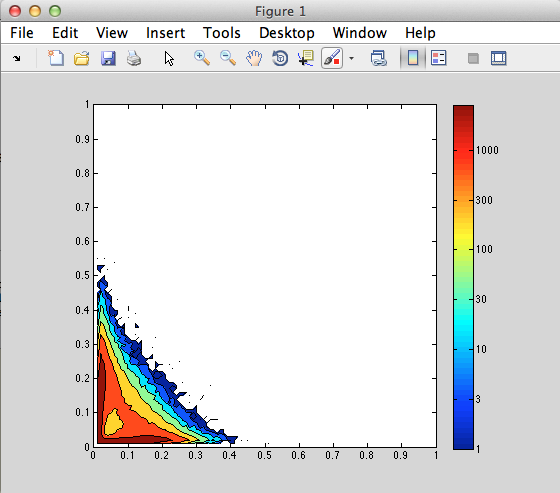 etc. I've done many these myself in my own graphics routines, they are easy to implement (much easier then to make good numbering!) and they look great. But the automatic choice of computer with latest native %pl right now for X axis looks acceptable. And also have you noticed that with the recent additions the axis drawing and text quality already looks more professional then for example in the two last plots?
The Y axis numbering does not look good with default settings. But I see new options x_sigfigs and y_sigfigs for user defined adjustments. Can you try them and post here to see how things look (use for example Postimage)? Will setting y_sigfigs to 2 fix y axis? I can not do that right now because my computers loaded multiple FTN95 programs so I can not overwrite DLLs or change FTN95 dir - I can not use latest DLL7s for my other programs, have crashes, do you too?
Use site Postimage.io where posting is easy as 2x2
Quoted from John-Silver
While I'm here, has anyone else noticed that the last numbers on both x and y scales are not printed !!!! This for me is a bug, although Paul might argue it's a limitation. I'm used to seeing scales numbered from start to finish
John, This specific thing is strictly saying not a bug because the data ends at 21.9674. Automatic axis numbering has to work in exact range of data. Though I agree with you and i myself in my own graphics programs numbering (written completely in FTN95 by the way) added small few percents search radius at the beginning and the end of X or Y axis to look if any 'good number' can be placed there like 0 or 1000 when data starts from 1.1 and ends at 996.9. My impression is that Paul have done something like this for automatic numbering of the beginning of axis number. Adding the same for the end of axis number would probably be beneficiary.
All things we discussed so far including not yet implemented surface plotting, color scales, 3D OpenGL plotting are often from few minutes to few hours, in worst case to few days (OpenGL) job. The numbering is a few weeks job. And the numbering in OpenGL I even not have done in decade (!, because not met on this planet anyone else who used with this specific Fortran such great thing like OpenGL to ask what i'm doing wrong why it does not work, and I do not RTFM)
Some things are very simple and look very attractive. Right now for example i can change the palettes of the color bar like in the figures above just with one click, this dramatically changes the plots. I can give the palette code if anyone wants though i am sure professional programmers can do that much more effectively
I have used modified versions of these routines in my own plotting routines and found them good for selecting scales:-
https://people.sc.fsu.edu/~jburkardt/f77_src/toms463/toms463.html
Ken
Ken, Good advice. Excluding probably first LOG example shown there it might be good option for universal scale for %pl
John, I may miss something with my blurry end of the week look: see the first LOG example with the absurd step distance 1.585? It should be XMINP=1 to XMAXP=200 with N=2 as usual
Also last one is also bad. It should plot tic axis marks from 0.1 to 2000 and numbering only large tic marks at exact decades 0.1, 1, 10, 100, 1000.
Middle example is kind of OK but N must be 3 not 2: 0.1, 1, 10
        XMIN      XMAX   N        XMINP      XMAXP          DIST

        1.8      125.0  10        1.585      158.489        1.585
        0.1       10.0   2        0.100       10.000       10.000
        0.1     1500.0   4        0.077     2154.436       12.915
https://people.sc.fsu.edu/~jburkardt/f77_src/toms463/toms463_prb_output.txt
Current native %pl is clearly better with the LOG scale
I have noticed that if the range of the y values to be plotted is less than 0.1 %pl plots nothing. Not a problem in itself as obviously one can rescale the signal and change the axis label accordingly but this does complicate the code immediately before the call to %pl. It would be better if %pl plotted something, even if the scales turned out to be a bit odd - simply a value/tick at the minimum and maximum values would be sufficient and much better than a blank window.
The following code illustrates the issue.
Ken
program sine_wave_test
implicit none
include<windows.ins>
real(kind=2) wt(1:361), sig(1:361), pi, max, min, dy
real(kind=2) k
integer i, j

pi=4.d0*atan(1.d0)

do i = 1, 361, 1
  wt(i)  = (pi/180.d0)*real(i-1,kind=2)
end do

!Test sine wave
k=0.1d0
do i = 1,10,1
  sig = k*sin(wt)
  max = maxval(sig)
  min = minval(sig)
  dy  = max - min
  j = winio@('%ww&')
  j = winio@('%pl[native,x_array,link=lines,n_graphs=1,framed]&',400,300,361,wt,sig)
  j = winio@('%ws&','max=')
  j = winio@('%`rf&',max)
  j = winio@('%ws&','min=')
  j = winio@('%`rf&',min)
  j = winio@('%ws&','dy=')
  j = winio@('%`rf&',dy)
  j = winio@('%ff%cn%bt[Continue]')
  k = k - 0.01d0
end do

!Test rectified sine wave
k=0.5d0
do i = 1,20,1
  sig = abs(k*sin(wt))
  max = maxval(sig)
  min = minval(sig)
  dy  = max - min
  j = winio@('%ww&')
  j = winio@('%pl[native,x_array,link=lines,n_graphs=1,framed]&',400,300,361,wt,sig)
  j = winio@('%ws&','max=')
  j = winio@('%`rf&',max)
  j = winio@('%ws&','min=')
  j = winio@('%`rf&',min)
  j = winio@('%ws&','dy=')
  j = winio@('%`rf&',dy)
  j = winio@('%ff%cn%bt[Continue]')
  k = k - 0.05d0
end do

end program sine_wave_test
Ken
This limitation has now been removed for the next release.
Thanks Paul,
What's the timescales for the next release, days, weeks or months? I ask as I've hit this issue many times since I started using the new %pl. It's not really per-unit friendly - that's the way electrical engineers do network calculations which tends to produce small delta values, where for example a 2% voltage drop is plotted as a departure of -0.02 from the reference value of 1.00
I could upload a new set of DLLs tomorrow but that wouild be before I have fixed one or two things for Dan.
Three and we are mostly done 😃
 Noticed nice font in this plot? Can anyone reproduce it?
I do not ask for the nice looking captions like in this plot which would be separate journey for the future updates. This could be not easy like 2x2 feature to implement.
Easy stuff: please allow larger range for the length of tic marks then 10 pixels. Good journals require very high resolution of the plots so we increase the pictures on 4k monitors almost to the end and 10 pixel long tics look too small. In LOG scale minor tic marks have to be 50-70% of the major tic marks
i am running out of further wishes 😃
Paul,
It would be very much appreciated if you could make a new dll available.
Thanks Ken
As to the fonts, yes, there are 300+ fonts in the computer and none looks nice like this one. Or the one in Sample Linear above, that is totally godlike font (I might be wrong, though I tried most of them).
Tic length change already are done by Paul, but not the minor ones in LOG scale (I might be wrong again) and not longer then 10 pixels (needs to be 20 at least). And impression was that in LOG scale minor tic marks (those between decades, like 2,3,4... between 1 and 10) are not changing together with major ones marking decades (1, 10, 100 etc). That requires really minor changes of existing settings.
Minor tic mark implementation and sizes for linear scale is a different story, here you are right.
Here is a new set of DLLs. Don't forget to create a backup before installing.
Thanks for your efforts Paul.
Regards
Ken