Silverfrost Forums

Welcome to our forums

Native %pl

9 Nov 2016 8:00 #18339

Agustin

If you use an ALLOCATABLE array with %pl then you will not be able to update it using DEALLOCATE and re-ALLOCATE.

The simplest way around this is copy the re-ALLOCATEd array to the array used to set up %pl. You can even change its size provided that you pass the number of data points (in %pl) as a variable and you make the %pl arrays large enough for every case.

It will get quite tricky if you want to vary the number of data points whilst drawing more than one curve on a pair of axes. The original and current design of %pl only allows for one value for the number of data points for each %pl.

11 Nov 2016 4:12 #18352

John

Tricky is not 'impossible' and might not even be 'difficult' if you are aware that there is only one value for the number of data points on all graphs in one %pl.

I have done what I can for the moment. I have been constrained by the original design and I am satisfied with what has been achieved within that constraint.

15 Nov 2016 10:04 #18388

Just a note to say that the design for the native %PL has changed again slightly so bear this in mind if you have started to use it in permanent code.

A new option [independent] has been added that provides for independent data for each graph. Also the use of arrays and two new functions that together allow the data to be changed after the window has been displayed.

If anyone is keen to try this out then I will upload a new set of DLLs.

15 Nov 2016 11:44 #18392

well Paul....you know that I am always ready for testing any new advance in the implementation of %pl.........

Agustin

16 Nov 2016 1:58 #18405

Here is a new set of DLLs etc.. The usual cautions apply.

https://www.dropbox.com/s/fk70o72p333h6uz/newDlls15.zip?dl=0

16 Nov 2016 7:36 #18407

I tried to run your example but I got:

WARNING the following symbols are missing: CHANGE_GRAPH_STYLE# D:\Documentos\Trabajos\Azpeitia\Fortran\ASCII\version 1.52\lgotemp@.obj (D:\DOCUMENTOS\TRABAJOS\AZPEITIA\FORTRAN\ASCII\VERSION 1.52\FREEFORMAT1.F95) CHANGE_GRAPH_DATA# D:\Documentos\Trabajos\Azpeitia\Fortran\ASCII\version 1.52\lgotemp@.obj (D:\DOCUMENTOS\TRABAJOS\AZPEITIA\FORTRAN\ASCII\VERSION 1.52\FREEFORMAT1.F95) Creating executable: D:\Documentos\Trabajos\Azpeitia\Fortran\ASCII\version 1.52\FreeFormat1.EXE Compilation and linking completed.

What am I missing?

Agustin

17 Nov 2016 7:30 #18416

Agustin

You will need to use the new clearwin.ins or mod files included in the download.

17 Nov 2016 10:43 #18418

Sorry!...by mistake I did not copy those files to the 'include' folder but to the FTN95 one.......that's why the compiler did not find the subroutine...now all works fine, thanks!....I will try now with my own code.. Agustin

17 Nov 2016 6:13 #18421

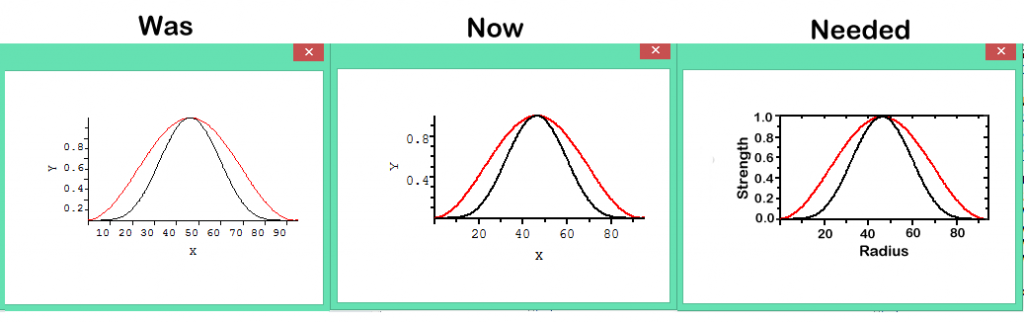
Paul, Can you please also create the boxed plotting surface like here ?

http://i1320.photobucket.com/albums/u523/rrr2005r/pl_was_now_neded4_zpsd3d42e03.png

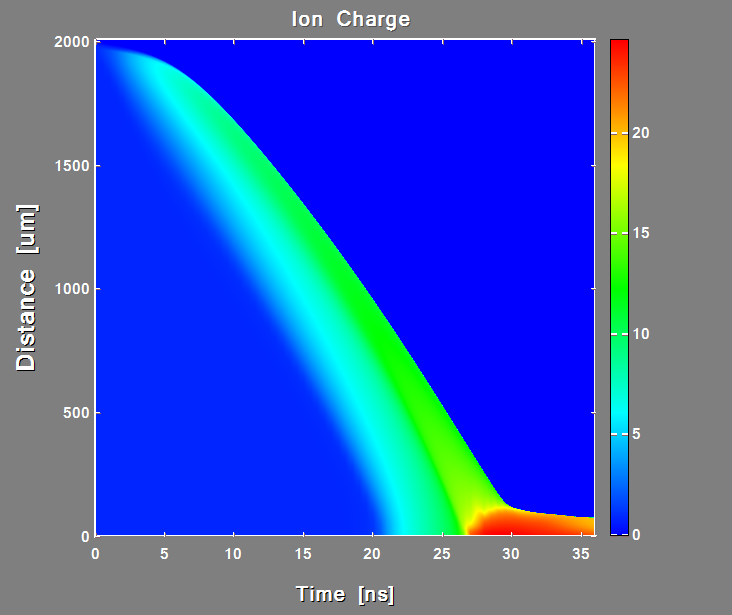
After finishing with XY plots obvious next logical step will be if new Plotter will also create such surface plots with just user providing data and clicking 'run' it will be totally genial utility everyone want

http://i1320.photobucket.com/albums/u523/rrr2005r/MyCodeSurfPlot_zps5c6fb231.png

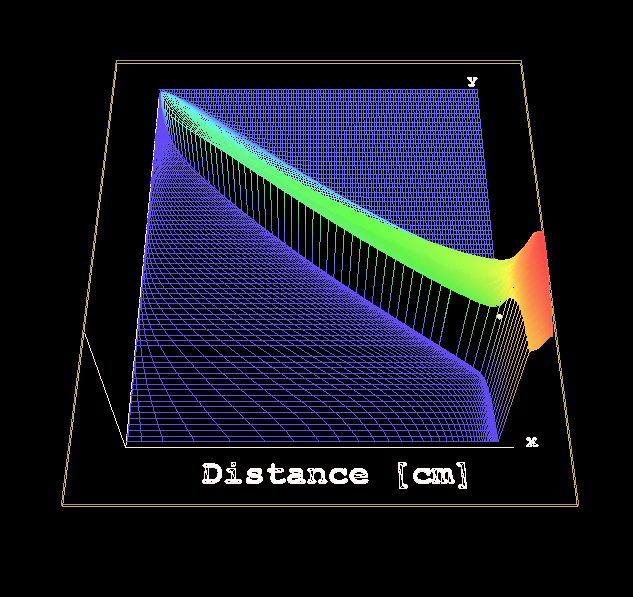
Same for 3D plots (surfaceplot and 3D plots are sharing 99.999% of the source code)

http://i1320.photobucket.com/albums/u523/rrr2005r/MyCode3DPlot2_zps7535756a.png

18 Nov 2016 7:13 #18426

Thanks Dan

The box should be easy. The rest maybe next week.

22 Nov 2016 6:19 #18448

I was trying to run your example program but using the option of x_array, with x_array changing from calc1 to calc2 subroutines.., so I have two data sets, x-y and x-z, so the program code is:

PROGRAM main 
      USE mydata
      n_points(1) = 0
      n_points(2) = 0
      i=winio@('%ww[no_border]%ca[Damped wave]%pv&') 
      i=winio@('%mn[Edit[Draw first,Draw second,Clear]]&', draw1, draw2,clear) 
      i=winio@('%fn[Tahoma]&') 
      i=winio@('%ts&', 1.1d0) 
      i=winio@('%tc&',rgb@(0,0,80)) 
      i=winio@('%it&') 
      i=winio@('%`bg&',rgb@(230,255,225)) 
      CALL winop@('%pl[native,independent]') 
      CALL winop@('%pl[n_graphs=2]')   
      CALL winop@('%pl[title='Sample plot']') 
      CALL winop@('%pl[x_axis=Time(Milliseconds)]') 
      CALL winop@('%pl[y_axis=Amplitude@(-4.0)]') 
      CALL winop@('%pl[width=1]') 
      CALL winop@('%pl[smoothing=4]') ! anti-aliasing 
      CALL winop@('%pl[colour=red,style=2,pen_style=0,x_array]')    
      CALL winop@('%pl[colour=blue,style=2,pen_style=4,x_array]')   
      i=winio@('%pl',800,400,n_points,x,y,z) 
      END

However, the compiler says: too few arguments to satisfy winio@ format (continuation 7). I found some additional issues during plotting but I like to solved this one first....

Agustin

22 Nov 2016 8:41 #18449

Found the problem!!!.....although this is not clear in the notes (at least for me), seems that one has to provide as many as x_array/y_array pairs as needed, so that, the last statement in the previous code should be:

i=winio@('%pl',800,400,n_points,x1,y,x2,z) 

The other issue that I discovered is that the function Clear() must include now not only y=0.0 and z=0.0, but also x1=0.0, and x2=0.0 or one will observe that the x-axis remains at x=500 forever....

Agustin

23 Nov 2016 8:05 #18453

Agustin

Yes. Maybe there was an error in my sample code.

When using the options [independent,x_array], the x and y arrays are in pairs otherwise there is just one x array.

23 Nov 2016 11:24 #18454

Quoted from ...

  i=winio@('%fn[Tahoma]&') 
  i=winio@('%ts&', 1.1d0) 
  i=winio@('%tc&',rgb@(0,0,80)) 
  i=winio@('%it&') 
  i=winio@('%`bg&',rgb@(230,255,225)) 
  CALL winop@('%pl[native,independent]') 
  CALL winop@('%pl[n_graphs=2]')   
  CALL winop@('%pl[title='Sample plot']') 
  CALL winop@('%pl[x_axis=Time(Milliseconds)]') 
  CALL winop@('%pl[y_axis=Amplitude@(-4.0)]') 

Paul, Why CALL winop@... not i=winop@... ?

23 Nov 2016 4:19 #18457

Dan

The is nothing useful to return from winop@.

23 Nov 2016 8:10 (Edited: 23 Nov 2016 8:22) #18458

Not all i=winio@ are useful either but some are. Formally these subroutines with CALL and functions with i=winio@ look and feel like they do the same things.

Why lose the possibility to have potential respond from function? This i=winio@ could be useful for something in future like generally useful is i=winio@

Besides CALLs break the style and confuse

On early stage of development it is possible to change things. Later this will be almost impossible.

23 Nov 2016 8:18 #18459

OK. I will look into that.

24 Nov 2016 4:26 #18463

Dear Paul,

I have found some problems with the locations of tick labels. As I am trying to implement the new %pl for plotting different types of data sets during the run of the program (they can be Current-Time, Potential-Time, Current-Potential, etc.), I have implemented a Function Legend that changes the Axis labels depending on what is plotted at a certain time. The result is that the tick labels can appear correctly located below the x-axis, for instance, but once I plotted a second data set, they move upwards (the same for the y-axis) and remain there for the rest of the run. See this code, for instance:

[code]WINAPP MODULE mydata USE clrwin INTEGER n_points(2) REAL8 xstart(2),dx(2) INTEGER,PARAMETER::n=1000 REAL8:: y(n)=0.0,z(n)=0.0,w(n) integer4 :: ancho,alto logical4 :: plot=.false.

  CONTAINS

  INTEGER FUNCTION legend()

integer ancho2,alto2,alto3,ancho3 ancho2=ancho/2.0 alto2=alto-20 ancho3=ancho*0.05 alto3=alto/2.0 if(plot) then CALL draw_characters@('Time/s', ancho2, alto2, 0) CALL rotate_font@(90.0D0) CALL draw_characters@('Current/A', ancho3, alto3, 0) CALL rotate_font@(0.0D0) endif legend = 2 END FUNCTION legend

  SUBROUTINE calc1(k)
    INTEGER i,x,k 
    DOUBLE PRECISION p1,p2,p3 
    p1=1.5d0 
    p2=150.0d0 
    p3=15d0 
    x=0 
    plot=.true.
    DO i=1,k 
      y(i)=p1*exp(-x/p2) 
      x=x+1 
    ENDDO 
  END SUBROUTINE calc1
   
  SUBROUTINE calc2(k)
    INTEGER i,x,k 
    DOUBLE PRECISION p1,p2,p3 
    p1=1.0d0 
    p2=150.0d0 
    p3=20d0 
    x=0 
    plot=.true.
    DO i=1,k 
      z(i)=p1*exp(-x/p2) 
      x=x+1 
    ENDDO 
  END SUBROUTINE calc2

  SUBROUTINE calc3(k)
    INTEGER i,x,k 
    DOUBLE PRECISION p1,p2,p3 
    p1=2.0d0 
    p2=150.0d0 
    p3=20d0 
    x=0
    plot=.true.
    DO i=1,k 
      w(i)=p1*exp(-x/p2) 
      x=x+1 
    ENDDO 
  END SUBROUTINE calc3

  INTEGER FUNCTION draw1()
    CALL calc1(n_points(1))
    CALL simpleplot_redraw@() 
    draw1 = 2 
  END FUNCTION draw1 

  INTEGER FUNCTION draw2() 
    CALL calc2(n_points(2))
    CALL simpleplot_redraw@() 
    draw2 = 2 
  END FUNCTION draw2 

  INTEGER FUNCTION clear() 
    y = 0.0d0
    z = 0.0d0
    w = 0.0d0
    plot=.false.
    CALL simpleplot_redraw@() 
    clear = 2 
  END FUNCTION clear

  INTEGER FUNCTION change()
    INTEGER i
    if(n_points(2) == 500)then
      n_points(2) = 1000
      dx(2) = 1.0d0
      CALL calc3(1000)
      i = CHANGE_GRAPH_STYLE@(2,0,0,255)
      i = CHANGE_GRAPH_DATA@(2,0.0d0,w)
    else
      n_points(2) = 500
      dx(2) = 2.0d0
      CALL calc2(500)
      i = CHANGE_GRAPH_STYLE@(2,2,4,RGB@(0,0,255))
      i = CHANGE_GRAPH_DATA@(2,0.0d0,z)
    endif    
    CALL simpleplot_redraw@() 
    change = 2
  END FUNCTION change  
  END MODULE mydata

  PROGRAM main 
  USE mydata
  external legend
  ancho=0.8*clearwin_info@('SCREEN_WIDTH')
 alto=0.8*clearwin_info@('SCREEN_DEPTH')

  n_points(1) = 1000
  n_points(2) = 500
  xstart = 0.0d0
  dx(1) = 1.0d0
  dx(2) = 2.0d0
  i=winio@('%ww[no_border]%ca[Damped wave]%pv&') 
  i=winio@('%mn[Edit[Draw first,Draw second,Change second,Clear
24 Nov 2016 5:04 #18464

Thanks. I will take a look at it.

24 Nov 2016 5:36 #18465

Ooopppss....seems that the code is incomplete. This is the main program:

PROGRAM main 
      USE mydata
      external legend
      ancho=0.8*clearwin_info@('SCREEN_WIDTH')
     alto=0.8*clearwin_info@('SCREEN_DEPTH')

      n_points(1) = 1000
      n_points(2) = 500
      xstart = 0.0d0
      dx(1) = 1.0d0
      dx(2) = 2.0d0
      i=winio@('%ww[no_border]%ca[Damped wave]%pv&') 
      i=winio@('%mn[Edit[Draw first,Draw second,Change second,Clear]]&', draw1, draw2,change,clear) 
      i=winio@('%fn[Tahoma]&') 
      i=winio@('%ts&', 1.1d0) 
      i=winio@('%tc&',rgb@(0,0,80)) 
      i=winio@('%it&') 
      i=winio@('%`bg&',rgb@(230,255,225)) 
      CALL winop@('%pl[native,independent]') 
      CALL winop@('%pl[n_graphs=2]')   
      CALL winop@('%pl[title='Sample plot']') 
      CALL winop@('%pl[x_axis=@]') 
      CALL winop@('%pl[y_axis=@]') 
      CALL winop@('%pl[width=1]') 
      CALL winop@('%pl[smoothing=4]') ! anti-aliasing 
      CALL winop@('%pl[colour=red,style=2,pen_style=0]')    
      CALL winop@('%pl[colour=blue,style=2,pen_style=4]')   
      i=winio@('%^pl',ancho,alto,n_points,xstart,dx,y,z,legend) 
      END
Please login to reply.