Silverfrost Forums

Welcome to our forums

Beta release of ClearWin+

3 Feb 2015 11:06 #15587

Here is the link, use it all including by some reason not highlighted end: https://onedrive.live.com/?cid=51A5F9B536E1368D&id=51A5F9B536E1368D!105

4 Feb 2015 9:08 #15588

I have not looked closely at the logic but maybe you need to call USE_GDIPLUS_IMAGE_FILES@(1) at other points in the program as well.

As a test try putting this in every subprogram.

7 Feb 2015 12:03 #15604

Paul,

I added the line

      C_EXTERNAL USE_GDIPLUS_IMAGE_FILES@ '__use_gdiPlusForImageFiles'
     *  (VAL):integer*4

in one of my subroutines as you mentioned, but when linking I get the error message 'WARNING the following symbols are missing __use_gdiPlusForImageFiles'. What is wrong?

Wilfried

7 Feb 2015 12:49 #15605

Are you sure that you are still using the salflibc.dll beta version?

7 Feb 2015 4:04 #15606

Yes, after installing the actual FTN95 version, I copied the latest salflibc.dll (dated from 28th of January) into c:\program files (x86)\silverforst\ftn95. I've just controlled that. Should I copy the DLL also into another path?

The error message didn't result from the line C_EXTERNAL ... but from the call to this function (j = use_gdiplus_...).

Wilfried

7 Feb 2015 4:50 #15607

Maybe there is an old copy of salflibc.dll that is getting in the way.

As a test, try copying the beta DLL to the folder that holds the current executable.

7 Feb 2015 5:03 #15608

It makes no difference... I just scanned my PC for the DLL, I copied the actual one also into the subdirectory ...\redist, but again no difference. I wrote a small test program, same result. I have no idea about the reason.

Wilfried

7 Feb 2015 5:10 #15609

Paul,

I found the solution. I only copied the DLL but not the LIB... Sorry for the trouble I made 😮ops:

Wilfried

8 Feb 2015 9:04 #15615

I still make the same mistake from time to time.

8 Feb 2015 9:39 (Edited: 9 Feb 2015 7:11) #15619

Unfortunately that suggestion did not work and I have absolutely no time to any experiments right now, fixing this thing is not urgent. But hopefully someone has some free time. By the way the program i uploaded could be useful for everyone many times in your lives. Disclaimer is usual - you can modify it at your convenience and use at your discretion, with of course my zero liability.

The zip file has no exe, only source and bat file for your compilation convenience, so nothing to worry about viruses.

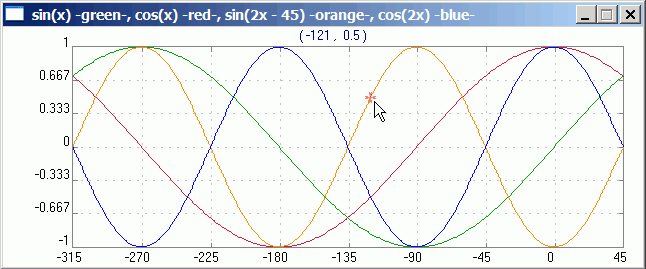
This program digitizes graphs. You have always use Ctrl+LeftClick to change or set anything

  1. drop the image,
  2. Ctrl+LeftClick on the point on the graph X or Y axis at any initial and end points, then right click, set physical coordinates for the four (X0,X1) and (Y0,Y1) points from the graph better for accuracy of digitizing taking a minimum and maximum on the graph (the pixel coordinates x,y will be set automatically). For example it will be (-315,45) and (-1,1) as in the picture below
  3. select/highlight the area which contains the graphs (without other things which might interfere, like graph axis, texts etc if they have the same color as digitized curve). For that again use Ctrl and left mouse button moving mouse fom one desired corner to another
  4. chose the color of the digitized curve by stepping on the curve and again CTRL+LeftClicking
  5. push Digitize button.

The digitized points will appear on the graph with the color and thickness you can additionally set. You can see if any points are correctly digitized. You can reload the graph if needed

The directory will contain digitized data and settings file for this specific graph with the same name so that next time you just drop the same graph and only click Digitize button

Try it on this curve http://koolplot.codecutter.org/graph.gif

But first please find the bug with PNG, GIF etc files 😃. BMP works fine if you set istate=0 in parameters. Turn this GIF file to BMP initially to see how things work, then change istate=1 and use GIF or PNG to see that the code stops working

9 Feb 2015 12:12 #15620

Dan,

I made a few modifications in your code. In „Program Digitizer“ I added

        C_EXTERNAL USE_GDIPLUS_IMAGE_FILES@ '__use_gdiPlusForImageFiles'  (VAL):INTEGER*4

        istate=1	
        istate0= USE_GDIPLUS_IMAGE_FILES@(istate)

These lines I deleted in the function ReadDragAndDropFiles, but there I added

    character*256  string

A bit more down, I de-activated

!        call get_dib_block@(filenameImageToRead,ImageArr,hres, vres,0,0,hres, vres,0,0,ier)
!        if(ier.ne.0) goto 993

After your winio@ calls, just before “goto 10000”, I added

      string = ' '
      string = '{'//trim(filenameImageToRead)//'}'//char(0)
      j = import_image@(string,0,0)

… and it runs.

It seems to me that get_dib_block@ doesn’t work together with the GDI+ enhancements, but the import_image@ function do the job.

Wilfried

9 Feb 2015 7:26 #15622

Thanks Wilfried, That was good workaround to display the bitmap. Now do you have similar workaround to read the bitmap into data array ImageArr(3,ixsize,iysize) what the get_dib_block@ was doing ?

But the big question still remains why does the small code I posted above works fine with get_dib_block@ and the enhancement on? That is impossible, isn't it? Here Paul may shed the light, probably, as this is him who speaks to the devil directly.

10 Feb 2015 8:51 #15624

Dan,

yes, the big question remains 😉

A workaround to get the array from the data loaded into a %gr area may probably look like this (but I'm sure there could exist a better way):

do j = 1,ImageWidth
  do i = 1,ImageHeight
    call get_rgb_value@(j,i,k)
    l = loword(k)
    ImageArr(1,j,i) = char(lobyte(l))
    ImageArr(2,j,i) = char(hibyte(l))
    ImageArr(3,j,i) = char(hiword(k))
  end do
end do

Wilfried

11 Feb 2015 6:47 (Edited: 11 Feb 2015 11:53) #15632

Yes, this works too, thanks.

(I extensively use this function after the mouse call get_mouse_info@ (ixmoubut, iymoubut, iflags) call GET_RGB_VALUE@( ixmoubut, iymoubut, iRGBvalue ) and by inertia though that it only shows mouse cursor rgb 😃 )

Will try to make small example so Paul will see the reason for other method troubles and then will post the whole code again

11 Feb 2015 7:10 #15633

Paul,

I modified the code a bit and though i could not find the reason i found two signs or clear irregularities.

  1. The code which i said worked OK in fact crashed on second time you drop the file

  2. Adding SAVE statement allowed it not to crash at least with two drops

    INTEGER , EXTERNAL :: DropFiles i=winio@('%ww[no_border]&') i=winio@('%bg[#cc9999]&') i=winio@('%si! Drag-n-drop BMP,PNG,GIF etc file here %ff %ff&') i=winio@('%dr&', DropFiles)

        i=winio@('%ac[Alt+X]&','exit') 
        i=winio@(' %ff %cn%tt[OK]') 
    

    END PROGRAM

     integer function  DropFiles() 
     use clrwin 
     character*128 filename1 
     integer*1, dimension(:,:,:), allocatable :: ImageArr 
     integer hres, vres, colours, ier 
     C_EXTERNAL USE_GDIPLUS_IMAGE_FILES@ '__use_gdiPlusForImageFiles'  (VAL):INTEGER*4 
     SAVE
    
     istate=1	
     istate0= USE_GDIPLUS_IMAGE_FILES@(istate)
    
     filename1 = clearwin_string@ ('DROPPED_FILE') 
     call get_dib_size@(filename1, hres, vres, nb_colours, ier) 
     print*,' hres,vres,nb_colours=',hres, vres, nb_colours 
    
     kAllocOK=0 
     allocate ( ImageArr(3,hres, vres),  stat = kAllocOK) 
     if (kAllocOK /= 0) write (*,*) 'Allocation problem #', kAllocOK, hres, vres 
    
     call get_dib_block@(filename1,ImageArr,hres, vres,0,0,hres, vres,0,0,ier) 
     if(ier.ne.0) Print*, 'get Err=',ier 
    
     i=winio@('%ww&') 
     i=winio@('%gr[full_mouse_input,rgb_colours,popup]&',hres,vres) 
     i=winio@('%ac[Alt+X]&','exit') 
     i=winio@('%ac[esc]&','set', LWwindow_control,0) ! 'exit') 
     i=winio@('%lw', LWwindow_control) 
    
     call display_dib_block@(0,0,ImageArr,hres,vres,0,0,hres,vres,0,0,ier) 
     if(ier.ne.0) Print*, 'Display Err=',ier 
    

    ! deallocate(ImageArr, stat = ios) ! if (ios /= 0) then ! print *, 'Was nothing to deallocate' ! end if

      DropFiles=2 
     end function
    

That fix is not urgent, since Wilfried's workaround solves the problem

11 Feb 2015 8:38 #15635

Your program works fine for me. I have modified it slightly but not in a significant way that I know of.

    winapp
    program main
    implicit none
    integer,external::DropFiles 
    c_external use_gdiplus_image_files@ '__use_gdiPlusForImageFiles'(VAL):integer 
    integer i,winio@
    i=use_gdiplus_image_files@(1) 
    i=winio@('%ww[no_border]&') 
    i=winio@('%bg[#cc9999]&') 
    i=winio@('%si! Drag-n-drop BMP,PNG,GIF etc file here   %ff %ff&') 
    i=winio@('%dr&', DropFiles) 
    i=winio@('%ac[Alt+X]&','exit') 
    i=winio@(' %ff %cn%tt[OK]%nl.') 
    end program          

    integer function DropFiles() 
    use clrwin 
    implicit none
    character*256 filename1 
    integer*1, dimension(:,:,:), allocatable :: ImageArr 
    integer hres, vres, colours, ier, LWwindow_control, i, kAllocOK, nb_colours 
    filename1 = clearwin_string@('DROPPED_FILE') 
    call get_dib_size@(filename1, hres, vres, nb_colours, ier) 
    Print*,' hres,vres,nb_colours=',hres, vres, nb_colours 
    allocate(ImageArr(3,hres, vres), stat = kAllocOK) 
    if(kAllocOK /= 0) Print*, 'Allocation problem #', kAllocOK, hres, vres 
    call get_dib_block@(filename1,ImageArr,hres, vres,0,0,hres, vres,0,0,ier) 
    if(ier /= 0) Print*, 'Get Err=',ier 
    i=winio@('%ww&') 
    i=winio@('%gr&',hres,vres) 
    i=winio@('%ac[Alt+X]&','exit') 
    i=winio@('%ac[esc]&','set', LWwindow_control,0) 
    i=winio@('%lw', LWwindow_control) 
    call display_dib_block@(0,0,ImageArr,hres,vres,0,0,hres,vres,0,0,ier) 
    if(ier /= 0) Print*, 'Display Err=',ier 
    DropFiles=2 
    end function 
11 Feb 2015 11:01 #15636

Thanks. Indeed it is interesting that you have found a stable configuration but the main point is that my text should also work as it is completely legitimate and it works without these new features fine. If not find the reason and leave it as is the devilry will still live in the compiler

I tried different things, even rebooted computer which took me two days to save and close 1000 open for months windows, and after that i thought i found the reason (it was in character128 filename1 versus yours character256 filename1 - which is strange) but things changed after reboot. That is exactly what i call devilry

Will experiment more when have time since this devilry usually kicks exactly the day before the important talk or meeting when there is absolutely no time 😃

12 Feb 2015 7:20 #15638

It might be something to do with the %gr options. If you find thing that makes the difference then please let me know.

13 Feb 2015 4:17 #15639

Seems %gr options above are ok. Crashing in this small code is caused by the declaration inside callback function. If move it as you initially suggested to main program (why? it should work both ways) this code does not crash. Still in my bigger program DIB function fails with error variable ier>0.

2 Mar 2015 5:50 #15782

I think i made an error above. One thing which was muddying transparent over graphics backgrounds texts was indeed fixed but now texts lost the transparency. Basically everything is returned back to older state where transparency of texts did not exist.

/* The reason why i made an error is because i made 'titanic' work for most controls i use and handpainted the white background under the texts to have approximately the same color as graphics bitmaps under it and when checked latest beta did not notice small discrepancy.

/** Since not many people really use this new feature yet, plus it is just a cosmetic problem, it is not urgent issue to fix. What was fixed is more important. And of course getting 64bit compiler out is way more important too.

Please login to reply.