Silverfrost Forums

Welcome to our forums

Font Picker dialog

5 Jan 2025 3:25 #31798

Is there already a way to invoke the Windows Font Picker dialog? I have need of a user selection of the font, style type, and size. I see how when I review the MSDN description, and wondered if I just missed something in the .enh or .chm help.

Bill

8 Jan 2025 5:20 #31800

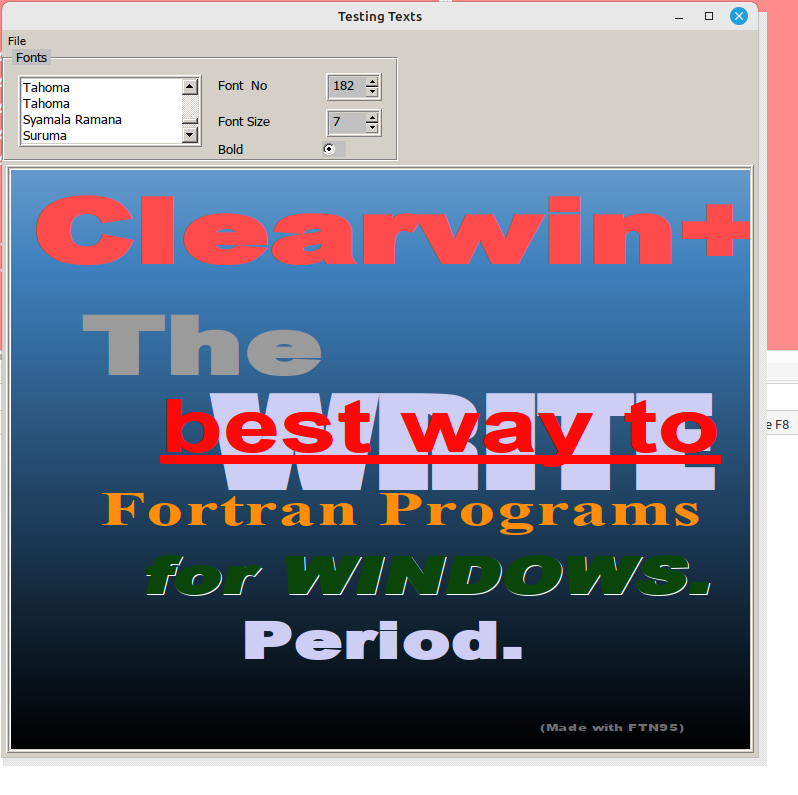
Bill, Selection of fonts to use for %gr graphics windows it is very easy. Here is an extraction from my very old Fortran77 code. It check all existing fonts on your computer and shows you their names in a dialog. You can also pic there font size, bold/italic and with one more additional easy (but missing here) command the font color

Selection of fonts for text windows or for OpenGL windows is a different story, but also probably doable this way.

        winapp 500000,500000
        include <windows.ins>
c	use clrwin

	external RADEX_LOGO5
	integer  RADEX_LOGO5
  
c        character*30 FontNames(1000), string
	real*8 FontCapt1Size
	common /font_capt1/ ifontCapt1, ibold1, FontCapt1Size

	character*50 Fontname1,string, StandardRADEXFont 
	common /CompFontsNames_/ Numb_CompFonts, iStandardRADEXFont, 
     *  Fontname1(300), StandardRADEXFont    

	common /GrSize_/ixWidGrRL5, iyWidGrRL5


	iOutUnit = 0
	ihwhole  = 11
	ihgrRL5 = 1
	ixWidGrRL5 = 740
	iyWidGrRL5 = 580
	ibold1 = 1 
	FontCapt1Size = 7
	ifontCapt1 = 1

        do j=1,300
        call get_font_name@(string,j)
        if (string.eq.' ') goto 999
        Fontname1(j)=string
c       print *,j,'  [',string,']'
        enddo
999 	Numb_CompFonts = j-1
	if(Numb_CompFonts.le.1) Numb_CompFonts = 1


	i=winio@('%ww[no_border,casts_shadow]&')	
        i=winio@('%ca[Testing Texts]%bg[grey]&')

        i=winio@('%sy[3d_raised]&')

        i = winio@('%mn[File[&Caption]]&',RADEX_LOGO5)
        i = winio@('%mn[[E&xit]]&','exit')

        i=winio@('%ob[named_l][Fonts] %`bg[window]%^20.4ls&',
     *  Fontname1, Numb_CompFonts, ifontCapt1, RADEX_LOGO5)

        i = winio@('%ac[Esc]&',  'exit')
c        i=winio@('%lw&',lw)


	i=winio@('  Font  No %ta%dd%il%4^rd%nl&', 
     *  1,  1,Numb_CompFonts, ifontCapt1,    RADEX_LOGO5)
	i=winio@('  Font Size %ta%df%fl%4^rf %nl&', 
     *  1.d0, 0.d0, 100.d0, FontCapt1Size, RADEX_LOGO5)

	i=winio@('  Bold %2ta%^rb[ ] %cb%ff&',  ibold1,  RADEX_LOGO5)


        i=winio@('%pv%^gr[full_mouse_input, rgb_colours, '//
     *  'user_resize, white]%lc',
     *  ixWidGrRL5, iyWidGrRL5, RADEX_LOGO5, ihgrRL5)


c        do j=1,300
c        call get_font_name@(string,j)
c        if (string.eq.' ') goto 9999
c        Fontname1(j)=string
c        print *,j,'  [',string,']'
c        enddo
c9999	continue

	End	
        integer function RADEX_LOGO5 ()
        RADEX_LOGO5 =2
        end function
https://i.postimg.cc/DwjPbkJp/Screenshot-from-2025-01-07-20-57-46.png

8 Jan 2025 9:05 #31801

Dan

Thank you for this very useful sample program.

I will keep it (in a simplified form) for future reference.

Here is a copy...

      winapp
      use clrwin
      real*8 FontSize
      character*80 FontName(300),str
      integer ifontNo,iBold,i,j,NumbFonts
      integer,external::cb
      iBold = 1
      FontSize = 7d0
      ifontNo = 1
      do j=1,300
        call get_font_name@(str,j)
        if (str.eq.' ') exit
        FontName(j)=str
      enddo
      NumbFonts = j-1
      if(NumbFonts.le.1) NumbFonts = 1
      i=winio@('%ww%ca[Testing Fonts]&')
      i=winio@('%ob[named_l][Fonts]%^20.4ls&',FontName,NumbFonts,ifontNo,cb)
      i=winio@('  Font  No %ta%dd%il%4^rd%nl&', 1, 1,NumbFonts,ifontNo,cb)
      i=winio@('  Font Size %ta%df%fl%4^rf %nl&',1.d0,0.d0,100.d0,FontSize,cb)
      i=winio@('  Bold %ta%^rb[ ] %cb%ff',  iBold,  cb)
      end   
      
      integer function cb()
        cb=2
      end function
9 Jan 2025 5:06 #31805

Thanks, Dan and Paul,

My need is a bit 'different' in that I am trying to choose a font, and imbed this into my report generator (creates a PDF), not into an existing ClearWin+ usage.

That said, I will keep this as a reference for sometime in the future.

Bill

P.S. As an aside, I have found that not all fonts in Windows have a file to be referenced (as I would need to know to embed into the PDF), these being 'native' for Windows. Even if I download a free one from the Microsoft store, it doesn't appear with a file name at all!

Has anyone looked at buying fonts for use? It is quite pricey!

20 Jan 2025 9:41 #31827

New options [font_pitch=p] and/or [font_set=s] have been added for listboxes and dropdown lists (%ls, %`ls and %el). These automatically populate a list with the names of available fonts.

p has the value 1 for fixed pitch, 2 for variable pitch or 3 for both. s has the value zero for the ANSI character set or 2 for the symbol character set. Other values of s, in the range 128 to 238, denote various language sets.

The arguments, named 'items' and 'num_items' are not required and must be omitted in this context.

The number of items shown in a dropdown list is limited, first by the supplied value of m (in %`m.nls) and then by the vertical height of the display screen. As a result, a dropdown list cannot be used when there are a large number of fonts available because some items will not be displayed.

20 Jan 2025 2:58 #31829

I will enjoy trying this feature out on the next release, or partial release(?).

Bill

21 Jan 2025 10:21 #31830

Bill

In order to make full use of the new options you will need interfaces to some new functions and subroutines; this means new include or mod files for ClearWin+. I may be able to provide an interim release shortly but this will not contain the include and mod files. Here is a sample program that illustrates how it will work in the end.

winapp
module TestFont
  use clrwin
  character*80 faceName
  integer(7) hwndSample,hwndList
  integer::bold,italic,underline,isz,icolour
  integer,parameter::N=8
  character(len=2)::sizes(N)
  
contains

integer function cb()
  integer(7) hFont
  integer ht
  ht = 10
  read(sizes(isz), '(i2)') ht
  call get_control_text@(hwndList, faceName, 80)
  call set_control_text@(hwndSample, faceName, 0, 0)
  call set_control_text_colour@(hwndSample, icolour)
  hFont = set_control_font@(hwndSample,faceName,ht,bold,italic,underline)
  cb = 2
end function

integer function selectColor()
  integer sel
  sel = choose_colour@()
  if(sel /= -1)then
    icolour = sel
    sel = cb()
  endif  
  selectColor = 2
end function

integer function initialise()
  integer i,fontNo
  sizes=[' 8',' 9','10','11','12','13','14','15']
  bold = 0;italic = 0;underline = 0;isz = 3;fontNo = 1;icolour = 0
  faceName = 'Sample'
  i=winio@('%ww%ca[Testing Fonts]&')
  i=winio@('%fn[Tahoma]&')
  i=winio@('%ob[named_l][Fonts]&')
  i=winio@('%~bg[BTNFACE]&')
  i=winio@('Name:%nl&')
  i=winio@('%`bg[WINDOW]&')
  i=winio@('%^29.10ls[font_pitch=2,font_set=1]&',fontNo,cb)
  i=winio@('%lc&',hwndList)
  i=winio@('Size: &')
  i=winio@('%`^6.10ls&',sizes,N,isz,cb)
  i=winio@('%2nl%cn%^tt[Colour]&', selectColor)
  i=winio@('%2nl %`^rb[Bold]&',     bold,cb)
  i=winio@('%nl %`^rb[Italic]&',    italic,cb)
  i=winio@('%nl %`^rb[Underline]&', underline,cb)
  i=winio@('%ff%nl&')
  i=winio@('%ts&', 1.7d0) !Increase the height of the sample box
  i=winio@('%`bg[WINDOW]&')
  i=winio@('%18ws[center,border]&',faceName)
  i=winio@('%ts&', 1d0)
  i=winio@('%lc&',hwndSample)
  i=winio@('%cb&')
  i=winio@('%sc',cb)
  initialise = i
end function      


end module

program main
 use TestFont
 i = initialise()
end program 

resources
1 24 default.manifest  
21 Jan 2025 2:08 #31833

Thanks, Paul. This will be very helpful.

Bill

22 Jan 2025 4:13 #31838

New options [colors] and [icons] have now been added for %ls and %`ls. [colors] displays coloured boxes to the left of the list using an array of RGB values. [icons] displays icons to the left of the list. These are automatically constructed from a continuous horizontal strip of 16x16 bitmaps.

The following sample illustrates how it will work...

winapp
program main
 use clrwin
 integer,parameter::N=16
 character(10)::items(N)
 integer cItem,colors(N)
 cItem = 1
 items = ['Black     ','White     ','Maroon    ','Dark green','Olive     ','Dark blue ','Purple    ',&
          'Aquamarine','Light grey','Dark grey ','Red       ','Green     ','Yellow    ','Blue      ',&
          'Magenta   ','Cyan      ']
 colors = [0,Z'ffffff',Z'000080',Z'008000',Z'008080',Z'800000',Z'800080',Z'808000',Z'c0c0c0',&
             Z'808080',Z'0000ff',Z'00ff00',Z'00ffff',Z'ff0000',Z'ff00ff',Z'ffff00'] 

iw = winio@('%ca[Colours]&')
iw = winio@('%`bg[BTNFACE]&')
iw = winio@('%`16.16ls[height=20,colors]',items,colors,N,cItem)

iw = winio@('%ca[Colours]&')
iw = winio@('%`16.16ls[height=18,icons]',items,'bitmap',N,cItem)
end program

resources
bitmap BITMAP colors.bmp
1 24 default.manifest
22 Jan 2025 5:24 #31839

Bill,

I'm mightily impressed that you do PDF output, although you can lay out pages with ClearWin+ and then use the WIndows PDF print driver.

Eddie

24 Jan 2025 8:34 #31855

Eddie,

Most of the PDF I do is to create output files of numerical-style reports and graphics data. The resulting PDF's (especially for the graphics data) that my users create are usually 36 inches wide (wide format plotter) and can easily be 1000 inches long. The PDF allows them to print at 300DPI.

PDF's gives me a 'surface' that has virtually no limits (the PDF SW interface limits outputs to 22,000 inches in both directions; no one has that much data). It's only that limit because there is a commercial drill hole laser printer that can continuous feed 2000 sheets of 11' long paper.

Because the PDF has actual move/draw style internal data, the resulting file is much, much smaller than one can get if a PDF file is created as an image. This may not be true for all graphics data; it is for my applications.

The PDF report capability allows me to generate a printed report that responds to all the 'standard' Fortran carriage control characters, as well as additional features (i.e. placing data at specific page locations given an (x,y) coordinate) at the same time the report is being created.

It has been fun using the PDF library for both text-style reports as well as the graphics routines I built to surround the PDF interface calls. I built an FTN95 compatible driver for the report capability. There are a few features I'd add to FTN95 that would remove the 'kludge' interface of supplying file names to user-drivers, but it's a small price to pay.

Bill

Please login to reply.