Silverfrost Forums

Welcome to our forums

Invalid FP operation, crash

22 Oct 2023 8:04 #30663

From my series of 'Saturday devilry'. It harasses me like that 10 times a day. This one already killed a lot of my time today

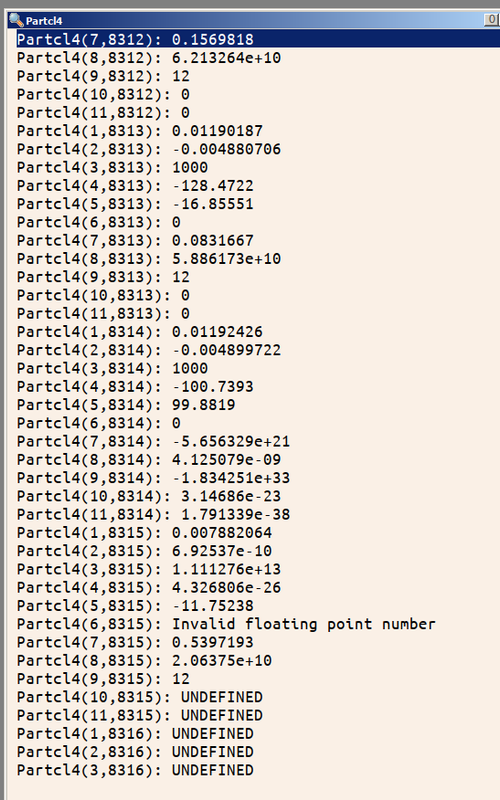
Never had this error before. Here what SDBG shows: crash on this line when reading some file. Notice err= and end= are present but not saved from crash nevertheless. Why? https://i.postimg.cc/VN6txLH2/Screenshot1a.png

The data is here: https://i.postimg.cc/6Qg8FVZG/Screenshot1b.png

How this number which must be 0 by default ( i set element #6 equal to 0 for every write) became corrupted i do not know. Devilry.

So how to avoid the crash? I suspect the number was larger than real4 allows. Or this was a denormal number. But anyway does FTN95 have the facility to deal with it? I can try substitute Partcl4 with some real8 variable (though this is unformatted read, that means it is not that straightforward to do) , check all is fine and copy its content into Partcl4 but this would slow down my read tremendously, it is already 1/3 of my day time losses. That would not help anyway if the place has a lot of garbage

23 Oct 2023 10:00 #30665

The first thing I see here is that FMT is missing in the read statement.

23 Oct 2023 3:30 #30666

Quoted from Kenneth_Smith The first thing I see here is that FMT is missing in the read statement.

Dan's code is doing an unformatted read, as he stated, so FMT does not come into play.

I suspect that Dan thinks that the ERR= clause in a READ statement covers all sorts of errors, including access violations caused by the variable PARTCL not being dimensioned suitably, etc. Here is an example to show that no I/O error is flagged when the I/O list contains an out of bounds array section.

program tst
   implicit none
   integer i, j(10), k(3), n
   do i=1,10
      j(i) = i*i+3
   end do
   open(10,file='x.bin',form='unformatted',status='replace')
   write(10)j
   close(10)
   
   n = 5
   open(11,file='x.bin',form='unformatted',status='old')
   rewind(11)
   read(11,end=20,err=30)k(1:n)  ! No I/O error, but subscript error
   print *,'k = ',k
   stop 'No I/O errors reading x.bin'
20 print *,'EOF on file x.bin'
   stop
30 print *,'ERR reading file x.bin'
   stop
end program
23 Oct 2023 4:38 #30667

This was not a variable limit problem, it was something else, some so stinky junk that even real*8 i tried to read it crashed the code 😃 Suspect what happened is that my external ssd drive fell during transfer (cables, cables everywhere, lots of cables) and electric noise caused something. What can happen in these 4 bytes which will put the code down? My impression was that some other compilers mark such places as a NOT A NUMBER and somehow there probably exist mechanism to not to crash the READ

24 Oct 2023 10:43 #30668

It has been my experience that the ERR= applies mainly to violations of an input format conversion (which an unformatted file does not have) or a bad record index used (for ACCESS='DIRECT'). If you try to read/write too much from/to a direct access file, that will be trapped as well. Very little else.

Stated another way, ERR= is great for formatted files!

ERR= It may also catch an end-of-file, and for that you'd have to use IOSTAT (=57) to get at the true cause.

There are ways of looking at the raw data in a file such as this. Perhaps that might explain why only one of thousands exhibits this behavior.

26 Oct 2023 6:09 #30669

Dan,

Can you assist to make a simple reproducer, by providing a link to the Partcl4 data.

A test program could be like

program tst
   implicit none
   real*4 :: Partcl4(11)
   integer i, n

   n = 11
   open(11,file='dan_partcl4_file.bin',form='unformatted',status='old')
   rewind(11)

   do i = 1,8315
     read (11,end=20,err=30)Partcl4(1:n)
     if (Partcl4(6) /= 0 ) write (*,*) 'non-zero 6 at line',i,partcl4(6)
   end do

   print *,'arrived at line = ',i-1
   write (*,*) Partcl4
   stop 'No I/O errors reading x.bin'

20 print *,'EOF on file x.bin at i=',i
   stop

30 print *,'ERR reading file x.bin at i=',i
   stop
end program

Then we could see what values are being read, possibly reporting with an octal or hex format.

Your SDBG report implies partcl4 is REAL4 ? You can't convert real8 stored data to real*4 in a read statement.

26 Oct 2023 6:12 #30673

John, I have 1-2 GB file with this error. I can send it to everyone who are interested.

I can create the Fortran code to read it or anyone can easily figure out how to read it as it has delimiter between the header and the data consisting of character variable containing 256 minus signs while the following it data is just eleven 4-bytes real numbers per each record, exactly like in the picture at the beginning this thread. The beauty of this method is that despite it is binary file everyone can open it with the text editor and see not just the garbage of binary content but the usual ASCII memo i left in the header about this specific variant of data. Header for example may look like this

Unformatted Data Version: 202310111 , Time= 1.00000045E-11                                                                                                                                                                                                      ßN                                                                    Ãiü3¨ :úñ¯ÚÜ@----------------------------------------------------------------------------------------------------------------------------------------------------------------------------------------------------------------------------------------------------------------3j¸ ‚=  zDu3B0þÁ    ,²’<»žƒN  À@        à´¸ ‚=  zDïh‘Ãù=öB    ²Ë\?;3Q  À@        Ò¯›¸[‚=  zDÊÞ£ÃÏ/®B    8–~?Ý$·Q  À@        ÒXò·(‚=  zD_5

The using this data code will read the file header, find the Data version and will read it accordingly. Or the code may completely ignore the header and search for 256 character delimiter and then read data. User though easily can see the major info about this file telling that this data file is for time moment Time= 1.00000045E-11. It is possible to add other useful info in the first line also consisting of 256 usual text/numbers symbols

27 Oct 2023 12:07 #30674

Dan,

Am I understanding that the file is an unformatted sequential binary file, using FTN95 format of 1 or 5 byte header/trailer format. There appear to be a mixture of record types.

However, there is a large chunk of 44-byte records (at least 8,315 records of 44 bytes > 357 kBytes of data) that is causing the problem.

You could read each of these records into a 44 byte field ( even character44 record ), then use TRANSFER to copy into real4 :: real_buffer(11) and check each entry, especially 'if ( real_buffer(6) /= 0 )' This approach could at least give you what hex values are in Partcl4(6,8315). You implied they should be zero, but something went wrong ?

Even reading these 44-byte records as character and dumping them into another 360kbyte binary file would overcome any invalid real number errors. Note these records have a 1-byte header/trailer in FTN95 format files.

Sorry, I am not a believer in 'Saturday devilry', so apply a systematic check of the problem.

Also puzzled as to how you edit the file's 256 character project header, without corrupting the FTN95 unformatted sequential file format ? Could this process corrupt the file

Please login to reply.