Silverfrost Forums

Welcome to our forums

An alternative to win_opt@

10 Jul 2023 7:21 #30431

The latest release allows you use double brackets %pl[[ rather than call win_opt@ and related routines. This also applies to %bn.

The following sample illustrates the idea and also the one exceptional case (using a function to define the curve) where the new approach will not work.

      MODULE plData
      CONTAINS
        DOUBLE PRECISION FUNCTION f(x)
        DOUBLE PRECISION x
        f = x*x
        END FUNCTION
      END MODULE plData

      WINAPP
      USE clrwin
      USE plData
      INTEGER,PARAMETER::N=11
      i = winio@('OK')
      i = winio@('%pl[[dx=0.1]&')      ! Extra [ instead of calls to win_opt@
      i = winio@('%pl[dy=0.2]&')
      i = winio@('%pl[x_max=1.0]&')
      i = winio@('%pl[y_max=1.0]&')
      i = winio@('%pl[width=2]&')
      i = winio@('%pl[smoothing=4]&')
      i = winio@('%pl[colour=red]&')
      i = winio@('%pl[etched]&')
      call winop_fun@('%pl[function]',f)
      i = winio@('%pl[gridlines]]&')   ! Extra ] to end what were calls to win_opt@
      i = winio@('%pl&',400,250,N,0.0d0,0.1d0)
      i = winio@('%ff%nl%cn%tt[OK]')
      END
28 Jul 2023 7:05 #30485

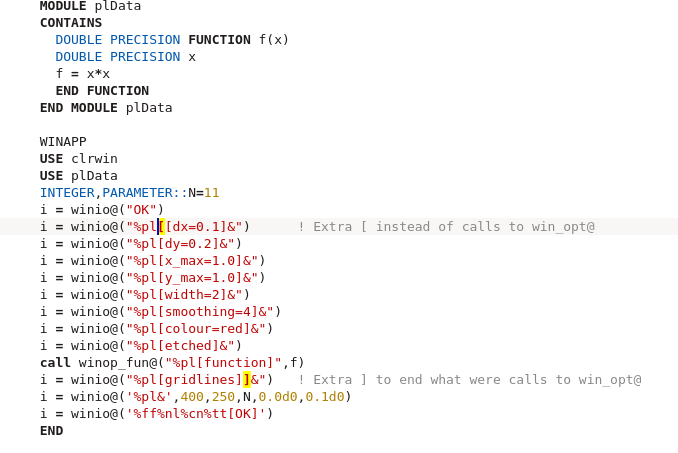
If happen that compiler find you some bracket mismatch error ('unmatched left or right bracket' or so) and you will start searching for it with some smart editor, which shows matched brackets, such editor will be confused and will confuse you showing wrong brackets openings and closes.

Here what editor Kate for example shows when you step with the cursor on the first bracket shown in yellow and ask him to highlight matched bracket: it will show matched bracket miles away, which is, needless to say, being completely irrelevant. Or is this exactly what intended by these double brackets? After Designers Mode I am not following Clearwin language complications anymore because think that this will not attract more users to it

https://i.postimg.cc/5NXV0nVQ/Screenshot-from-2023-07-27-23-47-22.png[/img]

28 Jul 2023 10:26 #30486

Consider the following simplification of Paul’s example code, also modified to use the more familiar WINOP@ approach:

      WINAPP
      USE clrwin
      USE plData
      INTEGER,PARAMETER::N=11
      call winop@('%pl[dx=0.1,dy=0.2,x_max=1.0,y_max=1.0]')
      call winop@('%pl[width=2,smoothing=4,colour=red,etched]')
      call winop_fun@('%pl[function]',f)
      call winop@('%pl[gridlines]')
      i = winio@('%pl&',400,250,N,0.0d0,0.1d0)
      i = winio@('%ff%nl%cn%tt[OK]')
      END

Here is the alternative code without using WINOP@:

      WINAPP
      USE clrwin
      USE plData
      INTEGER,PARAMETER::N=11
      i = winio@('%pl[[dx=0.1,dy=0.2,x_max=1.0,y_max=1.0]&')
      i = winio@('%pl[width=2,smoothing=4,colour=red,etched]&')
      call winop_fun@('%pl[function]',f)
      i = winio@('%pl[gridlines]]&')
      i = winio@('%pl&',400,250,N,0.0d0,0.1d0)
      i = winio@('%ff%nl%cn%tt[OK]')
      END

Both of these code snippets produce the required plot. Comparing the two codes, with the new approach is it clear than:

  1. All strings previously passed as arguments to winop@ must now end with & (since they are now being processed by winio@).
  2. The first string that was previously processed by winop@ must have the additional opening bracket ‘[‘ .
  3. The last string that was previously processed by winop@ must have the additional closing bracket ‘]’ .

In other words, the opening ‘[’ and closing ‘]’ brackets are place holders for the start and end of the strings that winio@ must now internally pass to winop@.

29 Jul 2023 5:59 #30487

First of all new features like this are provided with the aim of making ClearWin+ easier to use. They may not help some users and that's to be expected.

It would have been more intuitive to match the brackets on each line but the logic of the ClearWin+ code does not allow for this, at least not in a simple and direct way. I was quite surprised and pleased to be able to come up with this solution.

Please login to reply.