Silverfrost Forums

Welcome to our forums

Request for extension

15 Mar 2023 2:07 #30021

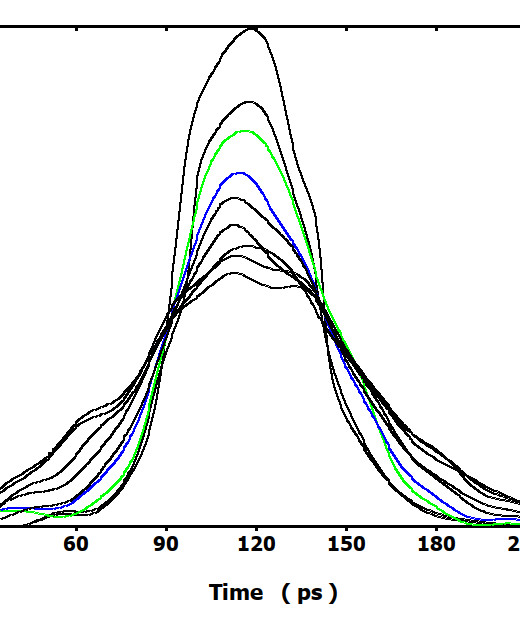
Currently %PL allows to plot only 9 curves on the same graph. As an example the plot looks like this: https://i.postimg.cc/wjrWdxjc/example1.jpg

This approximately covers 1/2 of evolution i intended to plot.

It is obvious that this limitation on number of curves is too restrictive. Would it be possible to triple or at least double that?

15 Mar 2023 8:24 #30023

Dan, take a look at the %pl[stacked] option.

16 Mar 2023 3:20 #30024

I know this option. It is extremely cumbersome way to deal with the multi-plot actually resembling a hack. Even those ways we discussed lately

https://forums.silverfrost.com/Forum/Topic/4064&highlight=multiplot

and which plot nicely https://i.postimg.cc/KYHdCvtz/multiplot.jpg turn out to be inconvenient after some experience with them. I stopped using them. I am asking now about just the standard plotting option to extend it a bit. It also is not ideal, but it's straightforward, simple and stable like all plotting should be.

As a side note, i think that the ideal, shortest, simplest and ultimately intuitive and obvious plotting method of multiple curves should look exactly like this

I=winio@('%pl[file=settings.set, independent]', n,m,x,y)

That's all, nothing else, this is complete line. All adjustments should be inside the settings.set file. Here n(m) is usual dimension of each of m plotted curves, and x and y are two-dimensional arrays x(n,m) and y(n,m) with n entries for each of m curves. The number of curves could be here infinite without any difficulties, conflicts or changes

How far is current standard method from ideal? Given its not punishing behavior it is pretty close to ideal. Currently i also use just one line to plot but it is long line like this

I=winio@('%pl[file=settings9.set, scale=linear, independent,n_graphs=9]', n, x(:,1),y(:,1),  x(:,2),y(:,2), x(:,3),y(:,3), x(:,4),y(:,4), x(:,5),y(:,5), x(:,6),y(:,6), x(:,7),y(:,7), x(:,8),y(:,8), x(:,9),y(:,9))

and even if i plot only say 3 curves all works OK. If extended to 20-30 i will just add more entries, it will be still universal without changes in number of plots in the source code

16 Mar 2023 8:05 #30025

In the following sample code a callback function is used to make a single plot by caling draw_curvesD@. This call could be repeated for other sets of data.

      WINAPP
      MODULE mymod
      USE mswin
      INTEGER,PARAMETER::N=11
      DOUBLE PRECISION x(N),y(N)
      CONTAINS
      INTEGER FUNCTION cb()
      DOUBLE PRECISION xx(5),yy(5)
      CALL set_plot_mode@(1)
      CALL set_line_width@(2) 
!     CALL set_line_style@(PS_DOT)
!     CALL draw_polylineD@(x,y,N,RGB@(0,0,255))   
      CALL draw_curvesD@(x,y,N,RGB@(0,0,255))   
!     CALL draw_beziersD@(x,y,N,RGB@(0,0,255))   
      CALL draw_line_betweenD@(0d0, 0d0, x(N), y(N), 255)
      CALL draw_line_betweenD@(0d0, 0d0, x(1), y(1), 255)
      CALL draw_rectangleD@(0.1d0, 0.1d0, 0.3d0, 0.15d0, RGB@(0,255,0))
      CALL draw_filled_ellipseD@(-0.1d0, 0.15d0, 0.04d0, 0.02d0, RGB@(0,255,0))
      CALL draw_charactersD@('Caption', 0.1d0, 0.2d0, 0)
      xx = (/0d0, 0.05d0, 0.05d0, 0d0, 0d0/)
      yy = (/0d0, 0d0, 0.035d0, 0.035d0, 0d0/)
      CALL draw_filled_polygonD@(xx,yy,5,RGB@(0,0,255))
      CALL draw_symbolsD@(x,y,N,11,5,255)
      CALL set_plot_mode@(0)
      cb = 2
      END FUNCTION
      END MODULE mymod
      
      PROGRAM main
      USE mymod
      INTEGER i
      DO i=1,N
        x(i)=0.1d0*(i-6)
        y(i)=x(i)*x(i)
      ENDDO
      i=winio@('%ca[Quadratic]%pv&')
      CALL winop@('%pl[title=Graph]') !graph title
      CALL winop@('%pl[y_max=0.25]')  !maximum y value on axis
      CALL winop@('%pl[x_array]')     !the data provides other max and min values
      CALL winop@('%pl[smoothing=5]') 
      CALL winop@('%pl[link=user]')   !all lines and symbols drawn via set_plot_mode@
      CALL winop@('%pl[frame]')
      i=winio@('%^pl&',400,250,N,x,y,cb)
      i=winio@('%sf%ff%nl%cn%tt[OK]')
      END
16 Mar 2023 9:41 #30026

Paul,

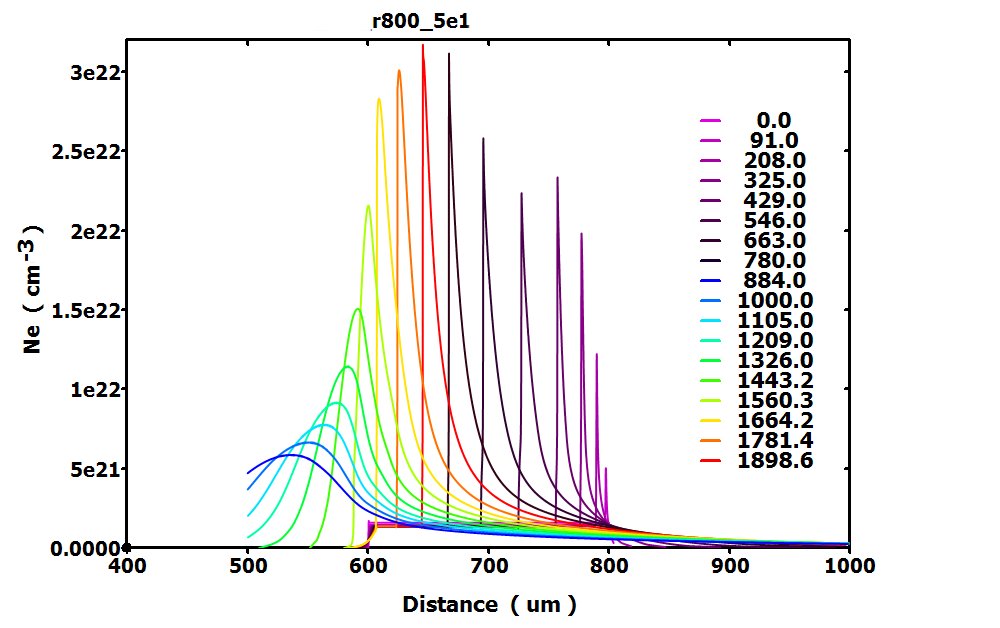
This is exactly how i made (with the help of Ken) this nice colorful plot above. It took me several days by the way. It is serving as one of my general purpose plots in the program. But what i found when tried to duplicate it and create similar plot for other part of the same program - this required me more efforts than it worth to spend time on it because to make it work flawlessly definitely will need some debug time and such code is tens and tens of lines long.

So i ended with the standard plotting way (first my plot above) which if needed could be made similarly colorful via Settings (excluding these nice Legend numbering at the right hand side of the plot but that would take even more time)

This is why i ask to just to extend the standard %PL plotting to handle 20-30 graphs instead of 9 currently. I hope this would not require much efforts. I do plots like that for different tasks happens sometimes few times per week.

16 Mar 2023 11:23 #30030

Here is another sample. In this case there are 20 plots and the y-data is stored in a 2-dimensional array.

      WINAPP
      USE clrwin
      INTEGER M,N,i
      PARAMETER(N=11,M=20)
      REAL*8 xm,x(N),y(N,M)
      CHARACTER(len=24) str
      DO i=1,N
        xx = 0.1d0*(i-1)
        x(i) = xx
        xm = 0.1d0
! Replace this DO loop with data for each plot...
        DO j=0,M-1
         y(i,j+1) = xm*xx
         xm = xm + 0.1d0
        ENDDO
      ENDDO
      i=winio@('%ca[Multi-graph]&')
      CALL winop@('%pl[n_graphs=20]') !20=M
      CALL winop@('%pl[stacked]')
      CALL winop@('%pl[x_array]')
      CALL winop@('%pl[x_max=1.0]')
      CALL winop@('%pl[dx=0.1]')
      CALL winop@('%pl[smoothing=4]')
      !Various line colours going from blue to red...
      DO j=1,M
        i = 255*j/M
        write(str,'(a,z6.6,a)') '%pl[colour=#', RGB@(255-i,0,i), ']'
        CALL winop@(trim(str))
      ENDDO  
      i=winio@('%pl&',400,250,N,x,y)
      i=winio@('%ff%nl%cn%tt[OK]')
      END
16 Mar 2023 1:24 #30031

Paul, Thanks for an example. I tried before 'stacked' option though some complexity stopped me. May be this was on my usual mischievous devilry saturdays 😃 and i may look again at that but first my questions:

  1. if stacked can do 20 graphs why regular %pl can not? What the difference?
  2. does stacked handle 'independent' X and Y similarly easy?
16 Mar 2023 2:12 #30032
  1. Suffice to say that to provide the extension that you are asking for would not be quick and easy.

  2. As I recall, only the Y values are stacked so you only get one set of X values.

16 Mar 2023 6:37 #30034

I think that you could leave out [stacked] in the last sample above and present the data in a way that is not 'stacked'. The %pl line will have many arguments but you could, for example, use multiple Fortran continuation lines.

17 Mar 2023 5:15 #30040

Do i correctly understand that something like this should work ?

I=winio@('%pl[file=settings9.set, scale=linear, stacked,independent,n_graphs=9]', n, &
& x(:,1),y(:,1),  x(:,2),y(:,2), x(:,3),y(:,3), x(:,4),y(:,4), &
& x(:,5),y(:,5), x(:,6),y(:,6), x(:,7),y(:,7), x(:,8),y(:,8), &
& x(:,9),y(:,9), x(:,10),y(:,10), x(:,11),y(:,11), x(:,12),y(:,12), &
& x(:,13),y(:,13), x(:,14),y(:,14), x(:,15),y(:,15), x(:,16),y(:,16), &
& x(:,17),y(:,17), x(:,18),y(:,18)......)
17 Mar 2023 6:51 #30042

Yes. I am suggesting that it may well work but you still need

CALL winop@('%pl[n_graphs=20]')

with 20 replaced by your value at the start.

17 Mar 2023 8:48 #30045

It only plots in my case 1 graph.

So i returned to your demo and made some changes. Here is the same code above i modified (see arrows in the text), this unfortunately does not plot anything. For simplicity I made it to plot just two graphs. And also for simplicity i made number of points equal in both plots

Did i made a mistake or three? Clearly i did, as at least this method (stacked+independent) plots something in my larger code

      WINAPP
      USE clrwin
      INTEGER M,N,i
      PARAMETER(N=11,M=2)          ! <-- changed M to 2
      REAL*8 xm,x(N,M),y(N,M)          !<-- changed X
      INTEGER :: Np(M)                ! <-- added Np
      CHARACTER(len=24) str

! Replace this DO loop with data for each plot...
      DO j=0,M-1
        DO i=1,N
          xx = 0.1d0*(i-1)
          x(i,j+1) = xx
          xm = 0.1d0
          y(i,j+1) = xm*xx
          xm = xm + 0.1d0
        ENDDO
      ENDDO
       
      Np(:)=N                             ! <-- added 

      i=winio@('%ca[Multi-graph]&')
      CALL winop@('%pl[n_graphs=20]') !20=M
      CALL winop@('%pl[stacked]')
      CALL winop@('%pl[x_array]')
      CALL winop@('%pl[x_max=1.0]')
      CALL winop@('%pl[dx=0.1]')
      CALL winop@('%pl[smoothing=4]')
      CALL winop@('%pl[independent]')             !        <-- added
      !Various line colours going from blue to red...
      DO j=1,M
        i = 255*j/M
        write(str,'(a,z6.6,a)') '%pl[colour=#', RGB@(255-i,0,i), ']'
        CALL winop@(trim(str))
      ENDDO 
      i=winio@('%pl&',400,250,Np,x(:,1),y(:,1),x(:,2),y(:,2))   ! <-- changed
      i=winio@('%ff%nl%cn%tt[OK]')
      END
17 Mar 2023 9:28 #30046

The number of graphs n_graphs is not 20 in your case. Also I suggested that you do not use [stacked]. The data presentation is probably wrong as well. That's all that I will contribute on this subject.

17 Mar 2023 10:55 #30049

Thanks for finding my bugs in these demos and discussion which may shed the light on limiting amount of plots %pl can do

Then here is my last question: does %pl have 9 graphs limit on standard way of plotting or it was lifted lately (we discussed to take off this limit couple years ago)?

May be somebody here will look at that and find something else i missed.

Conclusion is pretty strange so far:

  1. Looks like with Stacked it complains and swearing but plots 12 graphs ( 6 of which upside down ? May be still some other mistake is still here)

  2. But surprisingly without staked it somehow manages to plot 12 ...which indicates that my original program of this post made with the standard %pl method exactly like in the last demo (and which refused to plot more than 9 ) has some error (??). I use latest compiler 8.95

Here is the final modified Paul's demo code which supposed not to work for more than 9 graphs (and it indeed does not for more than 9 in my larger code why i started this thread and i do there exactly like is shown here) but it somehow unexplainable works in this demo

      WINAPP
      USE clrwin
      INTEGER M,N,i
      PARAMETER(N=11,M=12)
      REAL*8 xm,x(N,M),y(N,M)         !<-- changed X
      INTEGER :: Np(M)                ! <-- added Np
      CHARACTER(len=24) str

! Replace this DO loop with data for each plot... 
      DO j=0,M-1                                       <-- changed a bit
          xm = 0.1d0 * (j+1)
        DO i=1,N
          xx = 0.1d0*(i-1)
          x(i,j+1) = xx

          y(i,j+1) = xm*xx
          xm = xm + 0.1d0
        ENDDO
      ENDDO
       
      Np(:)=N                             ! <-- added 

      i=winio@('%ca[Multi-graph]&')
      CALL winop@('%pl[n_graphs=12]')  
!      CALL winop@('%pl[stacked]')
      CALL winop@('%pl[x_array]')
      CALL winop@('%pl[x_max=1.0]')
      CALL winop@('%pl[dx=0.1]')
      CALL winop@('%pl[smoothing=4]')
      CALL winop@('%pl[independent]')             !        <-- added
      !Various line colours going from blue to red...
      DO j=1,M
        i = 255*j/M
        write(str,'(a,z6.6,a)') '%pl[colour=#', RGB@(255-i,0,i), ']'
        CALL winop@(trim(str))
      ENDDO 
      i=winio@('%pl&',400,250,Np, x(:,1),y(:,1), x(:,2),y(:,2), x(:,3),y(:,3), x(:,4),y(:,4),&
        & x(:,5),y(:,5), x(:,6),y(:,6), x(:,7),y(:,7), x(:,8),y(:,8), x(:,9),y(:,9), x(:,10),y(:,10),&
        & x(:,11),y(:,11), x(:,12),y(:,12) )


      i=winio@('%ff%nl%cn%tt[OK]')
      END
18 Mar 2023 8:00 #30051

Yes you can have more than 10 plots (with or wihout [stacked]). Simply set n_graphs to the required number of graphs.

I have looked at the code for %pl and [stacked] with [independent] means both the x and the y arrays are stacked. But Dan, if you find [stacked] difficult to use why not go back to the old way of providing the data?

18 Mar 2023 4:01 #30052

This is supposed to be universal XY plotting utility, one of many others (3D, surface plots, etc) . Everyone needs such plotting tool. This code was started 20+ years ago with Simpleplot initially. Then i switched to native %PL

It supposed to work with 10+ graphs based on the demo above but after finding the bug today it started to plot ... one graph more, 10 total. Clearly more bugs are still there

I am ready to share this code with anyone. May be this will inspire people to rewrite it more clear way, Definitely today it is possible to make universal XY plotting program much faster with more transparent code and with many nice tricks (like smooth transitions from one curve to another, add eye candies, shadows etc). I'd be also glad to take anyone's code and incorporate into my codes.

Doing the plotting utilities yourselves, by controllable way in your favorite language makes them very convenient for reuse and adaptation for specific usages. Relying on some third party software though is totally wrong way doing that. This is why using %pl is essentially the only right way to do such things. The very few exclusions could be using such universal libraries like OpenGL or possibly some Microsoft's stuff. Anything else typically has the life span a decade or so and then disappear. It is not a good strategy in software development to rewrite your codes 5 times per life

Please login to reply.