Silverfrost Forums

Welcome to our forums

Suggestion %pl[native, scale=****] + CHANGE_PLOT_CHR@

11 Aug 2022 10:06 #29259

Would it be a simple (i.e. practical and not particularly time-consuming) addition to the library to add “scale” to the native pl options that CHANGE_PLOT_CHR@ be used to modify?

For example, if the scales were both linear when the %pl region was formed two buttons with callbacks would be used to switch x or y from linear to log scales, without the programmer having to use %pl[external] and a %gr to copy the updated %pl[external] back to the users display.

Ken

11 Aug 2022 11:22 #29260

Ken

I am not sure what you have in mind.

Is it possible to send me a short sample that does this the hard way using the existing functionality?

11 Aug 2022 1:02 #29261

Paul,

I don't have an example of the hard way (yet), but here's an example of what I was thinking about this morning.

By default, the display is linear on x and y, the button LINEAR_LOG would redraw the graph as it would appear if the call to winop@('%pl[scale=linear_log]') had not been commented out.

So if this functionality was implemented, it would be easy to switch between the four available options for scale (linear, log_linear, linear_log, log_log).

Hopefully, you can see what I am driving at?

winapp
module surge_arrester_mod
use clrwin
implicit none
integer, parameter :: dp = kind(1.d0)
! Data points correspond to IEEE WG 3.4.11
integer,  parameter :: n_a0 = 12
real(dp), parameter :: a0_ka(n_a0)  = [0.0000001d0,0.000001d0,0.00001d0,0.0001d0,0.001d0,0.01d0,0.1d0,1.0d0,&
                                       3.816d0,10.d0,20.d0,100.d0]
real(dp), parameter :: a0_a(n_a0)   = a0_ka*1000.d0
real(dp), parameter :: a0_vpu(n_a0) = [1.10d0,1.28d0,1.33d0,1.37d0,1.39d0,1.42d0,1.52d0,1.65d0,1.75d0,1.90d0, &
                                       2.10d0,3.69d0]
integer,  parameter :: n_a1 = 12
real(dp), parameter :: a1_ka(n_a1)  = [0.0000001d0,0.000001d0,0.00001d0,0.0001d0,0.001d0,0.01d0,0.1d0,1.0d0, &
                                       3.816d0,10.0d0,20.0d0,100.0d0]
real(dp), parameter :: a1_a(n_a1)   = a1_ka*1000.d0
real(dp), parameter :: a1_vpu(n_a1) = [0.72d0,1.00d0,1.08d0,1.11d0,1.15d0,1.18d0,1.23d0,1.36d0,1.45d0,1.55d0, &
                                       1.65d0,1.95d0]
real(dp)  :: vr0 = 458.75d0, vr1 = 570.d0  !Rated voltages
real(dp)  a0_kv(n_a0), a1_kv(n_a1)
integer :: n_pl(2) = [n_a0,n_a1]

  contains
  integer function gui()
  integer iw
    a0_kv = a0_vpu*vr0 ; a1_kv = a1_vpu*vr1
    iw = winio@('%mn[Exit]&','exit')
    iw = winio@('%bg&',rgb@(220,220,220))
    iw = winio@('%fn[Consolas]&')
    call winop@('%pl[native,n_graphs=2,gridlines,smoothing=5,frame]')
    call winop@('%pl[x_array,independent]')

!    call winop@('%pl[scale=linear_log]')           !This would create the display that the button LINEAR_LOG
!                                                   !would display

    call winop@('%pl[colour=red,symbol=1,tension=0.2]')
    call winop@('%pl[colour=blue,symbol=1,tension=0.2]')
    call winop@('%pl[width=2]')
    call winop@('%pl[x_axis=Amps,y_axis=kV]')
    iw = winio@('%pl&',800,500,n_pl,a0_a,a0_kv,&
                                    a1_a,a1_kv)
    iw = winio@('%ff%nl%cn%^tt[Log X, Linear Y]&', linear_log_cb)
    iw = winio@('')
    gui = 1
  end function gui
  
  integer function linear_log_cb()
  integer i, iw
    i = CHANGE_PLOT_CHR@(0,'SCALE', 0, 'LINEAR_LOG')
    if (i .ne. 0) iw = winio@('%ws%2nl%cn%bn[OK]',CLEARWIN_STRING@('ERROR_REPORT'))
    call PLOT_REDRAW@() ; linear_log_cb = 1
  end function linear_log_cb
  
end module surge_arrester_mod

program main
use surge_arrester_mod
i = gui()
end program main
11 Aug 2022 2:45 #29262

Here is the 'hard' way. Perhaps not as hard as I initially thought it would be.

winapp
module surge_arrester_mod
use clrwin
implicit none
integer, parameter :: dp = kind(1.d0)
! Data points correspond to IEEE WG 3.4.11
integer,  parameter :: n_a0 = 12
real(dp), parameter :: a0_ka(n_a0)  = [0.0000001d0,0.000001d0,0.00001d0,0.0001d0,0.001d0,0.01d0,0.1d0,1.0d0,&
                                       3.816d0,10.d0,20.d0,100.d0]
real(dp), parameter :: a0_a(n_a0)   = a0_ka*1000.d0
real(dp), parameter :: a0_vpu(n_a0) = [1.10d0,1.28d0,1.33d0,1.37d0,1.39d0,1.42d0,1.52d0,1.65d0,1.75d0,1.90d0, &
                                       2.10d0,3.69d0]
integer,  parameter :: n_a1 = 12
real(dp), parameter :: a1_ka(n_a1)  = [0.0000001d0,0.000001d0,0.00001d0,0.0001d0,0.001d0,0.01d0,0.1d0,1.0d0, &
                                       3.816d0,10.0d0,20.0d0,100.0d0]
real(dp), parameter :: a1_a(n_a1)   = a1_ka*1000.d0
real(dp), parameter :: a1_vpu(n_a1) = [0.72d0,1.00d0,1.08d0,1.11d0,1.15d0,1.18d0,1.23d0,1.36d0,1.45d0,1.55d0, &
                                       1.65d0,1.95d0]
real(dp)  :: vr0 = 458.75d0, vr1 = 570.d0  !Rated voltages
real(dp)  a0_kv(n_a0), a1_kv(n_a1)
integer :: n_pl(2) = [n_a0,n_a1]
integer :: uid_gr = 1
character(len=12), parameter :: pl_scale(4) = ['Lin X, Lin Y','Log X, Lin Y','Lin X, Log Y','Log X, Log Y']
integer :: pl_scale_selected = 1

  contains
  integer function gui()
  integer iw
    a0_kv = a0_vpu*vr0 ; a1_kv = a1_vpu*vr1
    iw = winio@('%mn[Exit]&','exit')
    iw = winio@('%bg&',rgb@(220,220,220))
    iw = winio@('%fn[Consolas]&')
    iw = winio@('%ob&')
    iw = winio@('%`gr[white]&',800,500,uid_gr)
    iw = winio@('%`bg[white]%`^ls&',pl_scale,size(pl_scale,kind=3),pl_scale_selected,change_pl_scale_cb)
    iw = winio@('%cb&')
    iw = winio@('%sc&',change_pl_scale_cb)
    iw = winio@('')
    gui = 1
  end function gui

  integer function change_pl_scale_cb()
  integer iw, i
  integer :: uid_pl = 2
    i = create_graphics_region@(uid_pl,800,500)
    i = select_graphics_region@(uid_pl)
    call winop@('%pl[native,n_graphs=2,gridlines,smoothing=5,frame]')
    call winop@('%pl[x_array,independent]')
    if (pl_scale_selected .eq. 2) call winop@('%pl[scale=linear_log]')
    if (pl_scale_selected .eq. 3) call winop@('%pl[scale=log_linear]')
    if (pl_scale_selected .eq. 4) call winop@('%pl[scale=log_log]')
    call winop@('%pl[colour=red,symbol=1,tension=0.2]')
    call winop@('%pl[colour=blue,symbol=1,tension=0.2]')
    call winop@('%pl[width=2]')
    call winop@('%pl[x_axis=Amps,y_axis=kV]')
    iw = winio@('%pl[external]&',n_pl,a0_a,a0_kv,a1_a,a1_kv)
    iw = winio@('')
    i = copy_graphics_region@(uid_gr,1,1,800,500,uid_pl,1,1,800,500,13369376)
    i = delete_graphics_region@(uid_pl)
    change_pl_scale_cb = 1
  end function change_pl_scale_cb
  
end module surge_arrester_mod

program main
use surge_arrester_mod
i = gui()
end program main
11 Aug 2022 2:59 #29263

PS I’ve just noticed that when the “hard way” is compiled with WIN32 the exponent of the first two numbers on the x scale are missing for the log X case. This does not occur when compiled with X64.

11 Aug 2022 3:22 #29264

Ken

I will make a note and take a look at this.

Paul

11 Aug 2022 9:24 #29265

Paul, I see Log and Linear options are missing in Designber's Mode Settings for the plot (i mean the Plot Parameters window which appear at the left hand upper corner when you add just one single line to the %PL like that:

    CALL winop@('%pl[file=PlotParameters.set]')

May be just adding 4 these Log/Lin options will solve this problem without any tricky programming like in these examples Ken became such a 80th level master at? 😃 All my latest %PL plots are in Designers Mode, it simplified %PL to its ultimate extreme to just couple lines of Fortran text, MATLAB nervously smocking outside.

Ken, are you already using Designers Mode ?

12 Aug 2022 6:15 #29268

Dan

I suspect that this change would involve a lot of work for me with little or no benefit to the user.

12 Aug 2022 11:13 #29270

Paul, thanks for taking the time to look at this. If Dan's suggestion is not possible, then I suspect that my suggestion is even harder for you. No problems, for this particular program the end user needs to be able to see the plots for both linear x and log x, so the 'hard' way it shall be.

Dan, Yes I use Designer mode, although not as often as perhaps I should. Have you tried the relatively new SET_PLOT_MODE@ for %pl yet? Very powerful for even more customization of plots etc.

12 Aug 2022 12:40 #29273

Ken

I understand what Dan is asking for, whilst at the moment I am not clear about your request. I am working on something else at the moment (apart from enjoying our brief summer) so I aim to respond to your request sometime later.

12 Aug 2022 1:07 #29274

No problems Paul, I'll leave it with you for now but I suspect what I have suggested is a prerequisite for Dan's suggestion.

6 Sep 2022 9:59 #29335

Ken

I have had a look at this and it turns out to require a non-trivial change to ClearWin+. Some changes work (like linear to linear_log) but others fail.

I will leave this on my list and have another go at it later.

7 Sep 2022 7:39 #29336

Paul,

Thanks for taking the time to look at this. It is a pity that it would not be straightforward to implement. Perhaps, it is something for another day – as you suggest.

7 Sep 2022 7:58 #29337

Ken

It is working now. It just needed a night's sleep.

I plan to provide a new FTN95 and DLLs shortly.

This is what it will look like. Note the call to plot_redraw@ rather than simpleplot_redraw@.

  integer function change_pl_scale_cb()
    integer :: errstate
    character(10) :: t
    if(pl_scale_selected .eq. 1) t = 'linear'
    if(pl_scale_selected .eq. 2) t = 'linear_log'
    if(pl_scale_selected .eq. 3) t = 'log_linear'
    if(pl_scale_selected .eq. 4) t = 'log_log'
    errstate = change_plot_chr@(0,'scale',0,t)  
    call plot_redraw@()  
    change_pl_scale_cb = 2
  end function change_pl_scale_cb
7 Sep 2022 8:50 #29339

Paul,

That's brilliant, thank you for this addition. I hope it was not a restless sleep with your mind churning through the code for %pl.

29 Oct 2022 3:33 #29527

Paul, I can confirm that this works as expected for X64.

There is still a minor problem with Win32. If you try the example below, compile with Win32, and look at the x-axis labeling at 10-4, and 10-3 on the options with a logarithmic x-axis. These are both shown as 0.

winapp
module surge_arrester_mod
use clrwin
implicit none
integer, parameter :: dp = kind(1.d0)
integer,  parameter :: n_a0 = 12
real(dp), parameter :: a0_ka(n_a0)  = [1.0d-7,1.0d-6,1.0d-5,1.0d-4,1.0d-3,1.0d-2,1.0d-1,1.0d0,&
                                       3.816d0,1.0d1,2.0d1,1.0d2]
real(dp), parameter :: a0_a(n_a0)   = a0_ka*1000.d0
real(dp), parameter :: a0_vpu(n_a0) = [1.10d0,1.28d0,1.33d0,1.37d0,1.39d0,1.42d0,1.52d0,1.65d0,1.75d0,1.90d0, &
                                       2.10d0,3.69d0]
real(dp)  a0_kv(n_a0)
integer :: n_pl = n_a0
character(len=12), parameter :: pl_scale(4) = ['Lin X, Lin Y','Log X, Lin Y','Lin X, Log Y','Log X, Log Y']
integer :: pl_scale_selected = 1

  contains
  integer function gui()
  integer iw
    a0_kv = a0_vpu*500.d0
    iw = winio@('%mn[Exit]&','exit')
    iw = winio@('%bg&',rgb@(220,220,220))
    iw = winio@('%fn[Consolas]&')
    call winop@('%pl[native,n_graphs=1,gridlines,smoothing=5,frame]')
    call winop@('%pl[x_array,independent,colour=red,symbol=1,link=lines,width=2,x_axis=Amps,y_axis=kV]')
    iw = winio@('%pl&',800,500,n_pl,a0_a,a0_kv)
    iw = winio@('%`bg[white]%`^ls',pl_scale,size(pl_scale,kind=3),pl_scale_selected,change_pl_scale_cb)
    gui = 1
  end function gui
 
  integer function change_pl_scale_cb()
    integer :: errstate
    character(10) :: t(4)= ['linear    ','linear_log','log_linear','log_log   ']
    errstate = change_plot_chr@(0,'scale',0,t(pl_scale_selected)) 
    call plot_redraw@() 
    change_pl_scale_cb = 2
  end function change_pl_scale_cb
 
end module surge_arrester_mod

program main
use surge_arrester_mod
i = gui()
end program main
31 Oct 2022 4:57 #29531

Quiz: If we will take this code as a prototype - find at least 10 other small defects in /64 bit mode.

They are fixable in Designer's mode and one additionally appears in it. But major why, i think, the Designer's mode did not take yet masses by storm is that adding the line

CALL winop@('%pl[file=PlotParameters.set]')

does not show the icon for Designer's mode. It is there but no one see it.

Among other defects, adding above line before or after

iw = winio@('%pl&',800,500,n_pl,a0_a,a0_kv)

changes LOG scale numbering from SCIENTIFIC (10x) to mix of SCIENTIFIC + ENGINEERING (10x, 10, 100, 1000, 1e4 )

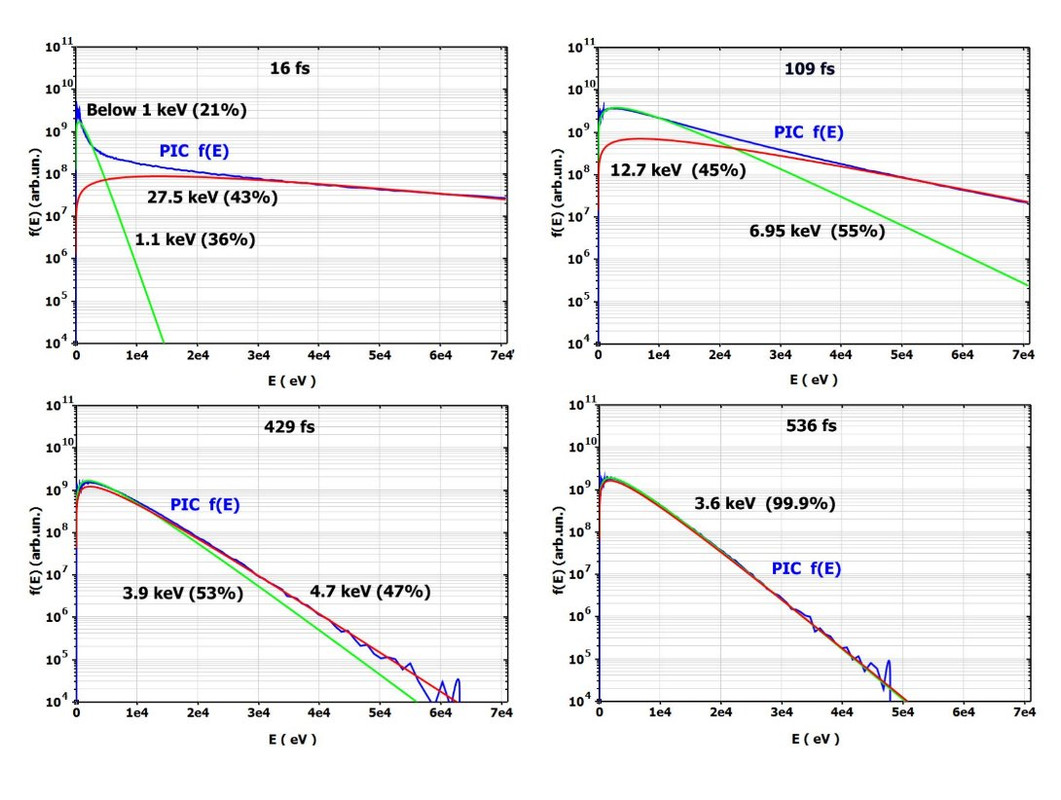
Native %PL in Designer's mode literally revolutionized %PL and simplified it to the extreme so that plotting in Fortran becomes doable with just couple lines of Fortran text with professional quality as opposed to draft one (and longer) like in this example. We just published some results plotted with %PL in prestigious Physical Review Letters journal. Take a look at %PL if you are still not using it

https://i.postimg.cc/yxbvNHLH/Image7.jpg

Sorry, i can not publish with higher resolution

31 Oct 2022 11:44 #29533

Dan, I tried adding the line you suggested.

CALL winop@('%pl[file=PlotParameters.set]')

I can see now why you like Designer Mode.

You can force the Designer Mode Icon to appear when the graph is first formed by including a minimum pl call back.

napp
module surge_arrester_mod
use clrwin
implicit none
integer, parameter :: dp = kind(1.d0)
integer,  parameter :: n_a0 = 12
real(dp), parameter :: a0_ka(n_a0)  = [1.0d-7,1.0d-6,1.0d-5,1.0d-4,1.0d-3,1.0d-2,1.0d-1,1.0d0,&
                                       3.816d0,1.0d1,2.0d1,1.0d2]
real(dp), parameter :: a0_a(n_a0)   = a0_ka*1000.d0
real(dp), parameter :: a0_vpu(n_a0) = [1.10d0,1.28d0,1.33d0,1.37d0,1.39d0,1.42d0,1.52d0,1.65d0,1.75d0,1.90d0, &
                                       2.10d0,3.69d0]
real(dp)  a0_kv(n_a0)
integer :: n_pl = n_a0
character(len=12), parameter :: pl_scale(4) = ['Lin X, Lin Y','Log X, Lin Y','Lin X, Log Y','Log X, Log Y']
integer :: pl_scale_selected = 1

  contains
  integer function gui()
  integer iw
    a0_kv = a0_vpu*500.d0
    iw = winio@('%mn[Exit]&','exit')
    iw = winio@('%bg&',rgb@(220,220,220))
    iw = winio@('%fn[Consolas]&')
    call winop@('%pl[native,n_graphs=1,gridlines,smoothing=5,frame]')
    call winop@('%pl[x_array,independent,colour=red,symbol=1,link=lines,width=2,x_axis=Amps,y_axis=kV]')
    CALL winop@('%pl[file=PlotParameters.set]')
    iw = winio@('%^pl&',800,500,n_pl,a0_a,a0_kv, pl_cb)     !### Call back added to make Designer Icon appear
    iw = winio@('%`bg[white]%`^ls',pl_scale,size(pl_scale,kind=3),pl_scale_selected,change_pl_scale_cb)
    gui = 1
  end function gui

 integer function pl_cb()
   pl_cb = 2
 end function pl_cb
 
  integer function change_pl_scale_cb()
    integer :: errstate
    character(10) :: t(4)= ['linear    ','linear_log','log_linear','log_log   ']
    errstate = change_plot_chr@(0,'scale',0,t(pl_scale_selected)) 
    call plot_redraw@() 
    change_pl_scale_cb = 1
  end function change_pl_scale_cb
 
end module surge_arrester_mod

program main
use surge_arrester_mod
i = gui()
end program main
31 Oct 2022 12:28 #29535

The icon should now automatically appear in the next release of ClearWin+.

1 Nov 2022 6:09 #29543

Ken, I simply blindly click on the corner where it hides and with more than 50% chance win 😃

Paul, Would be natural to include these LIN/LOG switching choices into Designer's mode

Please login to reply.