Silverfrost Forums

Welcome to our forums

%bx request

17 Sep 2021 4:54 #28271

I rather like %bx, and use it in places other than just underneath a toolbar.

I have noticed the new innovation of %ln, which is also useful.

Would it be possible to have a version of %bx where the colours are reversed (white above and grey below) or even with the two colours specified separately?

%`bx and %~bx perhaps?

Eddie

18 Sep 2021 6:24 #28272

Eddie

I have beening thinking along similar lines after creating a message box with the buttons on a grey background - basically a spilt background with different colours in each part.

I will add this to the wish list.

18 Sep 2021 7:40 #28274

Hi Paul,

Many thanks for considering it.

My own use of %bx in that unconventional way (i.e. not below a toolbar) puts a text message and an icon in the grey top part, and the action buttons in the lower white part, which looked great in Win7, but now looks a bit old-fashioned. The other way round would put the text on a white background and the action buttons on grey. My request for settable colours comes from a fear of what MS might do next!

I do think that this sort of thing sits naturally with %bx.

Eddie

26 Nov 2021 8:32 #28509

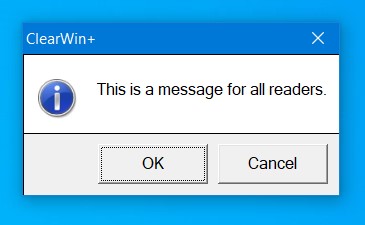
A new feature has been added to ClearWin+. It can be used to produce a split window with different background colours (although I suspect that it will not meet Eddie's requirements).

%~bg has been added (for the next release of ClearWin+). That is, the existing %bg will take the tilde modifier and this can be used within a %ob cell in order to set its background colour. Here is a sample program...

winapp
program main
integer iw
iw = winio@('%sy[no_border]&')
iw = winio@('%ca[ClearWin+]&')
iw = winio@('%1.2ob&')
iw = winio@('%nl %2si*   This is a message for all readers.%dy &',1.5d0)
iw = winio@('%cb&')
iw = winio@('%~bg[btnface]&')
iw = winio@('%dy%rj%8bt[OK]  %8bt[Cancel] %dy &',0.25d0,1.5d0)
iw = winio@('%cb')
end program main

https://i.postimg.cc/sxph10RN/ob-backgrond.jpg

26 Nov 2021 11:16 #28510

Hi Paul,

Actually it's brilliant and exactly what I had in mind (although it never occurred to me that the simplest way to implement it would be in an %ob - %cb construct).

My requirements are usually very simple, absolutely never include fancy bits of compliance to Fortran Standards I never heard of (or can't see that I have any need for), and are more about - dare I say it - compliance between the help file and the actuality so that I can work out (a) whether my problem is mine alone, and (b) helps in the exploration of things I didn't previously know existed.

(a) is about FTN95.CHM (and is a tall order) and (b) is about CWPLUS.ENH, both of which I consult on a regular basis. Have you thought of including them in the downloadable files along with the new DLLs?

Many thanks. I look forward to trying it out (and using it in earnest).

Eddie

26 Nov 2021 12:39 #28511

Eddie

At the moment most of the updating for ftn95.chm and cwplus.enh takes place just before a full release but I will keep your suggestion in mind.

26 Nov 2021 6:26 #28512

This will come in VERY handy for me. I have a number of selection %ob's and it would be nice the provide just a hint of visual aid of which descriptive text goes with which selection. Similar to having rows in a spreadsheet alternate colors to help the user as the y scan L/R or R/L for information.

Bill

27 Nov 2021 2:22 #28515

In that case, Bill, I imagine that Paul would gratefully receive either goods or money, just as I would ....

Eddie

Seriously, I was going to joke again about the food parcels, but not everyone has read '84 Charing Cross Road' by Helene Hanff and the point might be lost. For me the swapping of white and grey between 'above' and 'below' relative to %bx makes the small pop-up dialogs that are all that is needed to help particular points look nice and punchy. Paul's use of %dy is particularly nice.

Paul: what about a suggestion I made some years ago about making a composite button of all sorts of things like icons, bitmaps and text? Couldn't that work with a %ob .. % %cb wrapper? I see those very large clickable areas at several places in Windows. It might also work in a DIY ribbon.

I have tried making clickable bitmaps with all the stuff on them, but what looks good at one screen resolution doesn't necessarily work at another.

This is meant to be food for thought rather than a serious request.

E

27 Nov 2021 3:10 #28516

Eddie, you brightened my day!

You do bring up a good point re: buttons/bitmaps/colors to point out to a user the option/action to be taken. I also wonder about something I've done at 1920x1080 and how it will appear at 3840x2160. With scaling and all that. So far, my users have not gotten into the high resolution screens, so at least I can push that dilemma down the road a bit.

Since you can save icons within the same file at differing resolutions, I wonder how this is done in other software. Perhaps rhetorically: How does one select the resolution of an icon at run-time? I am not a Windows programmer by any stretch, and don't even know where to look....

Bill

27 Nov 2021 3:58 #28517

Eddie

I am guessing that you mean the kind of toolbar that you get for example with Word for Windows. I have tnought about that but it does not seem to me to be a reasonable prospect at the moment.

27 Nov 2021 4:33 #28518

Bill,

You can find the size of the screen with:

       IX=GetSystemMetrics(SM_CXSCREEN)
       IY=GetSystemMetrics(SM_CYSCREEN)

and then choose the icon size appropriately. It's a matter of doing it once somewhere near program startup, and saving the size. I have programs where I check the aspect ratio and if it is widescreen, put my toolbar down the lefthand side rather than along the top so that the client area is taller than otherwise.

It's a bit like looking at the parameters for a printer:

	ixdpi = GetDeviceCaps(jHDC, LOGPIXELSX)
	iydpi = GetDeviceCaps(jHDC, LOGPIXELSY)
       jXRES = GetDeviceCaps(jHDC, HORZRES)
       jYRES = GetDeviceCaps(jHDC, VERTRES)

I have a logo bitmap in several resolutions for stamping on a hardcopy output. For example, a logo that looks good on a 300dpi printer is tiny at 2400dpi, and the other way round a logo designed for 2400dpi takes up too much room on a 300dpi page.

The worse problem arises if your user tries the software out at the minimum Windows-acceptable resolution. You can refuse to run if the screen isn't big enough.

Eddie

27 Nov 2021 4:35 #28519

... and Bill, I forgot to say that the 'logical dpi' setting can also be important in picking the right icon size.

E

27 Nov 2021 4:47 #28520

Paul,

Yes, that was what I meant - in part. Microsoft don't always follow their own advice, as you must be aware - the 'ribbon' being a case in point.

The one use I had in mind was to be able to simulate the Office ribbon.

The other use was those dialogs where the whole shebang is clickable.

I can't see me rewriting a lot of applications just to put in ribbons, even if there was a complete toolbox, and as I often use workarounds, I'm always on the lookout for another.

Eddie

Please login to reply.