Silverfrost Forums

Welcome to our forums

FMT problem or wrong code with FMT?

22 Feb 2021 10:21 #27147

Hello,

I have the following call-back code, which work fine:

INTEGER FUNCTION mapa ()
CHARACTER(len=30) cb_reason
CHARACTER(len=256) CLEARWIN_STRING@
CHARACTER(len=53) output_string(4)
character(len=53), parameter :: fmt(1:3)=(/'(F10.2,A2,1A,F11.2,2A)      ','(2X,A3,1X,F7.2,A2)          ','(a15)                       '/)
INTEGER*4 CLEARWIN_INFO@
INTEGER*4 xlp, ylp
REAL*8 xlr, ylr
cb_reason = clearwin_string@('callback_reason')
IF (cb_reason .eq. 'PLOT_ADJUST') THEN
i = COPY_GRAPHICS_REGION@(handle_internal_gr, 1, 1, gw, gh, handle_pl_MM, 1, 1, gw, gh, 13369376)
END IF

call yield_program_control@(Y_Temporarily) !aby nebola CPU zahltená iba touto kresliacou funkciou
                            
        IF (cb_reason .eq. 'MOUSE_MOVE' ) THEN 
                            i=COPY_GRAPHICS_REGION@(handle_pl_MM,1,1,gw,gh,handle_internal_gr,1,1,gw,gh,13369376)

IF (rb_show_grid_data.eq.1) then 
22 Feb 2021 10:59 #27148

Sorry, something wrong went with my last message - here is once again:

I have the following call-back code, which work fine:

INTEGER FUNCTION mapa ()
CHARACTER(len=30) cb_reason
CHARACTER(len=256) CLEARWIN_STRING@
CHARACTER(len=53) output_string(4)
character(len=53), parameter :: fmt(1:3)=(/'(F10.2,A2,1A,F11.2,2A)      ','(2X,A3,1X,F7.2,A2)          ','(a15)                       '/)
INTEGER*4 CLEARWIN_INFO@
INTEGER*4 xlp, ylp
REAL*8 xlr, ylr
cb_reason = clearwin_string@('callback_reason')
IF (cb_reason .eq. 'PLOT_ADJUST') THEN
i = COPY_GRAPHICS_REGION@(handle_internal_gr, 1, 1, gw, gh, handle_pl_MM, 1, 1, gw, gh, 13369376)
END IF

call yield_program_control@(Y_Temporarily) !aby nebola CPU zahltená iba touto kresliacou funkciou
                           
        IF (cb_reason .eq. 'MOUSE_MOVE' ) THEN
                            i=COPY_GRAPHICS_REGION@(handle_pl_MM,1,1,gw,gh,handle_internal_gr,1,1,gw,gh,13369376)

IF (rb_show_grid_data.eq.1) then 
ylp = CLEARWIN_INFO@('GRAPHICS_MOUSE_X') ; xlp = CLEARWIN_INFO@('GRAPHICS_MOUSE_Y')

i = GET_PLOT_DATA@(ylp,xlp,ylr,xlr)

write (output_string(1),fmt(1)) ylr,' m',',',xlr,' m'

ylr_i = nint(ylr); xlr_i = nint(xlr)

DO v = 1,L

IF (ylr_i == y_mm_i(v) .and. xlr_i == x_mm_i(v)) then
!!! write (output_string(4),fmt(3)) 'Bod: ', point_ID_MM	
write (output_string(2),fmt(1)) y_mm(v),' m',',', x_mm(v),' m'
write (output_string(3),fmt(2))'H= ',H_MM(v),' m'
END IF

END DO

IF (rb_show_grid_data.eq.1) then 

call draw_filled_rectangle@(ylp+10,xlp+10,ylp+160+10+10,xlp+20+35+10,rgb@(255,255,0))
!!! call draw_characters@(output_string(4),ylp+10,xlp+45,rgb@(255,0,0))
call draw_characters@(output_string(2),ylp+10,xlp+45,rgb@(255,0,0))
call draw_characters@(output_string(3),ylp+10,xlp+60,rgb@(0,0,255))

END IF
END IF
END IF

mapa = 2

END FUNCTION mapa

So, when I use the code above, I can see the data displayed correctly in a yellow rectangle as can be see here:
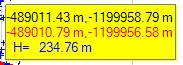
https://i.postimg.cc/hjWgx2qJ/ZLTY-BOX.jpg

Now, I want to let display the point names (point_ID) in the space between pixel coordinates (black in the yellow box) and real geodetic coordinates from the field (in red in the yellow box), which should be assigned to real point ID for checking.

Have a look at the two commented out lines in the code above (with three exclamation marks). When I activate them and change the pixel dimensions of the yellow box to create a space for point names appropriately, after compiling/linking (problem free), when I move over graphic area always getting the following error message: https://i.postimg.cc/pXCP5QTC/RT.jpgupload pix
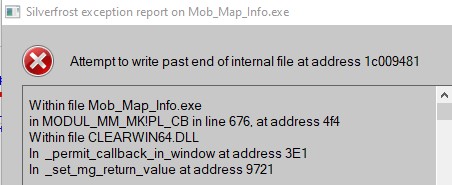
What´s wrong with the activated code in previously commented out lines?

Thanks for some tips!

Martin

22 Feb 2021 11:21 #27149

Martin

Maybe the length of the output_string elements needs to be increased above 53.

22 Feb 2021 12:23 #27151

Thanks Paul, but it did not help (I increased the length to 256). The same problem.

22 Feb 2021 1:04 #27152

It seems that something strange happens in the do loop:

DO v = 1,L

IF (ylr_i == y_mm_i(v) .and. xlr_i == x_mm_i(v)) then
write (output_string(4),fmt(3)) 'Bod: ', point_ID_MM   
write (output_string(2),fmt(1)) y_mm(v),' m',',', x_mm(v),' m'
write (output_string(3),fmt(2))'H= ',H_MM(v),' m'
END IF

END DO 

When I put the print statement

print*,'Bod: ',point_id_mm(v)	
pause

BEFORE the directive

write (output_string(4),fmt(3)) 'Bod: ', point_ID_MM

then on the screen is correct Point ID value displayed. Then, when I press ENTER, the mentioned run-time always appears.

When I put the PRINT directive AFTER that write statement, the PRINT is not reached at all and the run-time error appears.

I do not understand it.

22 Feb 2021 1:37 #27153

Martin, please note that you are asking readers of your post to read just the source of a 50-line subroutine, which itself contains calls to other subroutines, the sources of which you did not show, and tell you why the subroutine behaves in a certain way.

Not many people have complete Fortran compilers in their mental repertoire...

The word 'directive' has a specific meaning in conjunction with compilers. Your using that word to mean 'Fortran statement' adds unnecessary confusion.

22 Feb 2021 2:56 #27155

Thanks Mecej4 and sorry for the confusion.

I am already frustrated that I cannot find the problem after losing nearly whole day with no positive result.

The simply DO loop which reads in the data from an input file looks like follows (and is part of a subroutine)

...
CHARACTER*15 POINT_ID
CHARACTER*200 RIADOK_MM_VSEOB 

REAL*8,ALLOCATABLE X_OK(:), Y_OK(:), X_MM(:), Y_MM(:), H_MM(:)
INTEGER,ALLOCATABLE :: X_MM_I(:), Y_MM_I(:)
CHARACTER*15, ALLOCATABLE Point_ID_OK(:), Point_ID_MM(:)
...
		body_mm: do v = 1,L

			read(9,15) riadok_mm_vseob
!!!			read (9,15)  riadok_mm(v)
15			format(a)

			read(riadok_mm_vseob,*)point_id_mm(v), y_mm(v), x_mm(v), h_mm(v)
!!!			read(riadok_mm(v),*)point_id_mm(v), y_mm(v), x_mm(v), h_mm(v)

                         y_mm(v) = y_mm(v) * (-1.0d0)
                         x_mm(v) = x_mm(v) * (-1.0d0)

                         y_mm_i(v) = nint(y_mm(v))
                         x_mm_i(v) = nint(x_mm(v))

        end do body_mm

Both (call-back) and the subroutine are part of a module.

The commented out lines indicate that due to the problem I tried some alternatives, which also did not help. I will leave it without displaying the Point ID in the box.

I start to believe that this problem may have something to do with the designer (~%wi). As can be seen in the picture below, when I move in the graph where no points are located, in the yellow box can be seen a text (in blue), which is part of the caption of the main window defined by designer and subsequently by using %ca. Such text is nowhere present in the CHARACTER variable Point_ID_MM which is read in from an input file.

https://i.postimg.cc/bwZYwMQQ/designer.jpg

I designed something in the main screen using the designer and then updated the DLL´s for the newer ones, since I was unable to define the images in the designer. Even after such update I was unable to define the IMAGE in the designer what - as already Paul mentioned - means that the whole design must be newly created after such DLL updating (which I did not do).

I apologize again for the confusion.

22 Feb 2021 4:16 #27157

Martin

For a project of this complexity I think that you should avoid using the designer for Visual ClearWin+. It is relatively new and untested and at this stage should only be used for the simplest of dialogs.

23 Feb 2021 6:35 #27160

Thanks Paul for your notice.

Now, it seems that the problem has nothing to do with the designer after all.

I re-coded the main program without using the designer and the symptoms are similar.

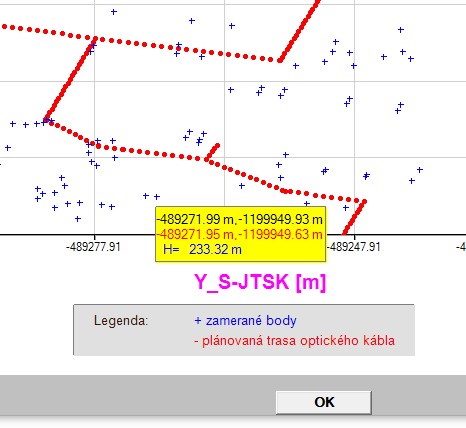
So, I limited the showing of the rectangular yellow box strictly only to the area where the blue points are available and all these unreadable signs does not appear anymore (they always appeared only then, when the mouse was outside the location of points). It looks like this:

https://i.postimg.cc/MTBYhqTT/Legenda.jpg

Although, the problem with showing the point name (Point ID) when hovering with the mouse over a blue point remains (run-time error).

Maybe, the DO loop inside the call-back which compares the coordinates and if they equal then should display the Point ID and is continuously invoked with the option %PL[full_mouse_input] simply has insufficient velocity when rapidly moving with the mouse over the graph. BTW, the run time error ONLY occurs when I move over the section of the graph, where the points are drawn (outside the points, no run-time occurs).

I will try implement the Ken´s approach posted today in the topic Location a value in one dimensional vector and its display.

Please - continue with the developing/enhancements of the designer (~%wi). I see it as excellent tool for easily creating any application design (although something with adding an IMAGE does not work problem free with me).

Many thanks!

Martin

24 Feb 2021 12:17 #27166

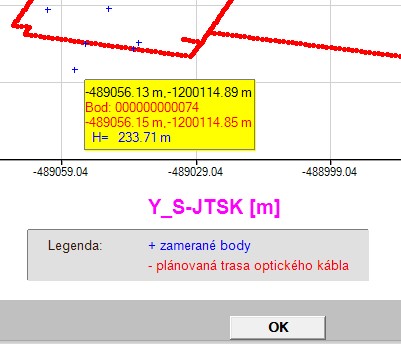
Finally, I resolved the mystery. Now, I can display also the Point ID in the showing box as can be seen in the picture below (and this also apply to the version with designer, so NO problem with the designer in this context!):

https://i.postimg.cc/GpRgbKY5/BOD-ukazuje.jpg

I looked at the corresponding fmt(3) statement 1000x (used for displaying of Point ID in the box) and the 1001 look was the right one.

I forgot to include in the fmt(3) statement the A descriptor for the text in apostrophes ('Bod: ') which appears before the PointID in the write statement:

write (output_string(4),fmt(3)) 'Bod: ', point_ID_MM(v)

The erroneous code was:

character(len=53), parameter :: fmt(1:3)=(/'(F10.2,A2,1A,F11.2,2A)      ','(2X,A3,1X,F7.2,A2)          ','(a12)                       '/)

The correct code is:

character(len=53), parameter :: fmt(1:3)=(/'(F10.2,A2,1A,F11.2,2A)      ','(2X,A3,1X,F7.2,A2)          ','(a5,a12)                    '/)

Again - Mea culpa. So, better to take a break now, because I already was dreaming about it.

Thanks!

Martin

Please login to reply.