Silverfrost Forums

Welcome to our forums

RESOURCE file problem?

19 Feb 2021 11:44 #27117

Hello,

I have a FTN95 project where everything works fine. Here, I created the main screen layout using the designer and the corresponding RCX file was also created.

For a reason (testing of some new variants of the F95 code), I created a new project, where I copied all f95 files and also the RCX file into the same folder of the new project.

I created the executable (no compilation and linking errors), but when I run the exe created in the new project it reports me

LAYOUT resource not found

Again, the original RCX file is present in the folder along with f95 files. Even the RESOURCE command is present at the end of the code of the main program.

I did not find the option to add resource file when using PLATO either by right clicking on the RESOURCE tab in the right pane of the Plato´s Explorer pane or through menu PROJECT/ADD RESOURCES. Both mentioned methods of adding source code files to a newly created project are possible. Right clicking on the RESOURCE tab offers nothing.

What is wrong?

Martin
19 Feb 2021 3:02 #27121

Martin

Can you post the code for the RESOURCES.

As a test try compiling the main program by calling FTN95 from a command prompt window,

You don't need to do anything about loading resources into Plato. In fact it might go wrong if you do this when using a RESOURCES directive.

19 Feb 2021 3:45 #27122

Paul,

I tried it.

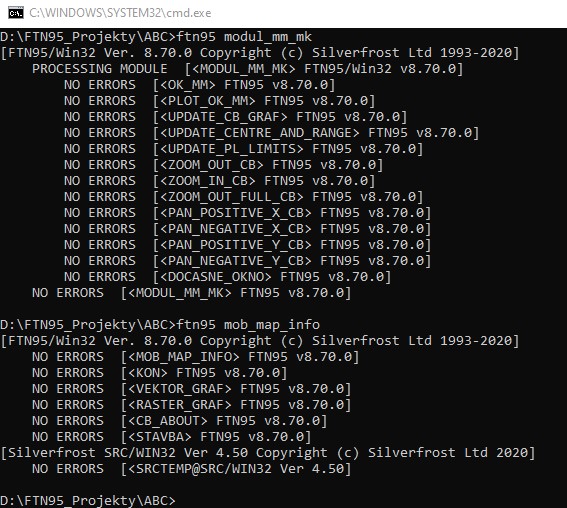
  1. When I compile the module and main program (each separately with no switches), I have no errors: https://i.postimg.cc/PrtZ5zjq/COMPILING.jpg

    BUT, for the main program, no OBJ file is created. Therefore I cannot link them together to create executable.

  2. When I removed the RCX file from the project directory and wanted to build the solution through PLATO, getting the following:

https://i.postimg.cc/XJsWcbpm/RCX-mimo.jpg

When I return the CRX file back to the folder, the ClearWin+ error as reported in my first post always appear.

  1. The code for the resources is as follows:

    RESOURCES

    1 layout 'Mob_Map_Info.rcx' jpeg1 IMAGE agis_logo_text_mensi.jpg

Only the image is OK and appears, however NO buttons designed in the designer.

19 Feb 2021 5:43 #27123

Try removing the blank line and using uppercase LAYOUT. Also check that the rcx file is in the current folder.

It should work when you run FTN95 for the main program. FTN95 takes the lines after RESOURCES and sends them to SRC for you. You don't run SRC yourself.

Thinking about it now, I am not sure what happens if you have a Plato project with more than one source file and RESOURCES at the end of the main program. If you have more than one Fortran source file then you may need to create a separate resource script. Check out the documentation on RESOURCES in the help file.

19 Feb 2021 9:24 #27125

I removed blank line, used uppercase for LAYOUT - nothing changed, when using command prompt. The same is also valid when I use Plato (ClearWin+ error appears - LAYOUT resource not found).

In the project I have 2 source code files: a source code for a main program and a source code for a module.

I copied the content of the module at the end of the main program after end program statement and removed the source code file of the module from the project (it means, I have one source code file with RESOURCE command AFTER the end of module statement at the end od source code, but when I compile the one source code file, I always get the compiler error:

error 404 - Cannot find definition for MODULE MODUL_MM_MK.

I will abandon this, since it is troublesome to be limited for 1 source file only in a project. Moreover - it seems that the problem remains.

Thanks for your tips.

Martin

20 Feb 2021 9:16 #27129

Martin

Here is the explanation and I apologise for not realising this earlier.

  1. The RESOURCES directive only works when /LINK or /LGO is used on the FTN95 command line.

  2. In project mode, Plato (and probably Visual Studio) does not use /LINK or /LGO on the FTN95 command line.

For a project, rather than use the RESOURCES directive, you must create a resource script and add it to the list of source files in the Project Explorer window. The resource script is a text file with extension .rc that contains the same lines as the RESOURCES directive but not the directive itself.

I will change the help file to include this information.

20 Feb 2021 11:40 #27134

Many thanks Paul and I very appreciate your effort!

20 Feb 2021 3:24 #27136

Paul,

after all, some observations regarding PLATO behaviour (to improve its functionalities) in conjunction with adding a resource (.RC) file through ADD NEW ITEM under the pane SOURCE FILES in the Project explorer:

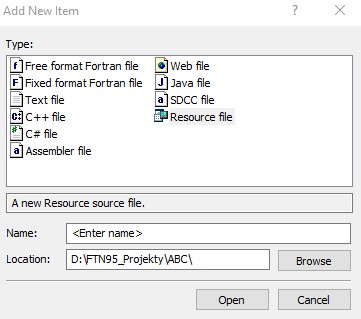
First, when I want to add a .RC file into a project, I see the following dialog:

https://i.postimg.cc/g0xbhfrK/PLATO-RC.jpg

Here, I must type in manually the name of the required RC file in the field

Name:

I think, this could be improved by offering a classic explore dialog for choosing a RC file by mouse clicking.

Second, I added the required RC file to a project problem free (although manually typing in its name). Then I deleted him (using REMOVE command) from the project (although 'physically' the RC file is still present in the Project folder, by removing it, it does not delete it from the project folder).

Then I tried to add the same file again

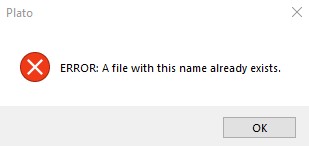
I was presented with the following error dialog:

https://i.postimg.cc/wT4WN3NS/PLATO-RC-ERROR.jpg

Question: Is this a PLATO´s error or did I something wrong?

20 Feb 2021 5:20 #27138

Martin

There are two options: a) add a new item and b) add an existing item.

If you choose (b) then you get the 'Open file' dialog.

I don't recall if 'Remove item' a) removes it from the project or b) deletes the file or c) both or d) gives you a choice. If it does not allow you to delete it and that is what you want to do then you must use some other method.

For example, the standard 'Open file' dialog allows you to delete a selected file by pressing the Delete key.

Paul

20 Feb 2021 5:38 #27139

Paul,

I apologize - you are right. Formally, it works as expected (adding existing item - a RC file). I added a RC file called agis.rc (picture below):

https://i.postimg.cc/QMSDBtv9/explorer.jpg

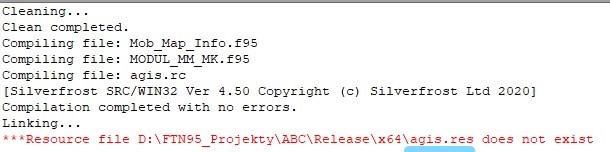
But still a problem persist. After adding the RC file, I build the solution and got the following:

https://i.postimg.cc/W3WJ7sqt/RES-namiesto-RC-podciarknute.jpg

So, it seems that the linker looks for a resource file with extension RES (not RC). Is it so?

21 Feb 2021 9:40 #27142

Martin

You have selected the x64 platform (64 bits) and the 'Release' configuration and the report says that SRC compileed agis.rc successfully to generate agis.res which is correct.

The linker SLINK64 is looking for agis.res in Release\x64\ which is where it should be. So the question is a) does agis.res exist and b) if it does, where is it?

Normally Plato would handle this automatically but maybe one or more of the default project settings has been changed.

It might help to look at the file called Buildlog that is generated by Plato and tells you what build commands it has issued on your behalf.

21 Feb 2021 12:08 #27143

Thanks Paul,

I had a look at the BUILD.LOG file. The following switches are used when compiling:

/64 /NO_BANNER /VS7 /DELETE_OBJ_ON_ERROR /ERROR_NUMBERS /UNLIMITED_ERRORS /WIDE_SOURCE /FPP /CFPP /BINARY

I only changed one option in the project settings - I checked ALLOW WIDE SOURCE.

SRC has only two switches - /r /BINARY as follows: 'D:\FTN95_Projekty\ABC\agis.rc' /r /BINARY 'Release\x64\agis.res'

SLINK64 had only one switch: /WINDOWS with /file and then come all obj files with PATH to be linked including the .RES file.

The problem is that the .RES file does not exist at all (probably was not created). I was unable to find him within the active project.

here is the picture of the Build.log file:

https://i.postimg.cc/JnYF4Nf0/BUILD-LOG-FILE.jpgcute book wallpaper

21 Feb 2021 2:11 #27144

Martin

I don't understand how that can happen.

I suggest that you run

SRC agis.rc /r

from a Command Prompt window. Make sure that agis.res exists and then copy it to Release\x64.

21 Feb 2021 2:55 #27145

Paul,

I tried:

https://i.postimg.cc/d02qVjKJ/DOS.jpg

The RES file is not created at all (see my project folder with files below after running the DOS command:

https://i.postimg.cc/kGzrc2dj/EXPL.jpghosting an image

I searched whole D disk for the RES file - nothing.

21 Feb 2021 3:08 #27146

Paul,

I found the problem!

In the RC file was a mistake in the jpg long file name, instead underscore sign which should be part of the jpg file name, there was a hyphen (dash). Now, the RES file is created and it works.

Many thanks for your cooperation!

Martin

Please login to reply.