Silverfrost Forums

Welcome to our forums

Dynamic backgrounds, font colors and warning signs

16 May 2020 5:29 #25431

Paul,

As a reminders to user, or warning that something in the code needs attention i really really miss the features of dynamically changeable color of background of all the major Clearwin functions (called controls) and color of fonts. I use warning by changing fonts and backgrounds as well as add warning signs (including external like handy function POP, thanks to Eddie), but with Clearwin all the warnings you are able to see only after you close the current window and reload it again which is often impossible (like with the main graphics window of the code opening at start and controlling everything) and getting numerous popped warning windows is a bit annoying

I do change backgrounds and color of fonts for example by adding in front of %rd the %`bg%rd with control variable defining the color of future field displaying number of loaded points. If number of points is withing the limit i use white background ibkg_Limit_Violated_Or_Not=rgb@(255,255,255), if the number of points is larger than expected then background is rozy ibkg_Limit_Violated_Or_Not=rgb@(242,168,173)

i=WINIO@('Number of loaded points %ta%`bg%rd%ff&', 
     *  ibkg_Limit_Violated_Or_Not, numbOfPoints)

This way the user can avoid numerous problems when your code GUI becomes very large. Eventually all GUIs starting with few simple lines become really complex, then super complex and at the end totally unmanageable in size and you stop noticing myriads of jumping numbers

Such CWP controls like %rd, %rf, %rb, fonts %fn and warning signs %si! or %si# all require ability to change them dynamically (and respect to warning signs %si - the appearance/disappearance or graying). With years i found that changing displayed background or font color or turn it to italic are very intelligent and gentle ways of reminding user about problems.

We discussed that in the past here, in what state thinking at Silverfrost got us closer to implementation of such capabilities ? Specifically I'd be already 99% happy if just the CALL WINDOW_UPDATE@(ibkg_Limit_Violated_Or_Not) changed the color of appropriate control above.

/* lost last 3 days of very valuable supercomputer time searching for the error in the code but in reality just did not notice that one of displaying data arrays (which was also present right in front of my eyes) was full. One more such victory and I am broke 😃. That is happening again and again in one code or another, in one place or another.

16 May 2020 6:30 #25432

There are already two functions SET_CONTROL_BACK_COLOUR@ and SET_CONTROL_TEXT_COLOUR@ that may do what you want.

17 May 2020 5:52 #25434

This is great, many thanks, Paul

17 May 2020 8:00 #25436

One option is to use 'smart' limits as illustrated here...

winapp
program main
integer n,m,iw,winio@
double precision x,y
n = 42
m = 0
x = 42.0d0
y = 0.0d0
iw = winio@('%ca[Smart Limits]&')
iw = winio@('%~il&',1,256)
iw = winio@('%tc[blue]&')
iw = winio@('Input:  %12rd&',n)
iw = winio@('  Result: %`12rd&',n)
iw = winio@('%ff&')
iw = winio@('Input:  %12rd&',m)
iw = winio@('  Result: %`12rd&',m)
iw = winio@('%ff&')
iw = winio@('%~fl&',1d0,256d0)
iw = winio@('Input:  %12rf&',x)
iw = winio@('  Result: %`12rf&',x)
iw = winio@('%ff&')
iw = winio@('Input:  %12rf&',y)
iw = winio@('  Result: %`12rf&',y)
iw = winio@(' ')
end
17 May 2020 11:09 #25437

Here is a sample where toolips are initially switched off but activated when an out-of-range value is input...

module mymod
  use clrwin
  integer n,ctrl
  integer(7) hWnd
  logical bad
contains
  integer function cb()
    if(n > 256) then
      if(.not. bad) then
        call set_control_text_colour@(hWnd, 255)
        call set_control_back_colour@(hWnd, RGB@(200,200,200))
        ctrl = 1
        call window_update@(ctrl)
        bad = .true.
        call beep@()
      endif
    else  
      if(bad)then
        call set_control_text_colour@(hWnd, 0)
        call set_control_back_colour@(hWnd, RGB@(255,255,255))
        ctrl = 0
        call window_update@(ctrl)
        bad = .false.
      endif  
    endif  
    cb = 2
  end function
end module

winapp
program main
use mymod
integer iw
n = 42
ctrl = 0
bad = .false.
iw = winio@('%ca[Tooltip report]&')
iw = winio@('%th[balloon]&',ctrl)
iw = winio@('Input:  %^?12rd[Bad value]&',n, cb)
iw = winio@('%lc', hWnd)
end
17 May 2020 3:52 #25440

This sample illustrates how a tooltip can be changed...

module mymod
  use clrwin
  integer n
  integer(7) hWnd
  logical bad
contains
  integer function cb()
    if(n > 256) then
      if(.not. bad) then
        call set_control_text_colour@(hWnd, 255)
        call set_control_back_colour@(hWnd, RGB@(200,200,200))
        call set_tooltip_text@(hWnd, 'Bad value');
        bad = .true.
        call beep@()
      endif
    else  
      if(bad)then
        call set_control_text_colour@(hWnd, 0)
        call set_control_back_colour@(hWnd, RGB@(255,255,255))
        call set_tooltip_text@(hWnd, 'Good value');
        bad = .false.
      endif  
    endif  
    cb = 2
  end function
end module

winapp
program main
use mymod
integer iw,ctrl
n = 42
bad = .false.
ctrl = 1
iw = winio@('%ca[Tooltip report]&')
iw = winio@('%th[balloon]&',ctrl)
iw = winio@('Input:  %^?12rd[Good value]&',n, cb)
iw = winio@('%lc', hWnd)
end
19 May 2020 1:57 (Edited: 19 May 2020 2:29) #25446

And the %~il and %~fl also look very useful, flexible and easy to use. Using %il/%fl for years I somehow missed this handy and in many cases better option with tilde

19 May 2020 8:16 #25447

DAn,

You missed it because it is a fairly recent addition to the (public) version.

Eddie

20 May 2020 9:09 #25474

Thanks Eddie, you have eased a bit my self-blaming 😃

19 Jul 2020 9:46 #26046

Paul, The way of making warnings using %~fl seems has a problem. If it is the user who changes the input manually then the red warning appears ok. But if it is the computer which changes the value using call window_update@(x) for the value of x outside the allowed range in this example, then the warning does not appear. And i was scratching my head all this time why the example above worked but when i placed tilde in the real code it did not... This is very pity as the way of making warnings looks extremely appealing and convenient, just add a tilde and all is done

20 Jul 2020 7:46 #26047

Dan

If the computer sets the value out-of-range then ClearWin+ adjusts the displayed value to be in range and an error icon does not appear because the adjusted value is in range.

At this point the stored value has not been corrected by ClearWin+ and maybe ClearWin+ can be fixed in this respect. But perhaps the computer should not use values that it knows to be out-of-range.

If the user sets the value out-of-range then the icon appears, the incorrect value is displayed whilst the corrected (in range value) is stored.

20 Jul 2020 7:25 #26057

Paul,

Then when the computer changes x, the %~fl%rf control behavior is not consistent with the behavior when user sets the values manually. This is why it took me more than a month to figure this out. Last what I expected was such strange anti-intuitive behavior

Logically in both cases (is it manual or computer way of setting x) the window should display x larger than xmax (or smaller than xmin) with red dot like it is doing manually. The red warning dot should be displayed if limit is broken. Otherwise what the tilde is for ? Manual and computer changing of x should have equal priority and the same behavior.

At the end all humans are the same computers just with the software which is called ideology 😃. And i envision that the future robotic society of smart gadgets and other IoT will complain about discrimination against them 😃 😃

21 Jul 2020 6:55 #26060

Dan

I will try to find a way that works all round but for the moment if you set a variable to a value within your code then you should also get your code to test that the value is in range.

21 Jul 2020 9:33 #26061

Paul,

I think that your answer is spot on, for who knows better what the program set the limits to than the programmer?

For those promiscuous programmers who like to fix their values and then forget them (akin to their treatment of partners nudge nudge wink wink), is there a way of asking CW+ what the limits are set to currently? (Via the Cotton-Eye-Joe methodology of 'Where did it come from' etc).

Someone like me will always know, because the answers will lie in a Common Block!

Eddie

21 Jul 2020 9:56 #26062

Eddie

At the moment there is no GET_INTEGER_LIMITS@ corresponding to SET_INTEGER_LIMITS@ but it could be added if you think that it would be useful.

21 Jul 2020 12:30 #26063

Well, not for me, but perhaps for others who like to program that way (if you forgive my attempts at humour). Such things are always useful because it lets people program 'their way' - a strength of FTN95. Perhaps it would be useful for Dan.

Eddie

21 Jul 2020 1:40 #26064

Paul,

I was unaware of SET_INTEGER_LIMITS@ until I read your last post, and then I discovered SET_FLOAT_LIMITS@ looking at the help files.

Is there a function to change step size e.g. for %df, to allow the user to switch from a large to a small step? I looked at this before and came to the conclusion is was not possible, but I may have overlooked something - again.

Ken

21 Jul 2020 2:42 #26065

Ken

There is no such function at the moment but it could be added.

21 Jul 2020 6:05 (Edited: 22 Jul 2020 8:15) #26066

Paul,

Despite %rf by sense was meant for reading floating point numbers, is not used always just for input. Quite opposite, it is convenient to use %rf for output too with call window_update@. The controls for writing %wd and %wf I find very inconvenient and never use them. They are also out of style with other controls: they do not have the same frame like %rf controls have making GUI ugly. Besides %~fl does not work on %wf

real*8 a
a=2
i=winio@('%es%~fl%rf%ff&', 0d0, 1d0, a)
i=winio@('%`bg[gray]%~fl%wf', 0d0, 1d0, a)
end

https://i.postimg.cc/xCHrLNkX/Image3.jpg So I use %rf for output. This makes %rf universal: I can load some variable, and computer like a robot can do the same. Some variables often serve not just for input purposes but both input and output, so this is natural to do that with %rf and %rd. In this sense it is not intended for computer to check such variables before displaying and restrict them like you have suggested. The %~fl with the tilde has to do that restriction as it does with as usual with %fl but it always has to display the warning sign (red dot) that the variable limits were broken, isn't it ?
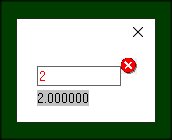
So the code above has to show variable as 2 with red dot or 1 with red dot but not 1 without red dot as if nothing wrong happened !!!! The %~fl with tilde makes behavior of older %fl without tilde a bit logically different: with tilde the %~fl%rf has to show real value of a not restricted by 0-1 limit like %fl without tilde ! https://i.postimg.cc/qRmKXq9d/Image5.jpg

If %wf would react on %~fl accordingly and had the frame like %rf the problem would be solved too

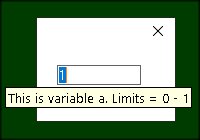
Eddie With a little bit different context than you asked for Paul, to not forget what the limits are as well as what this variable is used for (human memory is not made out of rubber and the codes tend to grow larger than a decent size city phonebook) i use ? sign with prompt: %?rf[variable a, limits 0 to 1].

real*8 a
a=2
i=winio@('%es%~fl%?rf[This is variable a. Limits = 0 - 1]%ff&',0d0,1d0, a)
i=winio@('%`bg[gray]%~fl%wf&',  0d0,1d0, a)
i=winio@('%th',1)
end

https://i.postimg.cc/MH48CnPw/Image7.jpg And %th used only ones for many controls. You definitely know this nice trick. Just mentioning it to those who do not know.

22 Jul 2020 7:57 #26072

Ken

I have added the following function for the next release...

          DOUBLE PRECISION SET_INCREMENT@(hwnd,increment)
          INTEGER(7) hwnd
          DOUBLE PRECISION increment

hwnd is the Windows handle of the control obtained using %lc. The function returns the old value. It can also be used for %dd.

Dan

This sounds rather tricky but I will make a note to investigate the possibility of adding a special routine that provides what you want.

By the way, in response to your earlier comment, %pl now has the option [file=fileName] as an alternative to [params]. For example:

CALL winop@('%pl[file=plot.dat]')
Please login to reply.