Silverfrost Forums

Welcome to our forums

Extra checking in Clearwin

19 Apr 2020 1:36 #25238

In the 8.62 I see nice new feature of extra checking for undefined variables in Clearwin. If something is not initialized we now get such messages https://i.postimg.cc/bv7LMfwY/Undefined.jpg I understand that this is still not the final production version, but is it possible to display either which line has a problem or better also add one more button 'Go do error' and it will be shown in debugger. Is this doable?
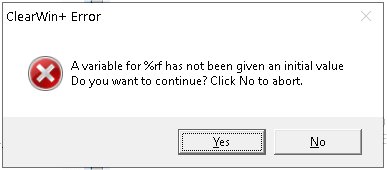
Currently what is going on is that the code goes to the last statement of Clearwin Fortran text without any warnings, swallowing the things without the hiccups and at the last its line only when GUI is jumping into the screen all these messages start to appear one by one without saying where the error occurs.

If it is not easily doable of course the current method is still way better than what we had before when such errors were not reported. When the user will debug he then will answer No and will look in the Fortran source text window in Debugger at all variables on the subject of forgotten undefined variables and will find the problem. But the difficulty is when GUI is very large, and actually there are many of them, then finding right place with undefined variable is like searching for the lost needle in the forest

19 Apr 2020 7:01 #25240

If you abort you should get a traceback with line numbers. Is that not the case?

20 Apr 2020 4:56 #25249

Unfortunately no, when you abort on the messages shown above even if you have multiple errors in the same piece of Clearwin text, there is no traceback, the SDBG cursor always stays on last line of the execusion of GUI.

The only you can do is just to manually sniff with the mouse popup bubbles all the variables on the subject of finding undefined variables.

As I understand, the Clearwin operates in this specific case with checking undefined variables not on line by line basis (like all Fortran compilers/debuggers checking for bugs) but it initially loads the whole Clearwin text and then when displays GUI it checks undefined variables are or not

20 Apr 2020 7:12 #25250

I now understand the situation.

The check can only be undertaken after the window has been created and when the data is first read in. At this point, the usual 'continuation number' (the number of ampersands used in a sequence of winio@ statements) is no longer available.

Perhaps ClearWin+ could store this number as part of the %rf data. In practice a given window will have a limited number of %rf values and it should be relatively easy to work out which one is undefined from the values displayed in the debugger.

21 Apr 2020 3:21 #25261

OK, here is my first experience with undefined variable error which compiler found in %rf in the 5000 lines subroutine.

I found this error on the line 3100 after looking through each and every line for two hours. Things are that I have 500 %rf there. This is totally impractical. One more such bug and the user will refuse to find it manually again. Imagine Linux code with its 100 million lines got the message that it has the error somewhere 😃

So my request to you guys is to please modify the bug reporting differently and find the way to tell which exactly line has an error. Because currently compiler essentially tells user: 'I found the undefined variable error in %rf somewhere in the code higher than this line'

Another useful feature which might help here is to add to the debugger missing for years Search for variables or just for any arbitrary text. That would speed up this search too. Currently SDBG searches only for subroutines

Also have I missed the FTN95 key which if used at compile time will create and error if undefined variable is found. Before temporally I used '/set_error_level error 298' for that as an equivalent of 'implicit none' checking for undefined variables. I think this approach worked OK so far but looks like it is failing if undefined variables are arrays.

As one more suggestion would be great if SDBG highlighted in red all undefined variables. At the end, searching for undefined variables was one of the strongest features of this compiler from its start

UPDATE. Oh, no, no more line-by-line manual inspection of almost each and every line of 5000 lines code! After finding two errors in %rf, the compiler found two more uninitialized variables in %rd 😦 . Looks like this method of reporting of undefined variables is impractical. One minutes job requires the whole day of hell

One more defect: compiler is continuing to hide variables declared as parameters. When you hover the mouse over such variables, SDBG shows no information at all.

21 Apr 2020 7:22 #25264

Dan

There is too much detail here for me to deal with but here are some pointers.

  1. I don't understand why you need to search through the whole of your code. I would expect you to be able to use the traceback to find the current window and winio@ list.

  2. For a search facility, why not use an IDE (like Plato) in parallel with SDBG/SDBG64, assuming you don't want to (or can't) run the debuggers directly from Plato.

  3. Undefined variables are detected at runtime when using /UNDEF and similar options on the command line. Warning 298 only provides information that can be detected at compile time not at runtime which is the whole point of /UNDEF checking.

  4. To get the debugger to show parameters you need /FULL_DEBUG on the FTN95 command line. This is not implied by other debugging options such as /UNDEF.

21 Apr 2020 10:36 #25274

What is 'the traceback to find the current window and winio@ list?'

Current window is found and opened automatically when you invoke debugger at the time the window above appears. Do you call the list of variables winio@ list? If yes, then there are a hell lot of variables there. Some are used for different purposes than winio@ and due to hell of them in total there and not so clear purpose of them (and many are undefined too but not used with winio@) I just found a bit less stressful to go trough the entire source code. For each occurrence of error you will need to go through the whole list of variables or the source text again !

About Plato: what I do not understand because just tried it few days back - does Plato use the same debugger SDBG64 we all know or it has its own debugger (or both at your choice)? If IDE is one thing and Debugger is separate thing in separate window then the use of IDE for se5arching of %rf, %rd or %rb occurrences in the text is not different then use of SDBG and my own editor - this jump 3000 times from one windo to another is very nonconvenient. If Plato IDE Fortran source and own debugger share the same window and we can use Search of variables than yes, this might help and I may start using Plato.

In summary, this new addition to search for UNDEFs is welcomed option but please think about modifying it to tell exactly where error is. Currently it only useful if GUI is tiny with just few potential places for error. When Clearwin text is 1000s of Fortran lines this will be very tough to find the offending place.

22 Apr 2020 7:13 #25279

I have thought of a new option to help tracing undefined values for %rf etc. and will aim to provide this shortly.

Regarding Plato/SDBG64, Plato has an option (in the Settings dialog) to integrate Plato with SDBG64. For the 64 bit Plato, the Plato executable contains a copy of the code for the SDBG64 executable. When debugging, Plato presents much of the output from the debugger in its own windows rather than use the debugger's own windows. This works well at least when debugging simple programs. There is an overhead when copying information from the debugger code to Plato windows and this could cause a delayed response when debugging major projects.

22 Apr 2020 8:38 #25283

A new checking option is now available to detect undefined variables with %rf etc.. This is included in new DLLs that can be downloaded via the following link...

https://www.dropbox.com/s/0brs3u14m5z5hqe/newDLLs44.zip?dl=0

Here is a simple demo program...

winapp
options(undef)
program main
use clrwin
call clearwin_option@('undef')
iw = winio@('%rd', n)
end

Note the options(undef) is the same as using /undef on the FTN95 command line and should only be used whilst testing.

When clearwin_option@('undef') is not called the testing for undefined values takes place when the variable is accessed.

When clearwin_option@('undef') is present the testing for undefined values takes place when the %rf code is processed.

With this new option, when you abort you will get line numbers in the traceback. For the sample code you get the error message together with

(https://www.dropbox.com/s/0brs3u14m5z5hqe/newDLLs44.zip?dl=0)

Here is a simple demo program...

winapp
options(undef)
program main
use clrwin
call clearwin_option@('undef')
iw = winio@('%rd', n)
end

Note the options(undef) is the same as using /undef on the FTN95 command line and should only be used whilst testing.

When clearwin_option@('undef') is not called the testing for undefined values takes place when the variable is accessed.

When clearwin_option@('undef') is present the testing for undefined values takes place when the %rf code is processed.

With this new option, when you abort you will get line numbers in the traceback. For the sample code you get the error message together with

[quote:f2b5d0a9d6]Within file prog.exe in MAIN in line 6, at address 7c

5 May 2020 9:46 #25331

Thanks, had only now the time to check this option. It is good option, it works with %rd, %rb but does not yet with %rf?

winapp 
options(undef) 
program main 
use clrwin 
real*8 an
call clearwin_option@('undef') 
iw = winio@('%rf', an) 
end
6 May 2020 7:21 #25334

It works OK for me.

7 May 2020 12:16 #25345

It dos not report the error but just straight shows the value 1e-305 in the window

7 May 2020 6:45 #25346

I tested it for 64 bits. For some unknown reason it does not work at the moment for 32 bits. I will check it out.

7 May 2020 10:37 #25348

This has now been fixed for the next release of salflibc.dll.

8 May 2020 1:19 #25356

I haven't even noticed that I used 32bit for test. For everything now I only use 64bit and recommend finally all to switch to 64

24 May 2020 12:22 #25506

Strange effect i get with this new option

    call clearwin_option@(\'undef\')

I ran the code as usual and got the crash with diagnostics

Invalid inital value for %RF format.
Are you sure the variable is initialised? at address 1c0088e9

Within file XX.exe
in TOOLSSHEET at address 42da
Within file CLEARWIN64.DLL
In  _close_all_windows at address CD
In  _permit_callback_in_window at address 1E1


RAX = 0000000000000159   RBX = 0000000572d00720   RCX = 000000001c040d70   RDX = 0000000000000003
RBP = 000000001c000000   RSI = 000000000000004e   RDI = 0000000572d00720   RSP = 0000000572d00660
R8  = 0000000572d00720   R9  = 000000001c040d70   R10 = 000000001c040d70   R11 = 000000001c040d70
R12 = 0000000000000001   R13 = 0000000572d01be8   R14 = 0000000572d01b98   R15 = 00007ffad84e91a8

1c0088e9) int       9

But when i added the above line to find which %rf was not initialized i got no errors

24 May 2020 5:55 #25507

UPDATE. Ran the same program later the same day without 'undef' and any changes and it does not crash. Devilry.

Please login to reply.