[size=18:ec092821bd]Hallo! 😃
Is there a Clearwin procedure to display images within a Fortran program?
Images such as .jpg, .jpeg, .gif, .bmp, .png
Eric[/size:ec092821bd]
Welcome to our forums
[size=18:ec092821bd]Hallo! 😃
Is there a Clearwin procedure to display images within a Fortran program?
Images such as .jpg, .jpeg, .gif, .bmp, .png
Eric[/size:ec092821bd]
Eric,
This is some F77 style code I used several years ago to add a logo defined in a resource file to a plot. I found it necessary to plot the image (in my case a bmp) offscreen and then copy it to the graphics screen as I could not get my printer to scale the graphic any other way. I am sure there are other neater ways, Some of the code is superfluous but it should give you some idea of how it can be done.
Brian
C plot bmp to offscreen region, copy and scale and then copy back to plot
C This is necessary because printer will not scale graphics
r_handle=30
hres=0
vres=0
if(hres.le.1)hres=768
if(vres.le.1)vres=89
rat=hres/vres
call create_graphics_region@(r_handle,hres,vres)
call use_rgb_colours@(r_handle,1)
call select_graphics_object@(r_handle)
i=IMPORT_IMAGE@('{logo.bmp}',0,0)
call create_graphics_region@(j_handle,5*hres,5*vres)
call use_rgb_colours@(j_handle,1)
call select_graphics_object@(j_handle)
hres1=bscale
vres1=bscale*vres/hres
factor=size/real(50)
offsetx=19
offsety=262
x1=((offsetx+0*factor)*scale+.5)
y1=((offsety+0*factor)*scale+.5)
call copy_graphics_region@
+(j_handle,0,0,hres1,vres1,r_handle,0,0,hres,vres,SRCCOPY)
factor=size/real(50)
offsetx=19
offsety=262
x1=((offsetx+0*factor)*scale+.5)
y1=((offsety+0*factor)*scale+.5)
hres1=hres1
vres1=vres1
call select_graphics_object@(hnd1)
call copy_graphics_region@
+(g_handle,x1,y1,hres1,vres1,j_handle,0,0,hres1,vres1,SRCCOPY)
call window_update@(hnd1)
call perform_graphics_update@
k=close_printer@(hnd2)
C note printer opened in earlier subroutine
Images can be displayed by calling winio@. For example, using %bm or %im or %ic plants an image directly to the Window. Alternatively you can use %gr to create a drawing surface and then call import_image@ to draw the image.
iw = winio@('%im[myimage]') end RESOURCES myimage IMAGE 'file.jpg'
or....
iw = winio@('%gr&', 300,300) iw = winio@('%lw',ictrl) ir = import_image@('file.jpg',0,0)
[size=18:570bed11ed]G'day Brian![/size:570bed11ed] 😃
G'day Brian![/size:570bed11ed] 😃
[quote:570bed11ed="Smib"]Eric,
This is some F77 style code I used several years ago to add a logo defined in a resource file to a plot.
Brian
That caught my eye, Brian. I will re-visit your approach when I've completed my current project.
I had a logo created for my newly-formed public relations business but it's far too large. Visit http://www.movethefence.com.au
Several other files were also supplied by the logo-designer but at a first glance I couldn't see any provision for scaling down.
Eric
[size=18:5937f9968b]Thank you Paul![/size:5937f9968b] 😃
Thank you Paul![/size:5937f9968b] 😃
[quote:5937f9968b="PaulLaidler"]Images can be displayed by calling winio@. For example, using %bm or %im or %ic plants an image directly to the Window. Alternatively you can use %gr to create a drawing surface and then call import_image@ to draw the image.
iw = winio@('%im[myimage]') end RESOURCES myimage IMAGE 'file.jpg'
or....
iw = winio@('%gr&', 300,300) iw = winio@('%lw',ictrl) ir = import_image@('file.jpg',0,0)
How would I modify the code if there were a large number of image files?
For example:
character file_path(1000)*100
The project is to organize the very large number of images I've photographed as part of my public relations business, using the RENAME function (which can also re-locate - MOVE):
The essence being the following test program, using Force 2.0 Fortran:
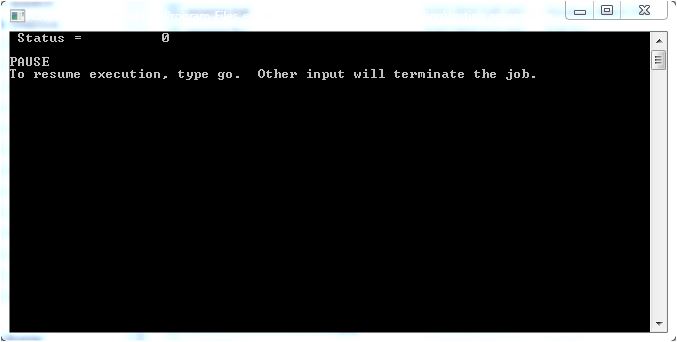
integer status
character path1(1000)*100, path2(1000)*100
C
path1(1) = 'f1\test_file.txt'
C
path2(1) = 'f2\test_file.txt'
C
status = rename( path1(1), path2(1) )
C
write(*, 11) status
11 format(' Status = ', i10/)
C
pause
end
And it worked! 😃

Eric
[size=18:18a04e502f]G'day John![/size:18a04e502f] 😃
G'day John![/size:18a04e502f] 😃
[quote:18a04e502f="John-Silver"] Eric .... G'day cobber 😃 Nice signature' you have there by the way 😃 Something we should all never forget.
Yes, 'cobber', a salutation as rare in Australia these days as rocking-horse excreta.
Humans are hard-wired to learn; we hate being taught cf Winston Churchill (apologies for any mis-quoting) ~
'I will not allow schooling to interfere with my education.'
Learn all you can while you can. It'll keep the 'Ol-Timer's' (Alzheimer's) at bay.
P.S. Anybody found a bio for Al Zhe Imer?
P.P.S. All the best in searching for a clarification. I'm sure others will be keen followers of your expedition.
[size=18:d60276e3e6]G'day again, Paul![/size:d60276e3e6]
My example code should, of course, have included a preview of the image.
G'day again, Paul![/size:d60276e3e6]
My example code should, of course, have included a preview of the image.
[quote:d60276e3e6="PaulLaidler"]Images can be displayed by calling winio@. For example, using %bm or %im or %ic plants an image directly to the Window. Alternatively you can use %gr to create a drawing surface and then call import_image@ to draw the image.
integer status
character path1(1000)*100, path2(1000)*100
C
C section to preview the image file
C and most likely rename it to something
C more searchable
C
path1(1) = 'f1\test_file.txt'
C
path2(1) = 'f2\test_file.txt'
C
status = rename( path1(1), path2(1) )
C
write(*, 11) status
11 format(' Status = ', i10/)
C
pause
end
Eric
Quoted from John-Silver
Well done getting the prog working.
[size=18:43dbbf459d]Not yet fully working John; need to determine if 'file.jpg' in the code following can be a character-array element, such as file_path(k).[/size:43dbbf459d]
iw = winio@('%im[myimage]')
end
RESOURCES
myimage IMAGE 'file.jpg'
or....
iw = winio@('%gr&', 300,300)
iw = winio@('%lw',ictrl)
ir = import_image@('file.jpg',0,0)
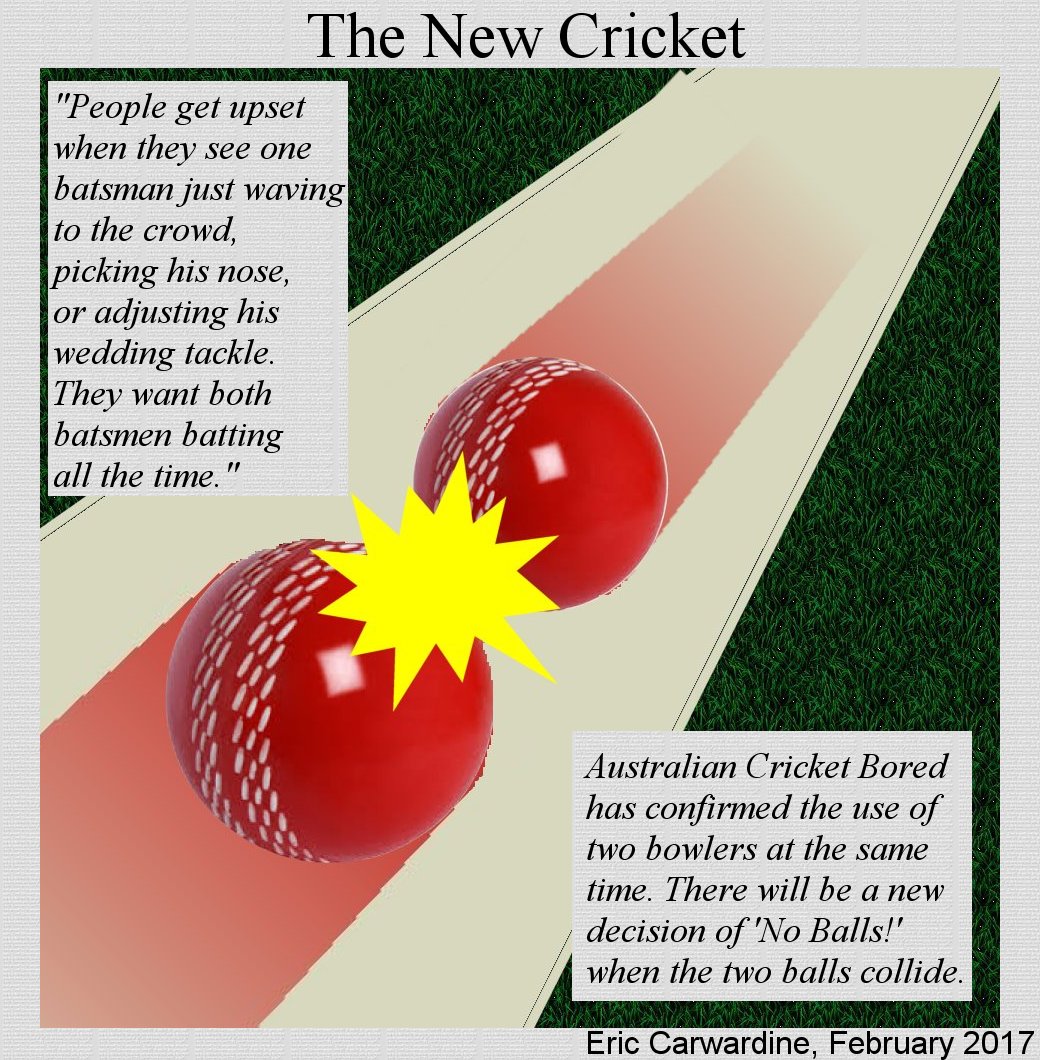
[size=18:43dbbf459d]P.S. 'Backyard Ashes' could be very lively with the New Cricket ...[/size:43dbbf459d]
http://www.movethefence.com.au/exhibits/cricket04.jpg
[size=18:43dbbf459d]Ewik aka Eric aka Nobody-in-particular[/size:43dbbf459d]
[size=18:c4a3452911]G'day again, Paul;[/size:c4a3452911]
G'day again, Paul;[/size:c4a3452911]
[quote:c4a3452911="PaulLaidler"]Images can be displayed by calling winio@. For example, using %bm or %im or %ic plants an image directly to the Window. Alternatively you can use %gr to create a drawing surface and then call import_image@ to draw the image.
iw = winio@('%im[myimage]') end RESOURCES myimage IMAGE 'file.jpg'
or....
iw = winio@('%gr&', 300,300) iw = winio@('%lw',ictrl) ir = import_image@('file.jpg',0,0)
I wrote a short program using the second code option Paul but I think it's missing something. See the code below and the two attached files.
Perhaps I need the full path specs for the image file dad09.jpg or a URL?
PROGRAM main
C
use clrwin
C
integer iw,winio@
C
iw = winio@('%gr&', 300,300)
iw = winio@('%lw',ictrl)
ir = import_image@('dad09.jpg',0,0)
C
pause
C
END PROGRAM main

Indeed, this code does not work. As usually anything in Clearwin is simple but always needs WORKING examples.
Think you need curly brackets. Try
i=IMPORT_IMAGE@('{file.jpg}',0,0)
I am curious how you got the solution but for all other users this hack is called a BUG which will take 100 swearing-at-effing-Clearwin man-years to find 😦
Looks like Paul was doing surgery of import_image@ and forgot the scissors inside 😃
And i was guessing why couple my tools stopped working
If all else fails, read the documentation...
INTEGER FUNCTION IMPORT_IMAGE@( RSCNAME, X, Y )
'RSCNAME is linked to a file via a resource script or is a file name enclosed in curly brackets.'
Sample code is also provided.
I suppose an alternative function with a different name could be provided, but then you would still have to read the documentation in order to find out which function to use.
Damn, i was wrong because yes do not read any manuals, relying just on common sense because Clearwin is now so large and mostly clean that there exist specific logic in its constructs. Sorry. you were right, and only now i noticed that brackets in my source code are indeed curly. Which tells me very strongly again and again that 4K for monitors is way too little if use native 100% font size on full 50' screen. This info will be useful if you plan to buy such monitors. Now I am waiting to switch to 8K monitors when they will be more affordable...Making terrible amount of typos and do not see them 😦
My common sense likes your suggestion for different name function. Curly brackets are way too unusual The current one IMPORT_IMAGE@ probably has to be renamed to something more clear like IMPORT_RESOURCE_IMAGE@. Since it is new function, just may be couple people are using it, this change will go fine, while IMPORT_IMAGE@ should have take regular files. To make change even simpler and add simplicity when failing to plot the warning could be added to use different name for the function.
Quoted from PaulLaidler If all else fails, read the documentation...
Thank you Paul.
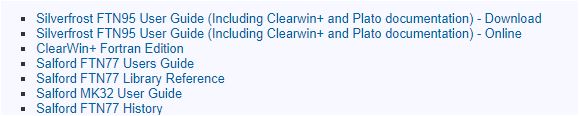
I have the Clearwin+, Fortran edition, 436-page manual but it does not mention IMPORT_IMAGE@, only IMPORT_BMP@ and IMPORT_PCX@
Should I get documentation from the following list?

Eric
You could use the online help or open ftn95.chm. I usually just use the help menu from Plato.
IMPORT_RSC_IMAGE@ has been added for the next release as an alternative name for IMPORT_IMAGE@ and a new function IMPORT_FILE_IMAGE@ has been added. This function can be used to import a file without the requirement to set the file name within curly brackets.
Cool, that could be more in the spirit of Clearwin than unusual curly brackets. You will use curly when first time read the manual but will definitely forget and miss them next time.
By the way one more related question about displaying images. I tried before ones but since forgot - Clearwin is like a universe now - is it possible to make graphical analogy of bubble help %th when you hover on the %tt or %bt buttons and the large size image appears showing what will this button create if you click on it? I have one huge summary page called Tools with 100s buttons and radiobuttons on it and I'm permanently lost searching what specific tool and graph style I need