Silverfrost Forums

Welcome to our forums

SDBG64: Can not cancel previously set breakpoint on variable

31 Aug 2019 5:06 #24288

If you set Use or Write Breakpoint on Variable you can not undo this action (by Canceling All Breakpoints or any other way) and the only outcome from this is to restart the debugger and start over again.

5 Sep 2019 8:23 #24304

I'll put it on my list.

7 Sep 2019 3:12 #24322

Thanks. Using the chance - i hope these problems confirmed by others are also in the pipeline:

https://forums.silverfrost.com/Forum/Topic/3564&highlight=sdbg64

Will add to that also that SDBG64 still missing existed in previous SDBG list of open read/write units and files

And when time allows i will prepare the demo of the nasty bug for both SDBG and SDBG64 which does not appear when debug small programs when after using F6 or F7 (continue run, or run one step) the menu starts to popup messing the debugging process. Could be that this one is just my bewitched programs' feature

7 Sep 2019 7:39 #24323

And of course this bug is yelling to be fixed: sometimes you can not push the SDBG64 to stop on the line you want. Here is an almost an ultimate example: the only place to land the debugger is highlighted by the dot by debugger itself, heck knows why it is missing all other valid executable lines. That is what i call 'devilry'
https://i.postimg.cc/449N21BF/Debugger.jpg

Unfortunately people do not often use advanced tools like SDBG, and if use do not report the bugs waiting someone else will do that for them.

This is another devilry of giant scale. I totally lost my trust in humanity after finding that couple obvious bugs in Microsoft's own Notepad (i call it Notebad) where not fixed for almost four decades. This simple editor was used gazilion times by billion people. Try to open in Notepad this line for example

 write(222,'(a,1pe10.3)') 'ThisBugIsTotallyStupid=',   Var

Now try to highlight the word ThisBugIsTotallyStupid by doubleclicking on it - and it highlights all the garbage around the word too, all these spaces, commas, punctuation marks, equal sign !!! You can use any other editors in the world, any browsers, even Microsoft Word and you will not find this buggy annoyingly sick non-standard behavior anywhere else.

If i'd be at Silverfrost i'd allow free version of the compiler only with one condition: users have to report 10 problems of any sort they will find, or suggest 10 improvements, or after a year should call themselves lazy morons and stop using the software.

9 Sep 2019 7:24 (Edited: 10 Sep 2019 9:25) #24327

And since this specific bug takes fixing way too much time i have to post this again.

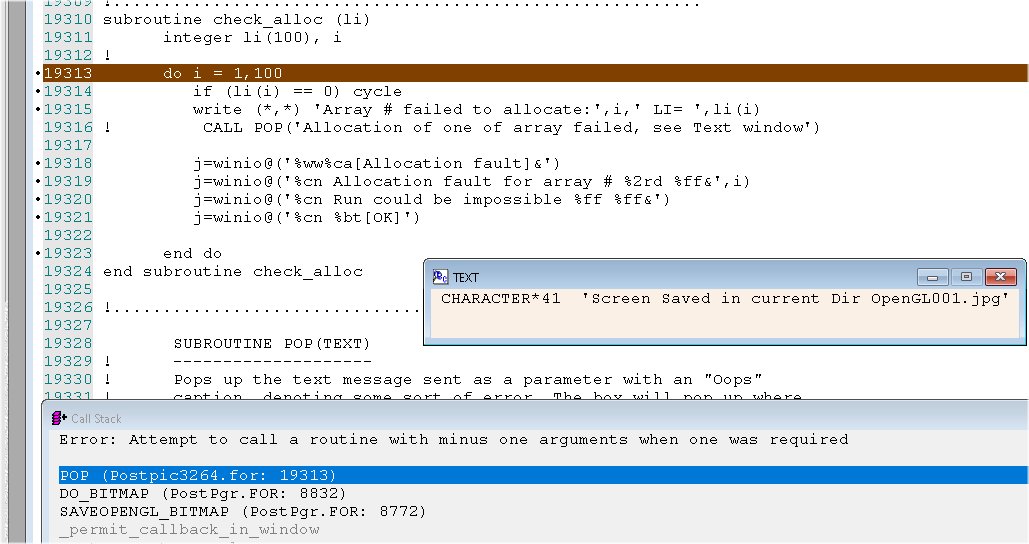
Unfortunately sometimes the SDBG64 still miss the exact offending line. Today i found finally a bug with a world record miss. SDBG64 missed line not by just one-two but so many lines that if you are not on very fresh head you will skip searching for this very strange bug for days 😃)) This is what really happened. In reality the bug was in the subroutine around 15 lines below (!!!!!!). SDBG64 landed into sub Check_alloc instead of POP below. Do not pay the attention to the error message about the 'argument number MINUS ONE' (!!!), this is a present to me from the devilry living in this compiler because its damn lazy effing users do not report the bugs https://i.postimg.cc/zX86RWsx/SDBG64-bug5.jpg

9 Sep 2019 7:50 #24328

Which version of FTN95 are you using?

10 Sep 2019 8:16 #24331

This function gives me Library date: 4:53:46 - 27:6:2019 Library version: 21.6.26.21

!============================================================
Integer function LibraryVersion64()
C_EXTERNAL GetLibraryVersionInfo '_GetLibraryVersionInfo'():INTEGER(7) 
C_EXTERNAL GetLibraryDateInfo '_GetLibraryDateInfo'():INTEGER(7) 
C_EXTERNAL GetString 'GET_CSTRING@'(REF,VAL,REF) 
CHARACTER(80) info,info2 

call GetString(info, GetLibraryDateInfo(), 80) 
print*,'Library Date: ', info 

call GetString(info2, GetLibraryVersionInfo(), 80) 
!Year since 1998, month, day, hour... 
print*, 'Library Vers: ', info2 

i=winio@('%ww%ff Library date: %ta%22rs%ff Library version: %ta%22rs%ff %nl%cn%bt[OK]',info, info2)


LibraryVersion64 = 2
end function
11 Sep 2019 5:37 #24334

But what version of FTN95 are you using? A patch for v8.50 is available and is critical in this instance.

11 Sep 2019 5:00 #24340

Can you please add to this function above the way to find all versions automatically. I supposed it is doing that with its digital accuracy.

I am lost what versions am using and what i patched. It is supposed to be the latest with some patches i downloaded from this forums after major release of 8.50 few months ago. I may misname the release, or scale back for some reason and then forget to return etc. Good to have to know that without human intervention to dig into file system besides just one click. Having this function is more useful than any other ways because you include it into your codes and you know your codes better than anything else and Clearwin+ menus are self-explanatory.

11 Sep 2019 6:57 #24341

Dan

If you type FTN95 on a command line then it will tell you what version you are using. If you are using v8.50 then you will get this behaviour and you need a later version.

11 Sep 2019 7:54 #24342

[FTN95/Win32 Ver. 8.51.0 Copyright (c) Silverfrost Ltd 1993-2019] [FTN95/x64 Ver. 8.51.0 Copyright (c) Silverfrost Ltd 1993-2019]

On your website there exist Apr 30 update which i downloaded month later. As As suggestion better to name the files there not just ftn95_update.exe but something like ftn95_update20190430_1.exe. Then we will know for sure what we installed. Ideally though all the FTN95, its LIB/DLL and update versions have to be gathered in one function like above or displayed on FTN95/HELP

12 Sep 2019 6:37 #24343

Dan

Can you check and confirm that the 'world record miss' was obtained after recompiling all sources in your program using FTN95 v8.51.0.

12 Sep 2019 7:41 #24350

Yes. As i wrote you can do new versions quality assurance of FTN95 on my programs. Of course my programs are pure hell mess other compilers compiled but just refused to run reliably. Not surprisingly as we all know from Polyhedron comparison of ability of compilers to find the errors. Some compilers will swallow the program even if you chop it before with the shredder. Though in this specific case with the 64bit debugger to miss the offending line is a crime. The 32bit one was never doing that in a lifetime. The newest option /CHECK_WINIO also crashing compiler in 9 out of 10 compilations but hopefully you may fixed this already based on your note to other post

If your computer has 32GB or more RAM you can try full code yourself. I can not extract the demo, sorry. With /nocheck code works ok. The /undef and /check do not report any issues they are designed to catch for. So I suspect this is an indication of the weakness of sdbg64. I may try older 32 bit sdbg when have time

13 Sep 2019 11:28 #24354

Tried 32bit, this specific error does not appear there

23 Sep 2019 9:03 #24418

Adding to menu 'Save Settings' is also needed. Currently this is allowed only at the exit.

10 Oct 2019 7:20 #24502

When the error happens the code launches SDBG64 which stops on offending line shown in violet.

But the color of background of line is extremely badly chosen. You can not see anything there. Good variants are shown at the corner. This definitely has to be changed

https://i.postimg.cc/Vvv0vnPw/SDBG64.jpg

/* Sick how damn conservative users of all versions of Fortran are. Almost no one uses excellent tool called debugger. Same for reporting bugs, let alone giving any suggestions for improvement...Is this difficult to type instead of

C:> Program.exe

C:> SDBG Program.exe 

adding just the key /DEBUG or /FULL_DEBUG when do the compilation to usual /CHECk and possibly /UNDEF ?

C:> FTN95 Program.f95 /DEBUG /CHECK /UNDEF
26 Oct 2019 10:04 #24567

I think you mean SDBG rather than SDBG64. The violet is showing you that it is the current execution point and that there is a breakpoint on that line. I admit it doesn't look ideal. SDBG64 doesn't vary the execution point line colour but you can see it is a breakpoint in the left margin.

26 Oct 2019 10:37 #24568

Dan: have the 'sdbg64 showing the wrong line' issues been fixed now by using the latest FTN95?

31 May 2021 3:28 #27884

I would like to make use of routines

C_EXTERNAL GetLibraryVersionInfo '_GetLibraryVersionInfo'():INTEGER(7)
C_EXTERNAL GetLibraryDateInfo '_GetLibraryDateInfo'():INTEGER(7)
C_EXTERNAL GetString 'GET_CSTRING@'(REF,VAL,REF)

mentioned above by Dan, because these routines could be used to provide for a way to check if the version number of dlls clearwin64.dll and salflibc64.dll loaded by an application is in sync with the version number of the dlls with respect to which the application in question has been built.

I would appreciate very much if they were part of the official release.

Regards, Dietmar

31 May 2021 3:56 #27885

Dietmar

There are two sample programs here...

https://forums.silverfrost.com/Forum/Topic/3180&highlight=getlibraryversioninfo.

Please login to reply.