Tried to suggest one more time to add to the SDBG the ability to see starting and ending line of DO/ENDDO , IF/ENDIF but found this was already discussed recently and i missed it.
It took me few months to recognize that i saved same data many times overwriting older one because by mistake placed saving data into the body of long DO/ENDDO. Was wondering why after do loop increased to 500-1000 from 50 some quick before operation started to lag like a hell. I even catched the event of saving data to harddrive by stopping debugger exactly on it (because opening files and saving data usually takes noticeable time) but still was surprised why this small saving was going excessively long.
So the reason was that i had DO loop starting and ending kilometers of source code away from this point where saving took place.
That is what happening when the source code is growing and growing and at some point it becomes unmanageable without good debugger. Similar situation with saving data many times in a loop by mistake i guarantee happened to everyone in a lifetime.
Isn't matching do/enddo if/endif is what compiler must to recognize first and hence can pass this info to the SDBG? If user ask about start_line or end_line of specific DO loop it just show the line number or jump to it. Surprised no one asked to add this feature 30-40 years ago, i must be in all Fortran4 of Fortran-66 debuggers, it does not matter that there were not the DO/ENDDO constructs but 'DO label' ones. Isn't strange that some editors are doing that but SDBG does not? Ideally would be that SDBG to tell the start/end of do loop by right clicking on its counting variable ijk like in DO ijk=1,1000
I did not use Plato. In the past i tried it and this ended in many suggestions to add this and that and fix this and that. Hopefully it matured already to works with many files and many projects as easy as with BAT files by just changing directory by moving mouse from one Total Commander screen to another (i have 6 of them of different background color open with 12 windows) and clicking on BAT file. Same ultimate simplicity is with the source code files: the used award winning Notetab editor (not Notepad) has all the sources in its tabs and opens them in one click and keeps open for months.
As to Notepad++, thanks for suggestion, may be it's time to switch to this editor. Few of them got some useful features lately.


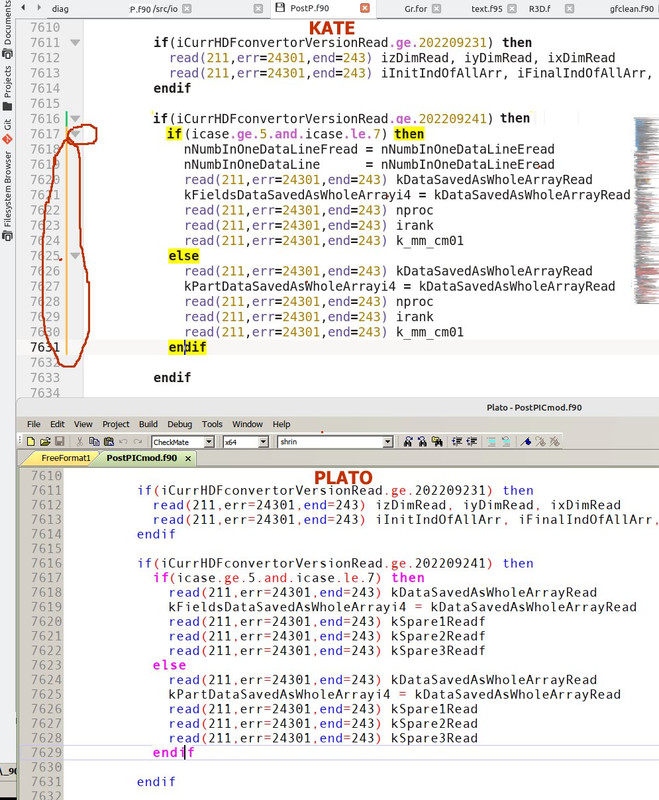
 I think both of these highlights - IF/ENDIF/DO/ENDDO and brackets - have to be ON by default, and not in the Miscellaneous rarely who looks into. Or i miss it? I think they were in Plato before