Silverfrost Forums

Welcome to our forums

Pure devilry catch in debugger

5 May 2018 1:48 (Edited: 5 May 2018 2:29) #22077

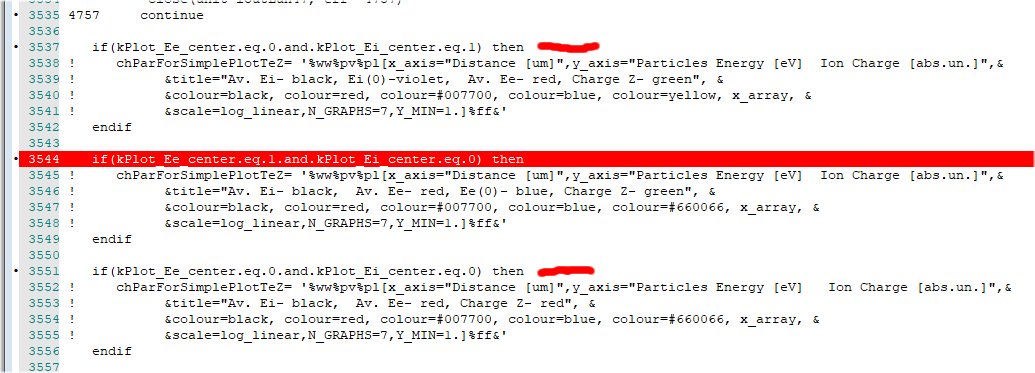
Look at this snapshot. By unimaginable way the SDBG64 succeeded to miss the first red line and stopped only at the second absolutely identical one with the undefined error message.
https://s25.postimg.cc/3ybfx6a1r/Pure_Devilry.jpg

UPDATE: i saved the code, double checked that the bug is 100% reproduced but when returned later again the bug disappeared. Double devilry?

Such happened decades ago as indication that i need to reboot computer. Anyone else saw such behavior with unexplainable errors?

5 May 2018 2:09 #22079

If kPlot_Ee_Center is 1 and kPlot_Ei_center is undefined, what the compiled code did is quite reasonable. Given an expression (L1 .and. L2), where L1 is false, L2 need not be evaluated to know that (L1 .and. L2) is false; thus, the problem that L2 may depend on undefined variables may not be detected.

The F95 standard has this to say:

7.1.7.1 Evaluation of operands It is not necessary for a processor to evaluate all of the operands of an expression, or to evaluate entirely each operand, if the value of the expression can be determined otherwise.

As a general rule, compilers that support detecting undefined variables do not flag the mere presence of such variables; only when one of these variables is used (or queried in the debugger). Otherwise, all of the program memory would have to be checked frequently, and that would consume too much time.

5 May 2018 2:15 #22080

You are probably right, mecej4.

Devilry escaped 😃

14 May 2018 5:52 (Edited: 14 May 2018 10:08) #22123

Checking input data should include checking that data is input AND that the input values are correct. If a program uses undefined variables, those are variables that should have been given values earlier, by assignment or a READ statement but, because of programmer error, have been left undefined.

Consider a program that solves a quadratic equation A x^2+B x + C = 0. By mistake, the program does READ *, A,B; as a result, the program uses C without defining it. If you only check that A and B have correct values, and do not notice that C has been left out of the READ statement, you would find that running the program with the same values of A and B gives a different set of results from run to run, and the program may even crash sometimes.

14 May 2018 9:15 #22124

I'd add to the above a check that the input data is actually input data for the program in question, and the correct version.

If the data file starts with something like:

'DannyBhoy version 39.01'

You can check that it is data for DannyBhoy.exe, but also it may not be compatible with an earlier version of the program, e.g. from version 32.00 the program may expect more or different data. In my case, such a change was adding the RGB values for all the material types, rather than letting the program decide.

It is a considerable annoyance to me that recent versions of my favourite, CorelDRAW!, won't read old files. However, you can fix this by having the appropriate version-dependent input facilities, then you can read old files.

In Mecej4's example, even if C has been initialised, you get the same answer every time, just that mostly they are wrong (in the sense that they aren't what the user expects). The program delivers the correct answer - maybe - to the problem given).

Sometimes too aggressive a check on data values can inhibit the use of the program. For example, checking that the unit weight of rock or soil is greater than 15 kN/m^3 stops you using the program on the moon or Mars, and even if earthbound, prevents you analysing problems involving peat or lightweight fills.

Eddie

Please login to reply.