Silverfrost Forums

Welcome to our forums

Printing output to local printer

15 Jun 2010 9:35 #6532

Hey there guys,

I just downloaded SilverFrost and have been playing around with it only for a short time now.. I was pointed to it in my search for finding a way to printing my Fortran 95 output to a local laserjet printer as opposed to the terminal/screen/file.

I found two small discussions on the subject on this board already, but nothing that really gave me much information (as I have ZERO programming knowledge outside of Fortran 95).

However, I found a short blurb of code in the help section of Plato with the following code:

	WINAPP
      INTEGER i,winio@
      EXTERNAL test
      i=winio@('%sc','HTML_PRINTER_OPEN',7,test)
      END

      INTEGER FUNCTION test()
      WRITE(7,*)
      WRITE(7,*) '0123456789'
      WRITE(7,*)
      CLOSE(7)
      test=2
      END

Is there a way of changing the font size and such?

Perhaps even the best thing that I could learn to do is how to send a FILE to the printer.. I could very easily print my output to a file then create some code to print that file..

Like I said, I have NO experience with coding other than Fortran 95 so things like WINAPP, Clearwin, and things of that nature are totally foreign to me.. I'm not even 100% sure how this code is accessing the printer dialog box.

[size=18:c1113659e8]ANY help would be appreciated!! [/size:c1113659e8] Thanks!

Mat
16 Jun 2010 11:23 #6535

Hi Mat Try this:

      WINAPP 
      INTEGER i,winio@ 
      EXTERNAL test 
      i=winio@('%sc','HTML_PRINTER_OPEN',7,test) 
      END 

      INTEGER FUNCTION test() 
      WRITE(7,1000) '<p><font size='2' face='Verdana'>'
      WRITE(7,1000) '0123456789 Size2 Verdana' 
      WRITE(7,1000) '</font></p>'
      WRITE(7,1000) '<p><font size='3' face='Times'>'
      WRITE(7,1000) '0123456789 Size3 Times' 
      WRITE(7,1000) '</font></p>'
      WRITE(7,1000) '<p><font size='6' face='Arial'>'
      WRITE(7,1000) '0123456789 Size6 Arial' 
      WRITE(7,1000) '</font></p>'
 1000 format(a)
      CLOSE(7) 
      test=2 
      END 

Regards Ian

16 Jun 2010 2:29 #6536

Ian,

Thanks for the response!

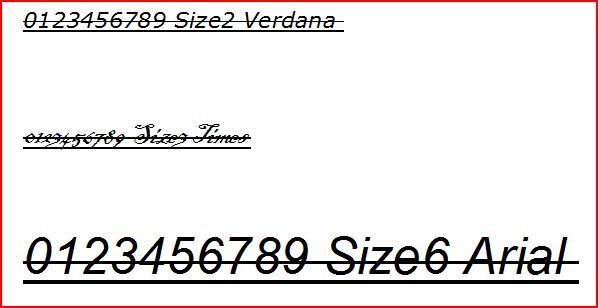
I compiled your code as is and this is the resulting printout:

http://i33.photobucket.com/albums/d74/DoktorD1313/OUTPUT.jpg

The problem goes away when I substitute 'HTML_PRINTER_OPEN' with 'PRINTER_OPEN'.

However, the output size is too large and I wont be able to get all of my output onto the page width wise.

16 Jun 2010 5:38 #6538

Perhaps you should use 'size 1'

I use draw_characters@ and this can have scaling and rotation applied. You would need to write each line to a character variable and then output that variable. You also need to keep track of the position on the page and use a new_page@. I write my data to a file and then write it using the above technique. Regards Ian

21 Jun 2012 1:38 #10380

Quoted from IanLambley Hi Mat Try this:

      WINAPP 
      INTEGER i,winio@ 
      EXTERNAL test 
      i=winio@('%sc','HTML_PRINTER_OPEN',7,test) 
      END 

      INTEGER FUNCTION test() 
      WRITE(7,1000) '<p><font size='2' face='Verdana'>'
      WRITE(7,1000) '0123456789 Size2 Verdana' 
      WRITE(7,1000) '</font></p>'
      WRITE(7,1000) '<p><font size='3' face='Times'>'
      WRITE(7,1000) '0123456789 Size3 Times' 
      WRITE(7,1000) '</font></p>'
      WRITE(7,1000) '<p><font size='6' face='Arial'>'
      WRITE(7,1000) '0123456789 Size6 Arial' 
      WRITE(7,1000) '</font></p>'
 1000 format(a)
      CLOSE(7) 
      test=2 
      END 

Regards Ian

Hi Ian so how would you do the above to get it to the screen or a file? BTW i too had it print strangely it worked when I ditched HMTL form printer statement, but it only displayed the same font sizes it merely printed what was in the quotes..

Please login to reply.